EasyManua.ls Logo

Samsung 950 - Page 164

Samsung 950
182 pages
Print Icon
To Next Page IconTo Next Page
To Previous Page IconTo Previous Page
Loading...
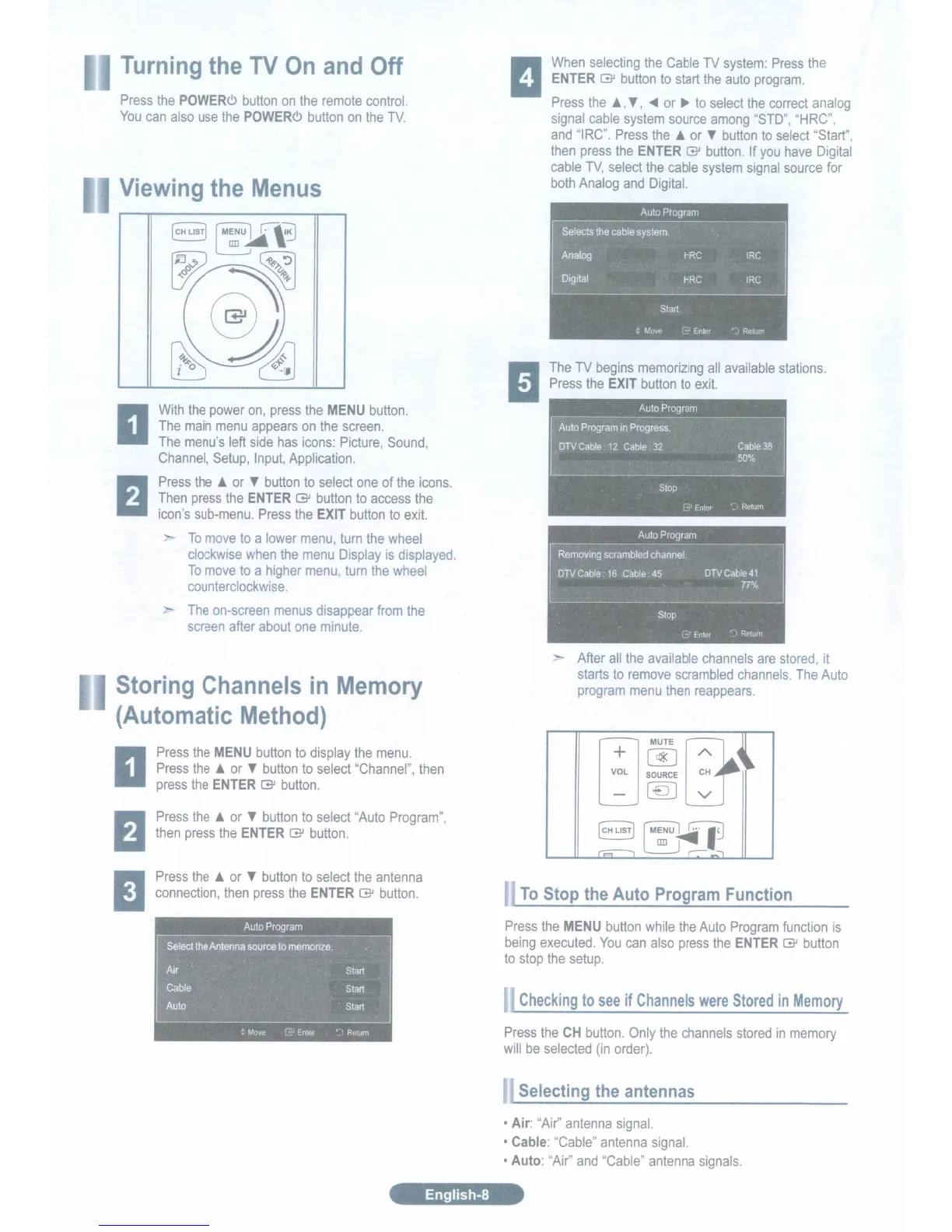
The
TV
begins
memorizing
all
available
stations.
Press
the
EXIT
button
to
exit.
When
selecting
the
Cable
TV
system:
Press
the
ENTER
[3J
button
to
start
the
auto
program.
Press
the
~
T,
.....
or
...
to
select
the
correct
analog
signal
cable
system
source
among
"STD",
"HRC",
and
"IRC".
Press
the
~
or
T
button
to
select
"Start",
then
press
the
ENTER
[3J
button.
If
you
have
Digital
cable
TV,
select
the
cable
system
signal
source
for
both
Analog
and
Digital.
enus
V
On
and Off
With
the
power
on,
press
the
MENU
button.
The
main
menu
appears
on
the
screen.
The
menu's
left
side
has
icons:
Picture,
Sound,
Channel,
Setup,
Input,
Application.
Press
the
~
or
T
button
to
select
one
of
the
icons.
Then
press
the
ENTER
[3J
button
to
access
the
icon's
sub-menu.
Press
the
EXIT
button
to
exit.
To
move
to
a
lower
menu,
turn
the
wheel
clockwise
when
the
menu
Display
is
displayed.
To
move
to
a
higher
menu,
turn
the
wheel
cou
nterclockwise.
--
The
on-screen
menus
disappear
from
the
screen
after
about
one
minute.
ie
ing
he
Press
the
POWERc>
button
on
the
remote
control.
You
can
also
use
the
POWERc>
button
on
the
TV.
Press
the
MENU
button
to
display
the
menu.
Press
the
or
T
button
to
select
"Channel",
then
press
the
ENTER
[3J
button.
oring Channel in
(Au omatic ethod)
emory
After
all
the
available
channels
are
stored,
it
starts
to
remove
scrambled
channels.
The
Auto
program
menu
then
reappears.
[j
MUTE
~l
~
-
[Q]
Press
the
~
or
T
button
to
select
"Auto
Program",
then
press
the
ENTER
[3J
button.
Press
the
or
T
button
to
select
the
antenna
connection,
then
press
the
ENTER
[3J
button.
To
Stop the Auto Program Function
Press
the
MENU
button
while
the
Auto
Program
function
is
being
executed.
You
can
also
press
the
ENTER
[3J
button
to
stop
the
setup.
Checking
to
see
if
Channels
were
Stored
in
Memory
Press
the
CH
button.
Only
the
channels
stored
in
memory
will
be
selected
(in
order).
Selecting the antennas
Air:
"Air"
antenna
signal.
Cable:
"Cable"
antenna
signal.
Auto:
"Air"
and
"Cable"
antenna
signals.
English-8

Table of Contents

Related product manuals