EasyManua.ls Logo

Samsung 950 - Page 165

Samsung 950
182 pages
Print Icon
To Next Page IconTo Next Page
To Previous Page IconTo Previous Page
Loading...
Se
ting
he
Channel
List
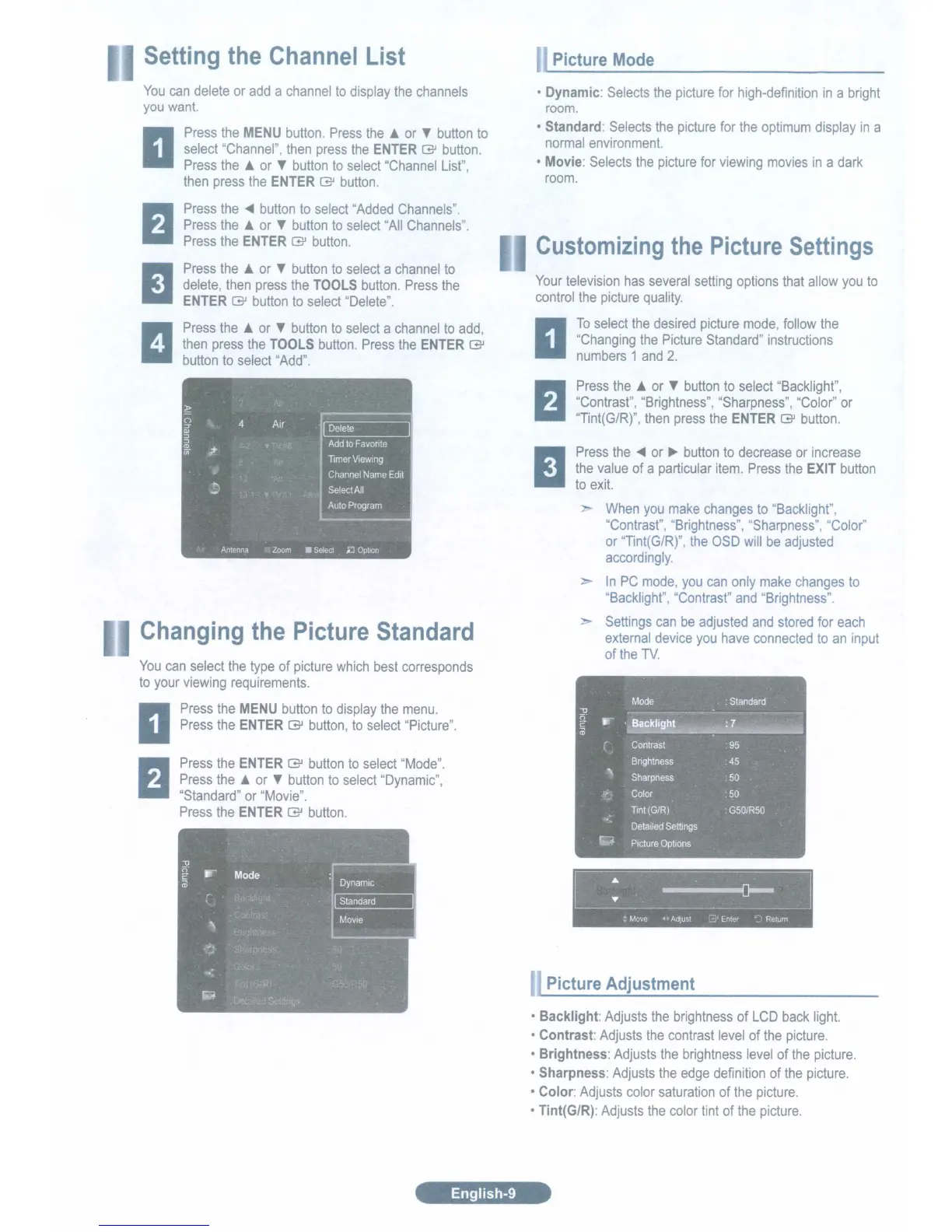
Picture Mode
You
can
delete
or
add
a
channel
to
display
the
channels
you
want.
Press
the
MENU
button.
Press
the.
or
T
button
to
select
"Channel"
then
press
the
ENTER (3J
button.
Press
the
or
T
button
to
select
I
Channel
List"
I
then
press
the
ENTER (3J
button.
Press
the
.....
button
to
select
"Added
Channels
ll
Press
the
or
T
button
to
select
'All
Channels".
Press
the
ENTER
(3J
button.
Press
the
A.
or
T
button
to
select
a
channel
to
delete,
then
press
the
TOOLS
button.
Press
the
ENTER
(3J
button
to
select
'Delete".
Press
the.
or
T
button
to
select
a
channel
to
add,
then
press
the
TOOLS
button.
Press
the
ENTER
(3J
button
to
select
"Add".
Dynamic:
Selects
the
picture
for
high-definition
in
a
bright
room.
Standard:
Selects
the
picture
for
the
optimum
display
in
a
normal
environment.
Movie:
Selects
the
picture
for
viewing
movies
in
a
dark
room.
Customizing
the
Pic
ure
ettings
Your
television
has
several
setting
options
that
allow
you
to
control
the
picture
quality.
To
select
the
desired
picture
mode,
follow
the
"Changing
the
Picture
Standard"
instructions
numbers
1
and
2.
Picture Adjustment
Press
the.
or
T
button
to
select
"Backlight",
IIContrast",
"Brightness",
"Sharpness",
"Color"
or
"Tint(G/R)",
then
press
the
ENTER
[3J
button.
~
: Move Adjust Enter Return
:
Standard
Mode
~~~~lI:~'c~~
...
'i~~il.~~
Contrast
.
95
Brightness
.
45
Sharpness
50
Color
:
50
Tint
(G/R)
:
G50/R50
Detailed
Settings
Picture
Options
...
Press
the
.....
or
~
button
to
decrease
or
increase
the
value
of
a
particular
item.
Press
the
EXIT
button
to
exit.
When
you
make
changes
to
"Backlight",
"Contrast",
"Brightness",
"Sharpness",
"Color"
or
"Tint(G/R)",
the
OSD
will
be
adjusted
accordingly.
In
PC
mode,
you
can
only
make
changes
to
'Backlight",
"Contrasf'
and
"Brightness".
Settings
can
be
adjusted
and
stored
for
each
external
device
you
have
connected
to
an
input
of
the
TV.
Backlight:
Adjusts
the
brightness
of
LCD
back
light.
Contrast:
Adjusts
the
contrast
level
of
the
picture.
Brightness:
Adjusts
the
brightness
level
of
the
picture.
Sharpness:
Adjusts
the
edge
definition
of
the
picture.
Color:
Adjusts
color
saturation
of
the
picture.
Tint(G/R):
Adjusts
the
color
tint
of
the
picture.
~
l~
9
4 Air
(U
~
~
Add
to
Favonte
CD
.?
en
Timer
Viewing
Channel
Name
Edit
Select
All
Auto
Program
Antenna
Zoom Select
D Option
Press
the
ENTER (3J
button
to
select
"Mode".
Press
the.
or
T
button
to
select
Dynamic",
"Standard"
or
"Movie".
Press
the
ENTER
(3J
button.
Changing
the
Picture
Standard
You
can
select
the
type
of
picture
which
best
corresponds
to
your
viewing
requirements.
Press
the
MENU
button
to
display
the
menu.
Press
the
ENTER (3J
button,
to
select
"Picture".
English-9

Table of Contents

Related product manuals