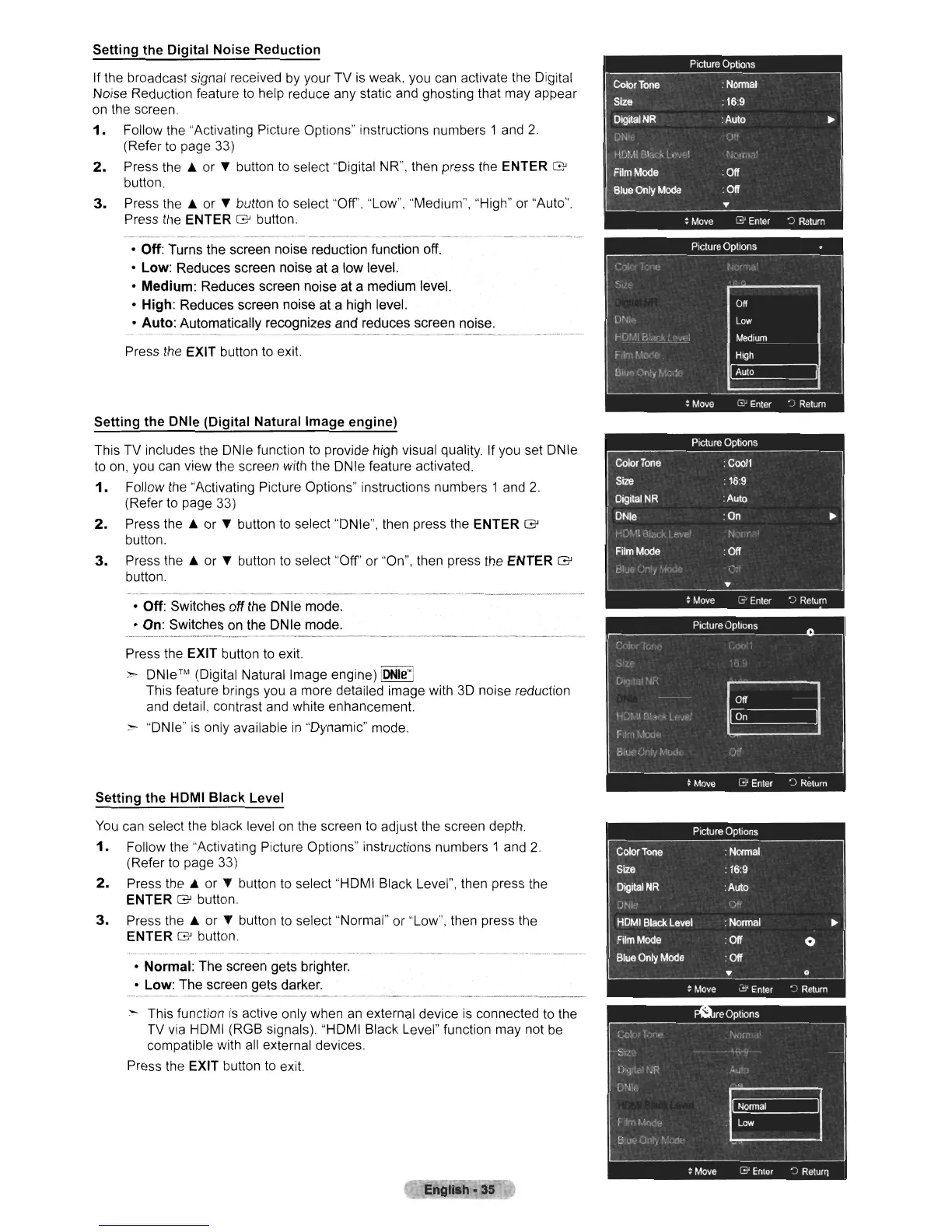
Setting the Digital Noise Reduction
If the broadcast signal received
by
your TV
is
weak, you can activate the Digital
Noise Reduction feature
to
help reduce any static and ghosting that may appear
on
the screen.
1.
Follow the "Activating Picture Options" instructions numbers 1
and
2
(Refer
to
page 33)
2.
Press
the.
or
...
button
to
select "Digital NR", then press the ENTER
G'
button.
3.
Press
the.
or
...
button
to
select "Off', "Low", "Medium", "High" or "Auto".
Press the ENTER
G'
button.
o Off: Turns the screen noise reduction function off.
o Low: Reduces screen noise at a low level.
o Medium: Reduces screen noise at a medium level.
o High: Reduces screen noise at a high level.
o
Auto:
Automatically recognizes and reduces screen noise.
Press the EXIT button
to
exit.
Setting the DNle (Digital Natural Image engine)
This TV includes the ONle function
to
provide high visual quality If you set DNle
to
on,
you
can
view the screen with the DNle feature activated.
1.
Follow the "Activating Picture Options" instructions numbers 1
and
2.
(Refer
to
page 33)
2.
Press
the.
or
...
button
to
select
"ON
Ie", then press the ENTER
G'
button.
3.
Press
the.
or
...
button
to
select "Off' or "On", then press the ENTER
G'
button.
o Off: Switches off the DNle mode.
o On: Switches on the DNle mode.
Press the EXIT button
to
exit.
>-
DNle™
(Digital Natural Image engine)
IDNle'"!
This feature brings you a more detailed image with
3D
noise reduction
and
detail, contrast and white enhancement.
~
"ON
Ie"
is
only available
in
"Dynamic" mode.
Setting the HOMI
Black
Level
You
can select the black level
on
the screen
to
adjust the screen depth.
1.
Follow the "Activating Picture Options" instructions numbers 1
and
2
(Refer
to
page
33)
2.
Press
the.
or
...
button
to
select "HDMI Black Level", then press the
ENTER
G'
button.
3.
Press
the.
or
...
button
to
select "Normal" or "Low", then press the
ENTER
G'
button.
o Normal: The screen gets brighter,
o Low: The screen gets darker.
:-
This function
is
active only when
an
external device
is
connected
to
the
TV
via
HDMI (RGB signals). "HOMI Black Level" function may not
be
compatible with
all
external devices.
Press the EXIT button
to
exit.
Engllah·35












 To Next Page