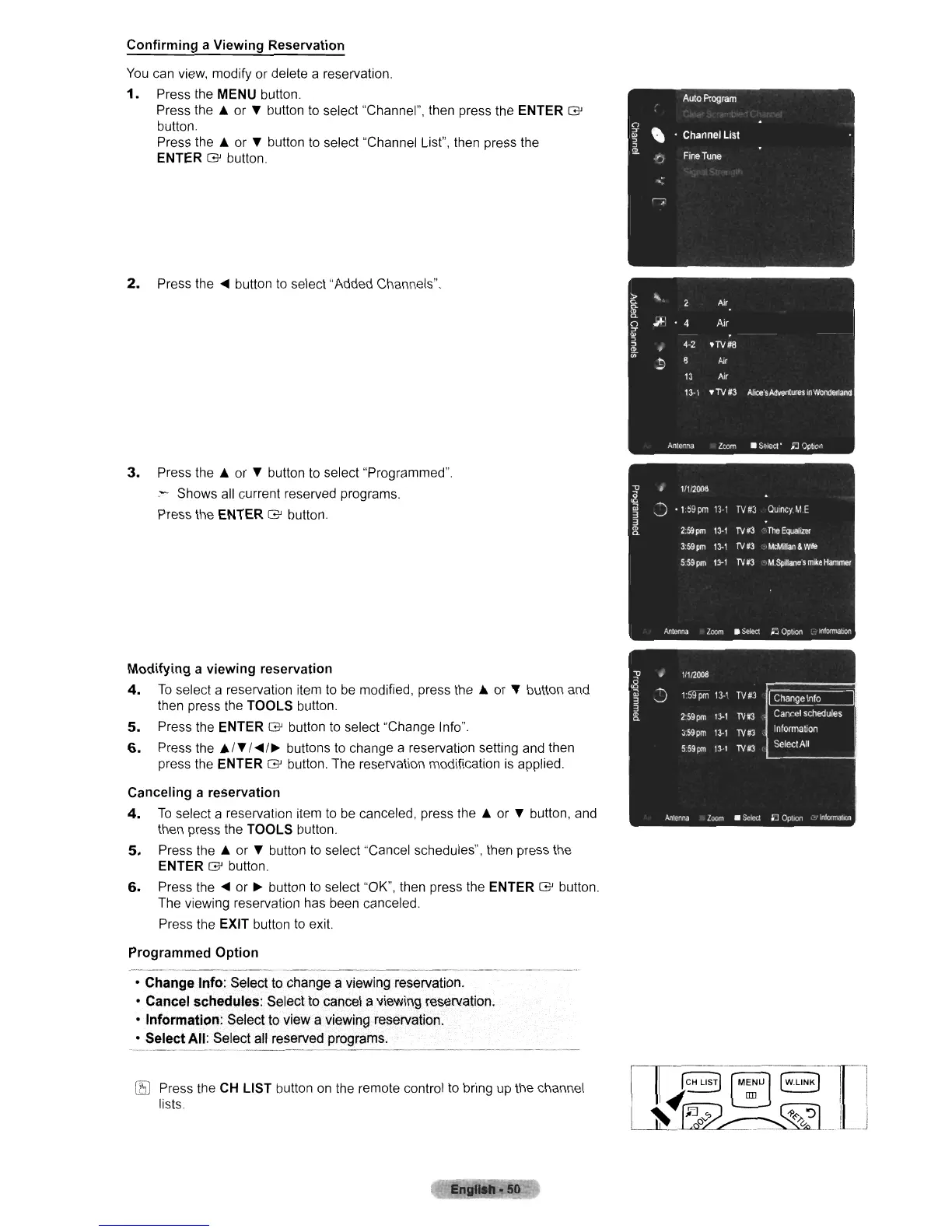
Confirming a Viewing Reservation
You
can
view,
modify or delete a reservation.
1.
Press the
MENU
button.
Press the A or Y button
to
select "Channel", then press the ENTER G
button
Press the A or Y button
to
select "Channel List", then press the
ENTER G button.
2.
Press the
<III
button
to
select "Added Channels".
3.
Press the A or Y button
to
select "Programmed".
.- Shows
all
current reserved programs.
Press the ENTER G button.
Modifying a viewing reservation
4.
To
select a reservation item
to
be
modified, press the A or Y button
and
then press the TOOLS button.
5.
Press the ENTER G button
to
select "Change Info".
6.
Press the
AI
Y
1<11I/.
buttons
to
change a reservation setting
and
then
press the ENTER G button. The reservation modification
is
applied.
Canceling a reservation
4.
To
select a reservation item
to
be
canceled, press the A or Y button,
and
then press the TOOLS button.
5.
Press the A or Y button
to
select "Cancel schedules", then press the
ENTER G button.
6.
Press the
<III
or.
button
to
select "OK", then press
the
ENTER G button.
The viewing reservation has been canceled.
Press the EXIT button
to
exit.
Programmed Option
• Change Inf(): Select to change a viewing reservation.
• Cancel schedules: Select to cancel a viewing reservation.
• Information: Select
to
view a viewing reservation.
• Select All: Select all reserved programs.
rB
Press the
CH
LIST button
on
the
remote control
to
bring
up
the channel
lists.
~
------'T-'
JCH
L1sj
[M~U
]
[WLlNKJ
I I
~
.~
'----'
~
I I
_~~_._.
v.
1.
...1












 To Next Page