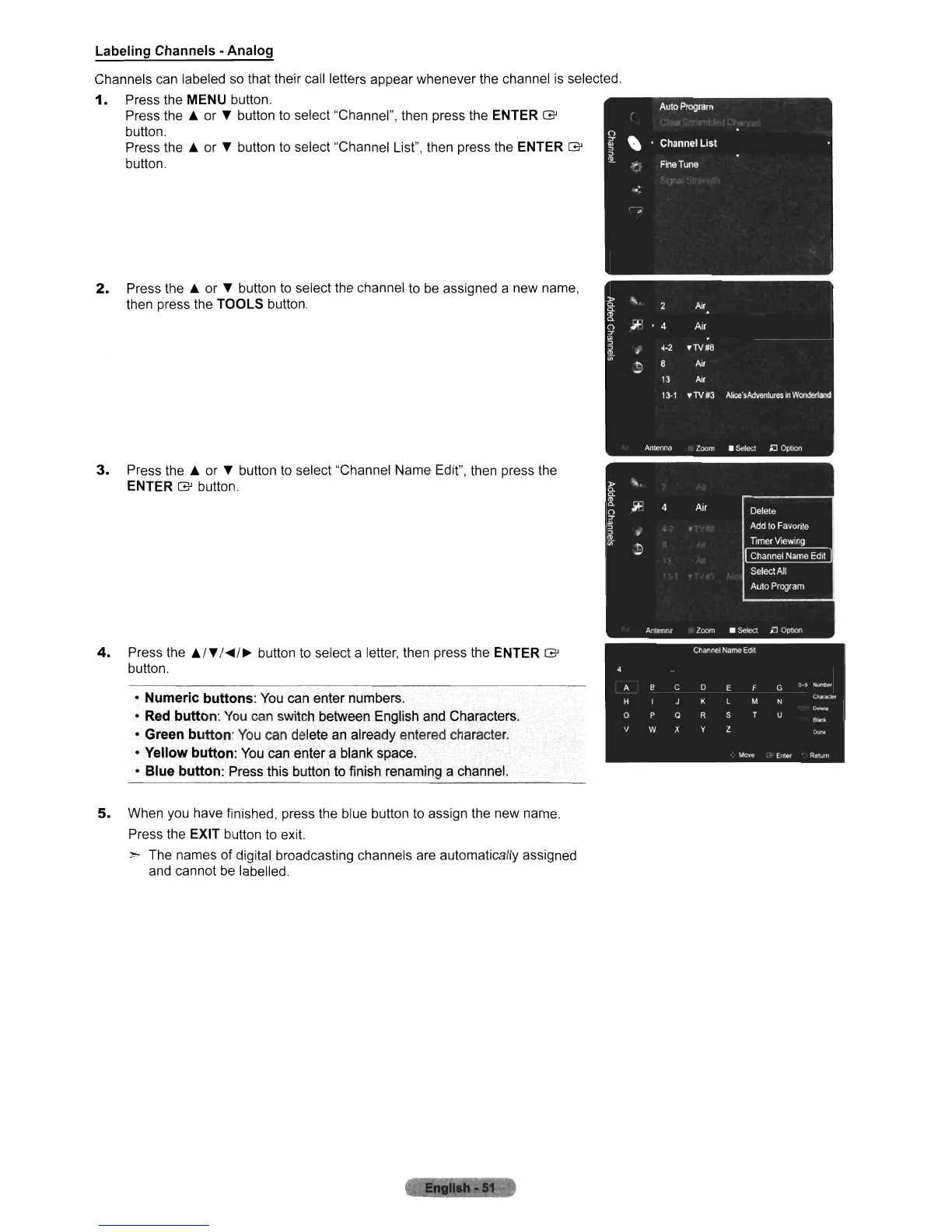
Labeling Channels - Analog
Channels can labeled
so
that their call letters appear whenever the channel is selected
1.
Press the
MENU
button.
Press the
..
or T button to select "Channel", then press the
ENTER
G
button.
Press the
..
or T button to select "Channel List", then press the
ENTER
G
button.
2.
Press the
..
or T button to select the channel to
be
assigned a new name,
then press the
TOOLS button.
3.
Press the
..
or T button to select "Channel Name Edit", then press the
ENTER
G button.
4.
Press the
..
IT
I
"'/~
button to select a letter, then press the
ENTER
G
button.
• Numeric
buttons:
You
can enter numbers.
•
Red
button:
You
can switch between English and Characters,
• Green
button:
You
can delete
an.
already entered character.
••
Yellow
button:
You can enter a blank space.
• Blue button: Press this button to finish renaming a channel.
5.
When you have finished, press the blue button to assign the new name.
Press the
EXIT button to exit.
> The names of digital broadcasting channels are automatically assigned
and cannot
be
labelled.












 To Next Page