Date Code 20010719 701 Motor Protection Relay
Installation
Relay Connections
2.17
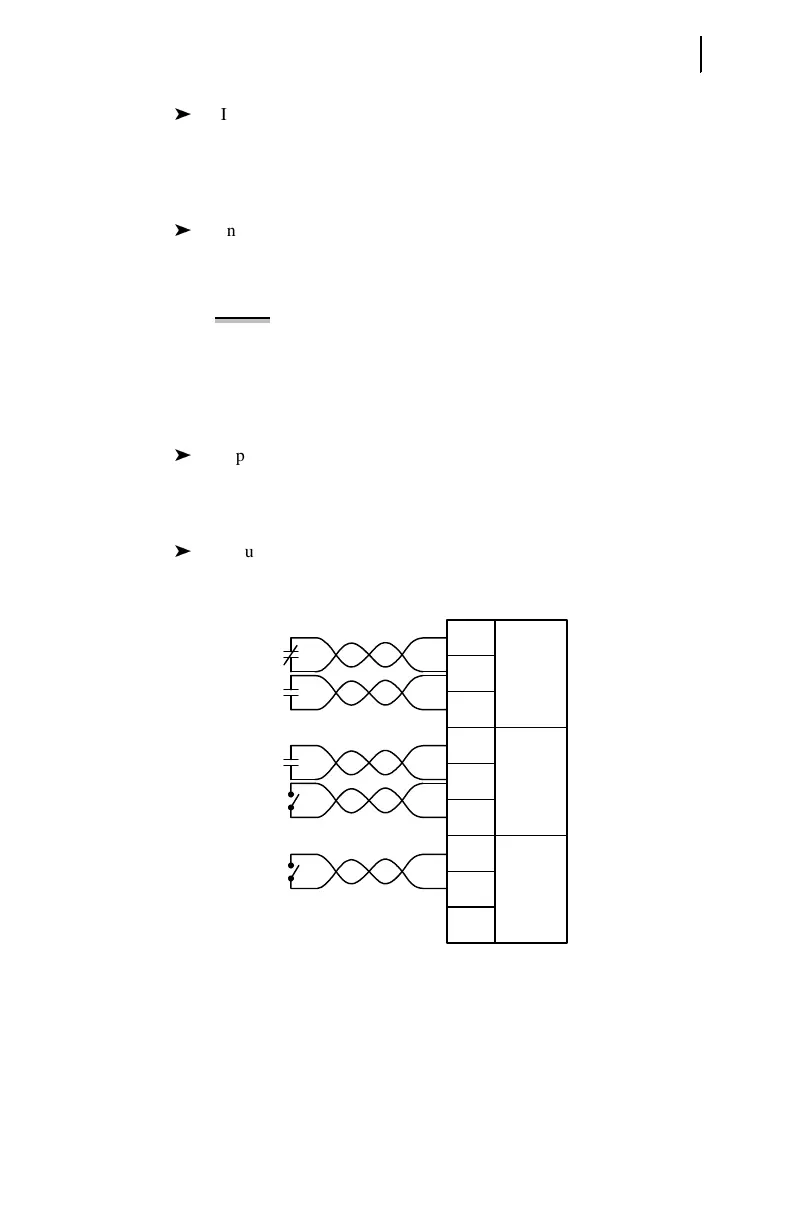
Input IN3 is configured for a speed switch. If you want speed switch
tripping, connect the speed switch contact to IN3 or to the contact
input on the SEL-2600 RTD Module. See Speed Switch Tripping on
page 4.29 in Section 4: Settings Calculation for additional
information regarding the speed switch tripping function.
Input IN4 is configured for Access Level 2 control. You can connect a
key switch to this input. When the switch contact is closed, you can
use relay Access Level 2 commands to change relay settings or
control output contacts.
NOTE: The relay does not require that this input be used for
Level 2 access. You can also enter the appropriate relay
password using the serial port or front panel to gain entry to
Access Level 2. Shorting the IN4 input makes password entry
unnecessary; this is useful if the Access Level 2 password is
lost.
Input IN5 is configured to enable an emergency restart. The
Emergency Restart function resets the relay thermal model and
overrides all other starting lockout functions to allow an immediate
motor start.
Input IN6 is not applied in the factory default settings.
Figure 2.14 Contact Input Factory Default Wiring Diagram.
Analog Output
The SEL-701 Relay single analog output provides a dc current level signal
proportional to any one of several relay measurements. Relay settings described in
Analog Output Settings on page 4.42 in Section 4: Settings Calculation allow you to
Programmable
Contact Inputs
C01
C02
C03
C04
C05
C06
C07
C08
C09
IN1+
COM 1,2
IN2+
IN3+
COM 3,4
IN4+
IN5+
COM 5,6
IN6+
52b
Direct
Trip
Speed
Switch
Factory
Default
Functions
Key
Switch
Emergency
Restart
Key
Switch
ACCESS2



 To Next Page