Date Code 20090730 Instruction Manual SEL-734 Meter
Section 11
Front-Panel Operation
Front-Panel Layout
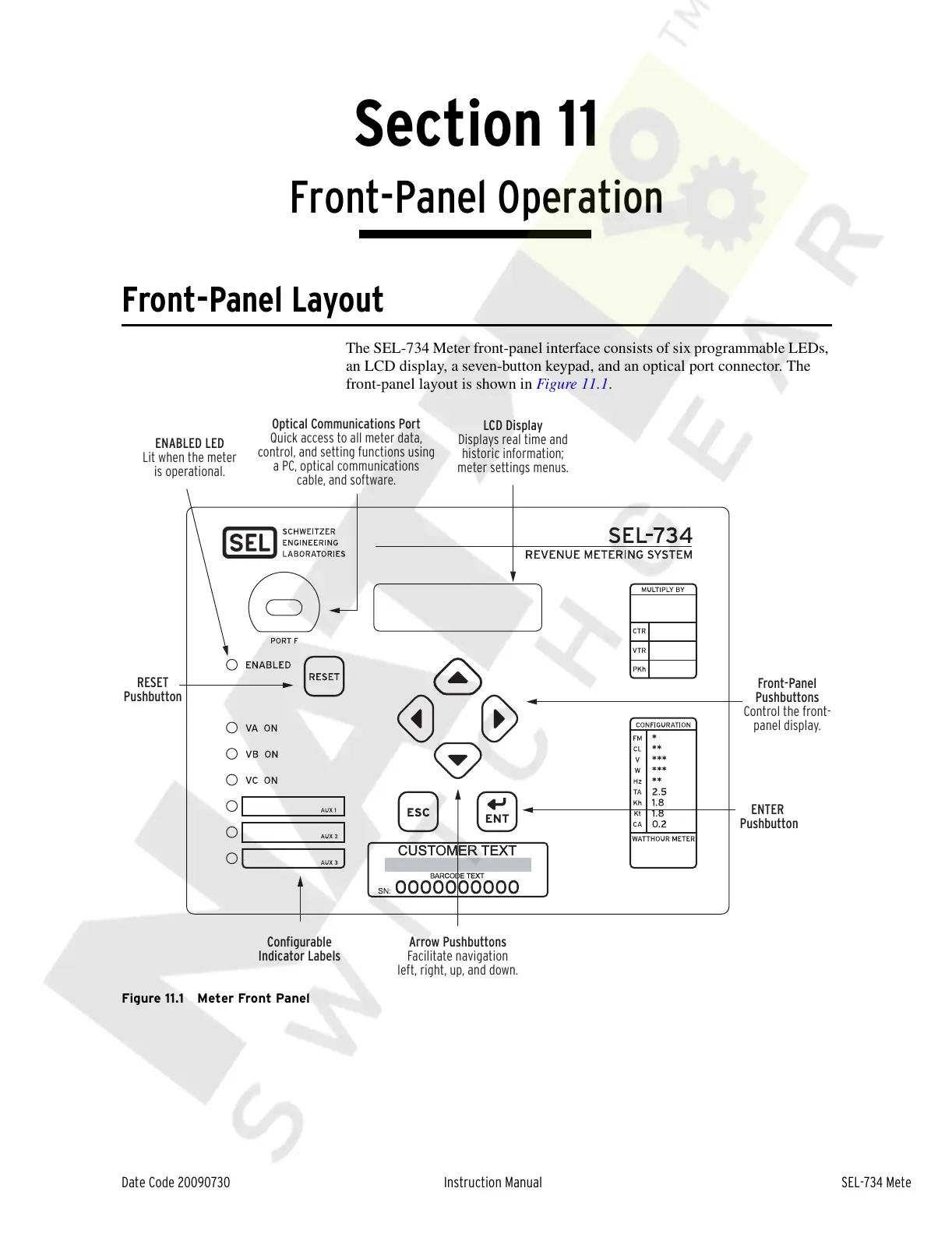
The SEL-734 Meter front-panel interface consists of six programmable LEDs,
an LCD display, a seven-button keypad, and an optical port connector. The
front-panel layout is shown in Figure 11.1.
Figure 11.1 Meter Front Panel
LCD Display
Displays real time and
historic information;
meter settings menus.
Front-Panel
Pushbuttons
Control the front-
panel display.
ENTER
Pushbutton
Configurable
Indicator Labels
ENABLED LED
Lit when the meter
is operational.
Optical Communications Port
Quick access to all meter data,
control, and setting functions using
a PC, optical communications
cable, and software.
RESET
Pushbutton
Arrow Pushbuttons
Facilitate navigation
left, right, up, and down.
Courtesy of NationalSwitchgear.com



 To Next Page