11.6
SEL-734 Meter Instruction Manual Date Code 20090730
Front-Panel Operation
Front-Panel Main Menu
Front-Panel Main Menu
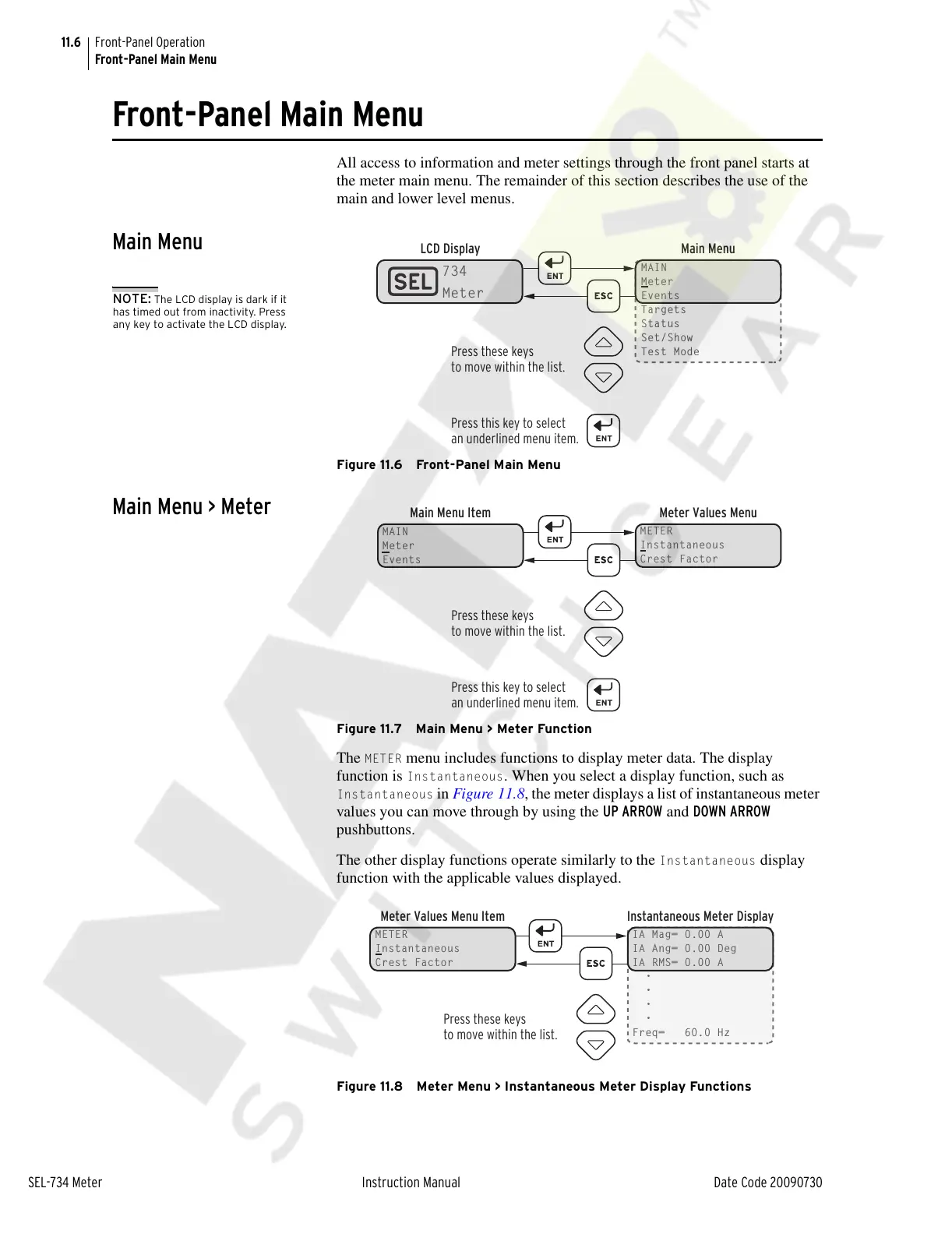
All access to information and meter settings through the front panel starts at
the meter main menu. The remainder of this section describes the use of the
main and lower level menus.
Main Menu
Figure 11.6 Front-Panel Main Menu
Main Menu > Meter
Figure 11.7 Main Menu > Meter Function
The METER menu includes functions to display meter data. The display
function is
Instantaneous. When you select a display function, such as
Instantaneous in Figure 11.8, the meter displays a list of instantaneous meter
values you can move through by using the UP ARROW and DOWN ARROW
pushbuttons.
The other display functions operate similarly to the
Instantaneous display
function with the applicable values displayed.
Figure 11.8 Meter Menu > Instantaneous Meter Display Functions
Press these keys
to move within the list.
Press this key to select
an underlined menu item.
LCD Display Main Menu
MAIN
Meter
Events
Targets
Status
Set/Show
Test Mode
734
Meter
NOTE: The LCD display is dark if it
has timed out from inactivity. Press
any key to activate the LCD display.
MAIN
Meter
Events
Main Menu Item Meter Values Menu
METER
Instantaneous
Crest Factor
Press these keys
to move within the list.
Press this key to select
an underlined menu item.
Meter Values Menu Item Instantaneous Meter Display
IA Mag= 0.00 A
IA Ang= 0.00 Deg
IA RMS= 0.00 A
•
•
•
•
Freq= 60.0 Hz
Press these keys
to move within the list.
METER
Instantaneous
Crest Factor
Courtesy of NationalSwitchgear.com



 To Next Page