5.2
SEL-734 Meter Instruction Manual Date Code 20090730
Time-of-Use
TOU Setup
TOU Setup
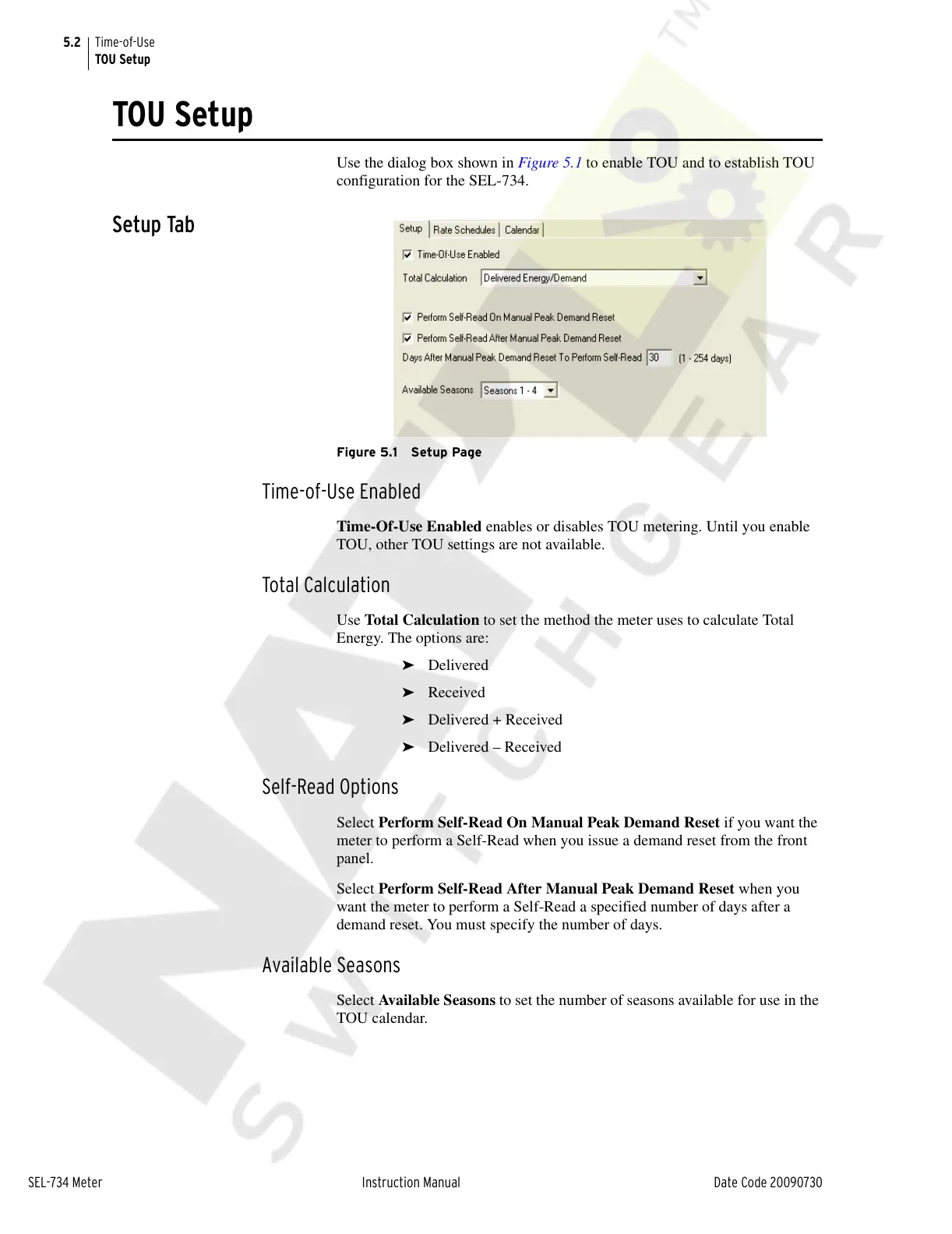
Use the dialog box shown in Figure 5.1 to enable TOU and to establish TOU
configuration for the SEL-734.
Setup Tab
Figure 5.1 Setup Page
Time-of-Use Enabled
Time-Of-Use Enabled enables or disables TOU metering. Until you enable
TOU, other TOU settings are not available.
Total Calculation
Use Total Calculation to set the method the meter uses to calculate Total
Energy. The options are:
➤ Delivered
➤ Received
➤ Delivered + Received
➤ Delivered – Received
Self-Read Options
Select Perform Self-Read On Manual Peak Demand Reset if you want the
meter to perform a Self-Read when you issue a demand reset from the front
panel.
Select Perform Self-Read After Manual Peak Demand Reset when you
want the meter to perform a Self-Read a specified number of days after a
demand reset. You must specify the number of days.
Available Seasons
Select Available Seasons to set the number of seasons available for use in the
TOU calendar.
Courtesy of NationalSwitchgear.com



 To Next Page