4.11
Date Code 20090730 Instruction Manual SEL-734 Meter
Metering
Demand Metering
NOTE: Changing setting EDEM,
DMTC, or DMSI resets the present
internal demand meter values to zero.
Demand current pickup settings
PDEMP, NDEMP, GDEMP, and QDEMP
can be changed without affecting the
demand meters.
The following examples in this section illustrate demand current.
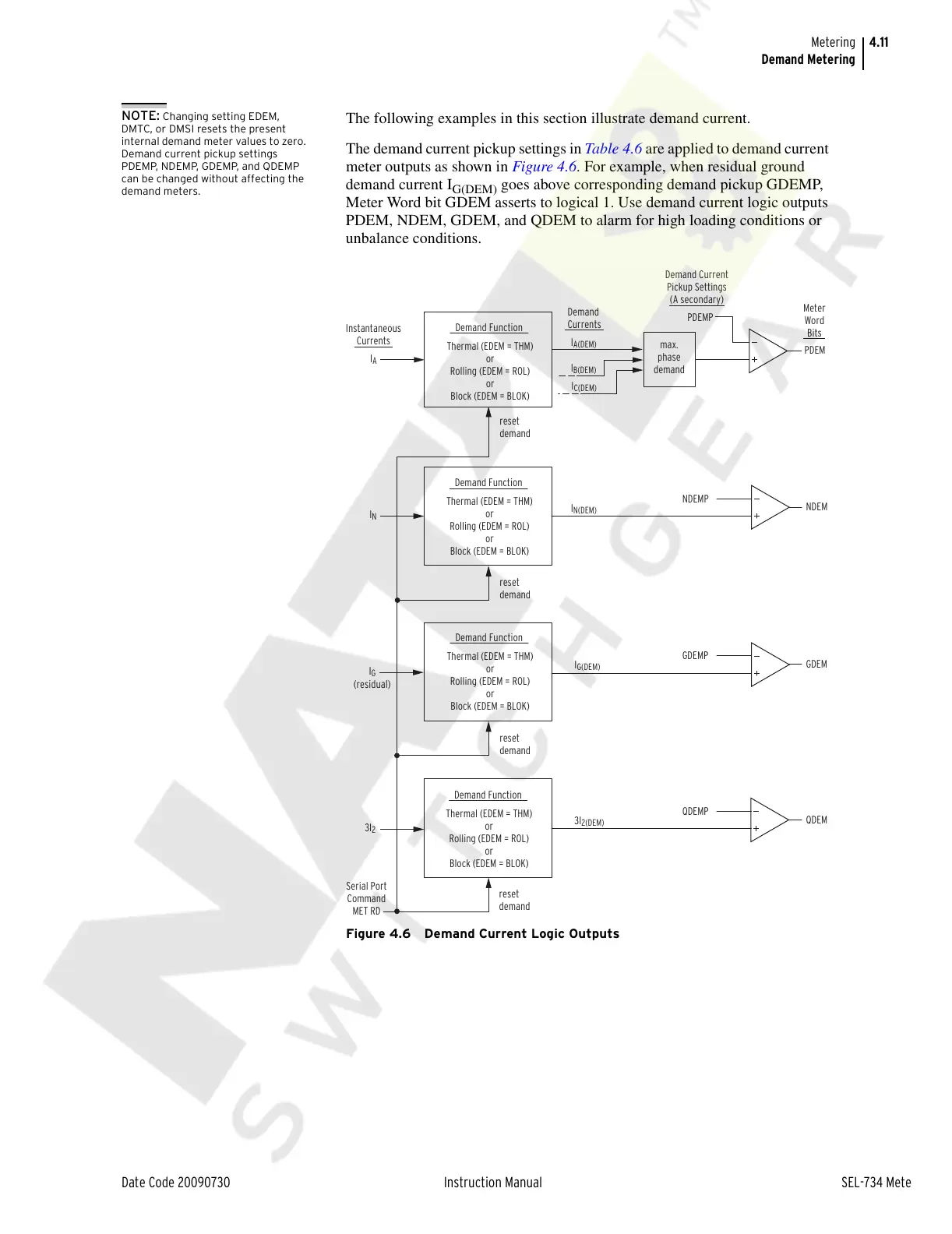
The demand current pickup settings in Table 4.6 are applied to demand current
meter outputs as shown in Figure 4.6. For example, when residual ground
demand current I
G(DEM)
goes above corresponding demand pickup GDEMP,
Meter Word bit GDEM asserts to logical 1. Use demand current logic outputs
PDEM, NDEM, GDEM, and QDEM to alarm for high loading conditions or
unbalance conditions.
Figure 4.6 Demand Current Logic Outputs
Demand Current
Pickup Settings
(A secondary)
Serial Port
Command
MET RD
QDEMP
QDEM
GDEMP
GDEM
I
G(DEM)
I
N(DEM)
3I
2(DEM)
I
C(DEM)
I
B(DEM)
I
A(DEM)
NDEMP
NDEM
PDEM
Demand
Currents
PDEMP
max.
phase
demand
(residual)
reset
demand
reset
demand
reset
demand
reset
demand
I
A
I
N
I
G
3I
2
Meter
Word
Bits
Demand Function
Thermal (EDEM = THM)
or
Rolling (EDEM = ROL)
or
Block (EDEM = BLOK)
Demand Function
Thermal (EDEM = THM)
or
Rolling (EDEM = ROL)
or
Block (EDEM = BLOK)
Demand Function
Thermal (EDEM = THM)
or
Rolling (EDEM = ROL)
or
Block (EDEM = BLOK)
Demand Function
Thermal (EDEM = THM)
or
Rolling (EDEM = ROL)
or
Block (EDEM = BLOK)
Instantaneous
Currents
Courtesy of NationalSwitchgear.com



 To Next Page