11.4
SEL-734 Meter Instruction Manual Date Code 20090730
Front-Panel Operation
Front-Panel Menus and Operations
Before you can perform a front-panel menu activity that is marked in the
instruction manual with the padlock symbol, you must enter the correct
Access Level 2 password or Access Level E password. After you have
correctly entered the Access Level 2 password, you can perform other Access
Level 2 and Access Level E activities without reentering the password. The
Access Level E password allows you to perform Access Level E and Access
Level 1 activities.
Access Level 2 or Access Level E Password Entry
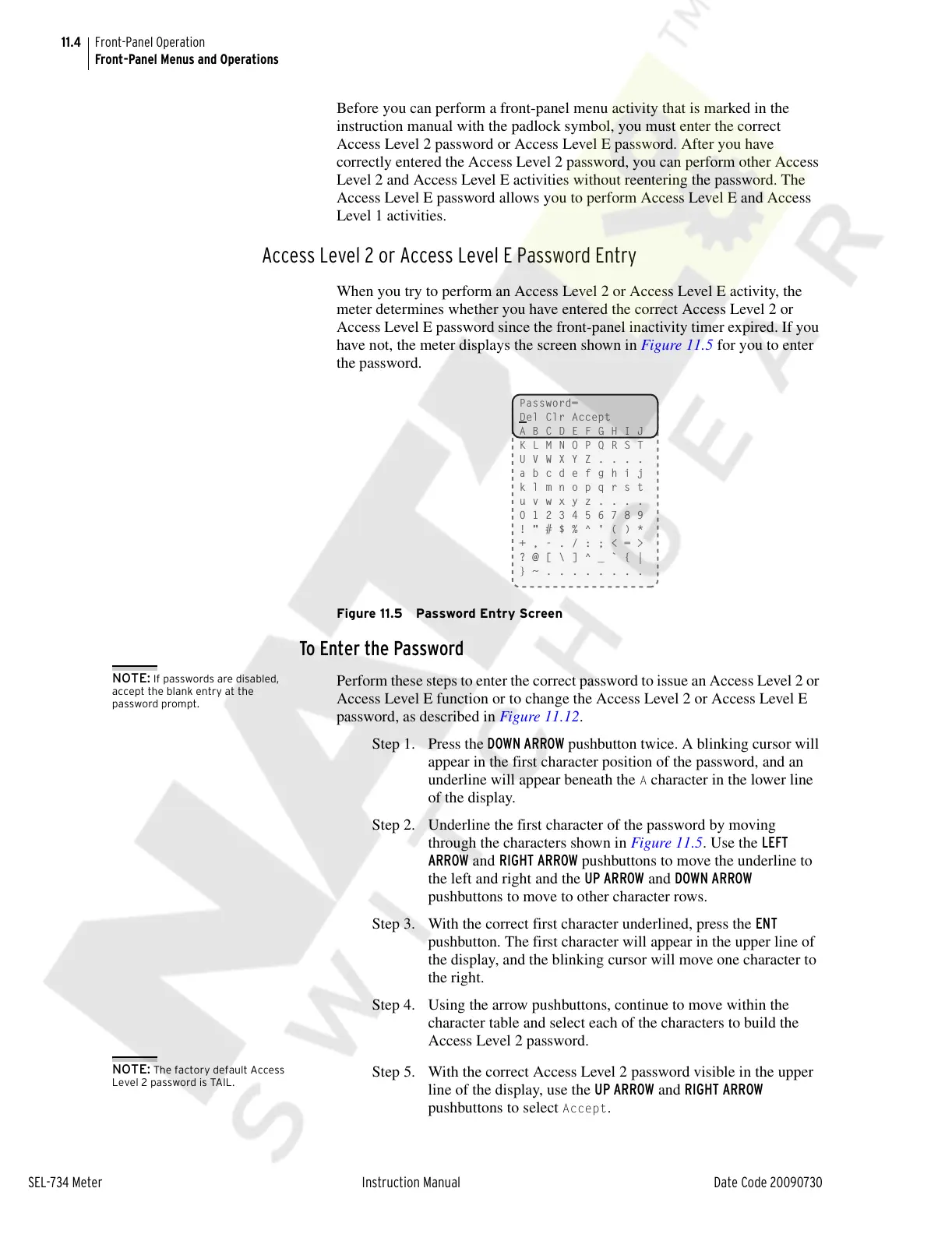
When you try to perform an Access Level 2 or Access Level E activity, the
meter determines whether you have entered the correct Access Level 2 or
Access Level E password since the front-panel inactivity timer expired. If you
have not, the meter displays the screen shown in Figure 11.5 for you to enter
the password.
Figure 11.5 Password Entry Screen
To Enter the Password
NOTE: If passwords are disabled,
accept the blank entry at the
password prompt.
Perform these steps to enter the correct password to issue an Access Level 2 or
Access Level E function or to change the Access Level 2 or Access Level E
password, as described in Figure 11.12.
Step 1. Press the DOWN ARROW pushbutton twice. A blinking cursor will
appear in the first character position of the password, and an
underline will appear beneath the
A character in the lower line
of the display.
Step 2. Underline the first character of the password by moving
through the characters shown in Figure 11.5. Use the LEFT
ARROW and RIGHT ARROW pushbuttons to move the underline to
the left and right and the UP ARROW and DOWN ARROW
pushbuttons to move to other character rows.
Step 3. With the correct first character underlined, press the ENT
pushbutton. The first character will appear in the upper line of
the display, and the blinking cursor will move one character to
the right.
Step 4. Using the arrow pushbuttons, continue to move within the
character table and select each of the characters to build the
Access Level 2 password.
NOTE: The factory default Access
Level 2 password is TAIL.
Step 5. With the correct Access Level 2 password visible in the upper
line of the display, use the UP ARROW and RIGHT ARROW
pushbuttons to select
Accept.
Password=
Del Clr Accept
A B C D E F G H I J
K L M N O P Q R S T
U V W X Y Z . . . .
a b c d e f g h i j
k l m n o p q r s t
u v w x y z . . . .
0 1 2 3 4 5 6 7 8 9
! " # $ % ^ ' ( ) *
+ , - . / : ; < = >
? @ [ \ ] ^ _ ` { |
} ~ . . . . . . . .
Courtesy of NationalSwitchgear.com



 To Next Page