60 53 362 D3472
30 D3472.201.10.20.02 07.2016
3Product description Sirona Dental A/S
3.2Controls and functional elements of the DAC UNIVERSAL Operating Instructions DAC UNIVERSAL
3.2.3.2
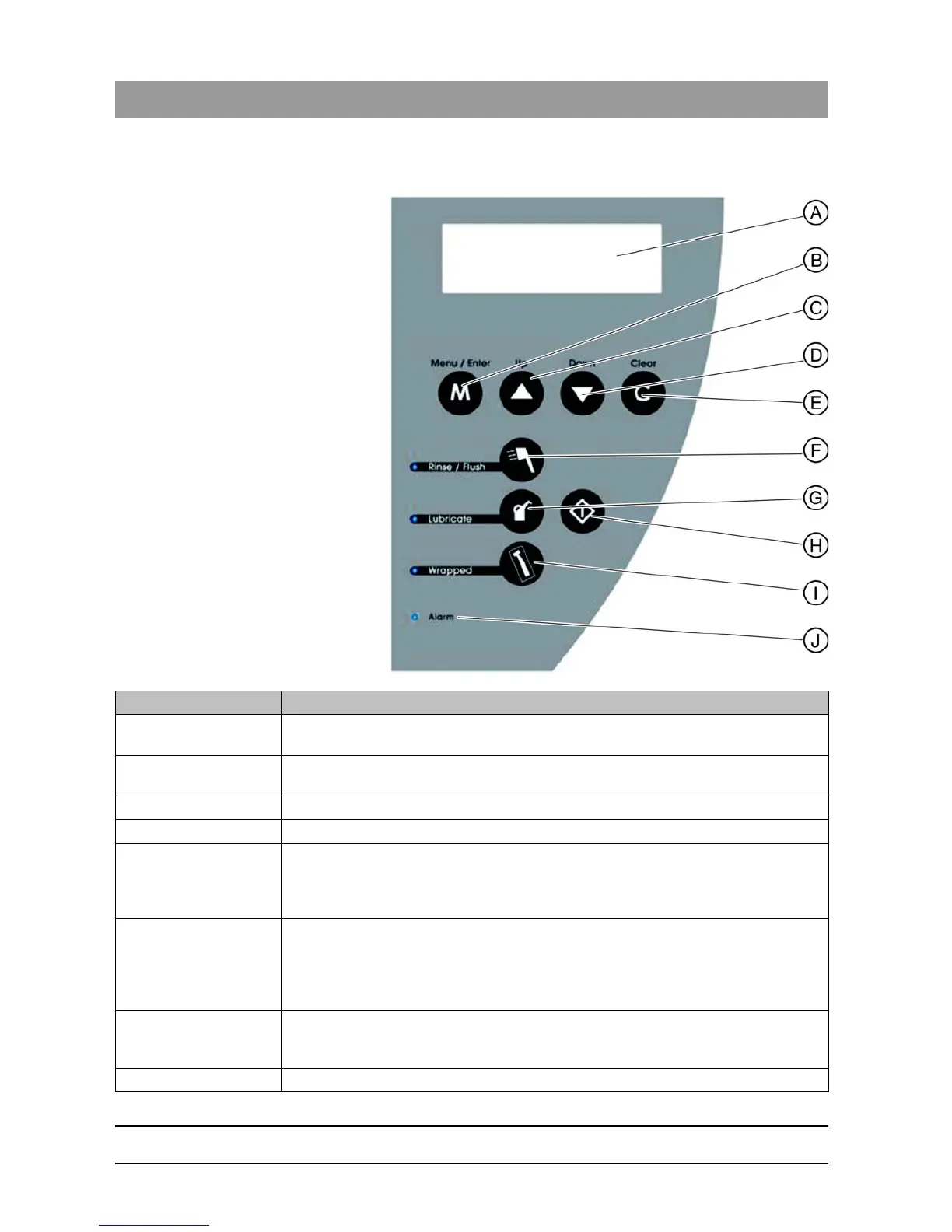
Display and keyboard DAC UNIVERSAL STANDARD
Display/button Description
A: Display The temperature and pressure in the chamber are displayed constantly. The pressure is
indicated as an absolute value (including ambient air pressure).
B: "Menu/Enter"-Key This key opens the menu. In addition, it is used as an entry/confirmation key for the menu
system.
C: "Up"-Key This key is used to scroll up the menu.
D: "Down"-Key This key is used to scroll down the menu.
E: "Clear"-Key This key can be used to exit the menu step by step. When the key is pressed and held
(approx. 2 s), the system switches to stand-by mode. This key is also used when the DAC
UNIVERSAL displays a message. The message is deleted by pressing this key. The key
is used to interrupt a cycle even if it is not yet finished.
F: "Rinse/Flush"-Key
(Cleaning)
When the cycle is active, a blue LED control lamp lights up. Pressing the "Rinse/Flush"-
Key when it is switched on activates and deactivates cleaning. When the blue LED control
lamp is off, cleaning is deactivated.
IMPORTANT: When cleaning is omitted, successful sterilization is no longer ensured,
except for the WRAPPED lid.
G: "Lubricate"-Key
(Lubrication)
When lubrication is activated, a blue LED control lamp lights up. Pressing the "Lubricate"-
Key when it is switched on activates and deactivates lubrication. When the blue control
lamp is off, lubrication is deactivated.
H: "Start"-Key This key switches the DAC UNIVERSAL on and starts it.














 To Next Page