60 53 362 D3472
D3472.201.10.20.02 07.2016
95
Sirona Dental A/S 5Operation DAC UNIVERSAL ADVANCED
Operating Instructions DAC UNIVERSAL 5.2Using the menu and display information DAC UNIVERSAL ADVANCED
båÖäáëÜ
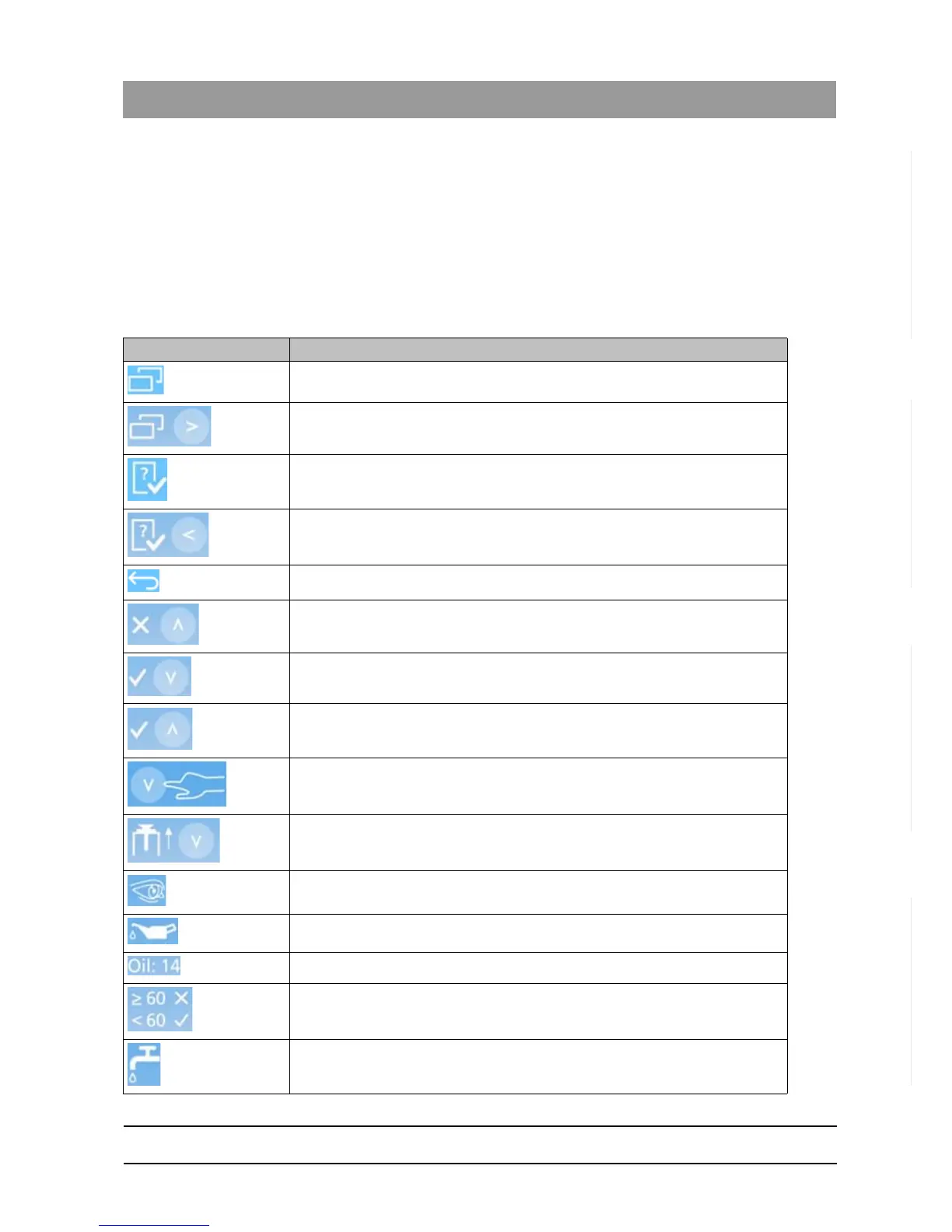
5.2.4 Symbol definitions DAC UNIVERSAL ADVANCED
Refer to this list to see the definition of symbols used on the display of the
DAC UNIVERSAL.
For symbols not explained here see
● „Display information DAC UNIVERSAL ADVANCED [ → 71]“
● „Menu overview DAC UNIVERSAL ADVANCED [ → 77]“
● „Menu options DAC UNIVERSAL ADVANCED [ → 83]“
Symbol Description
Menu system.
Press “Right”-Key to enter the menu system.
Check & Clean.
Press the “Left”-Key to enter the Check & Clean section.
Return.
Press the “Up”-Key to abort and return.
Press the “Down”-Key to approve and continue.
Press the “Up”-Key to confirm.
Press the “Down”-Key
Press the “Down”-Key to open the lid.
Look for.
Oil.
Oil count.
Below 60 is OK, above or equal to 60 is NOT ok.
Water.














 To Next Page