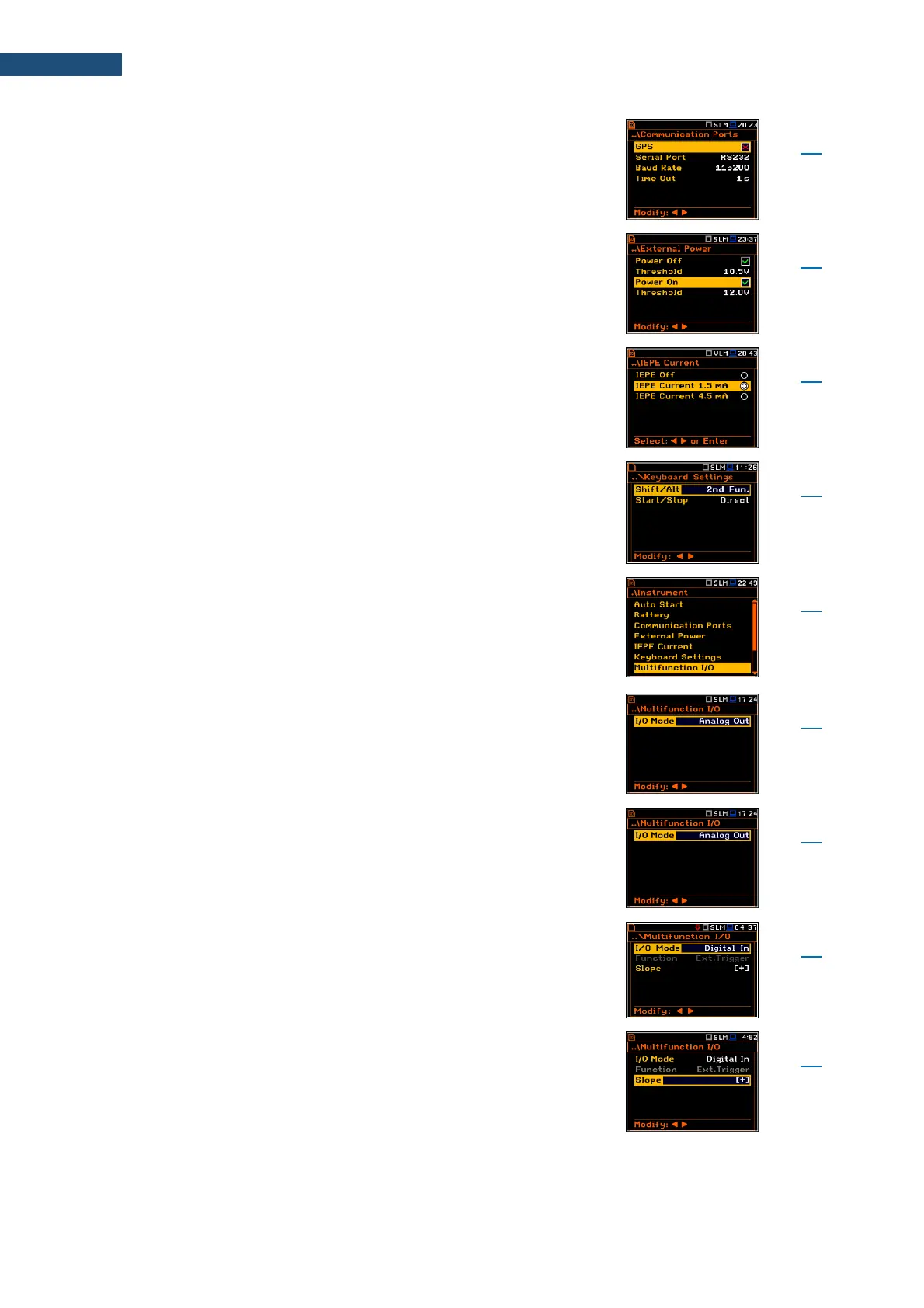
Screen that enables configuring the instrument
communication ports: GPS and Serial Port – RS232 or
Bluetooth.
Screen that enables configuring automatic instrument
switching on or off in case the voltage of the external DC
power exceeds or becomes lower than the threshold
level.
Screen enabling setting the supply current of the
microphone or accelerometer: Off, 1.5mA or 4.5mA.
Screen that enables setting the Shift, Alt, Start, Stop keys
functionality.
Screen that enables configuring the instrument's I/O port
parameters: I/O Mode, Function, Slope, Polarisation,
Active Level, Source, Source Type, Alarm Level, Send
SMS and Send E-Mail.
Detailed description of the I/O port is given in
Appendix C.
Mode of the I/O port: Analog Out, Digital In, Digital Out.
Mode of the I/O port when analogue signal is transmitted
from the input of the instrument to its output without any
digital processing (i.e. frequency filtering).
Mode of the I/O port when external digital signal is used
as an external trigger to start measurements. The
instrument is acting in this case as so called “slave
instrument”.
Trigger voltage slope defined for the Digital In I/O mode:
[+] (uprising as default) or [–] (falling).



 To Next Page