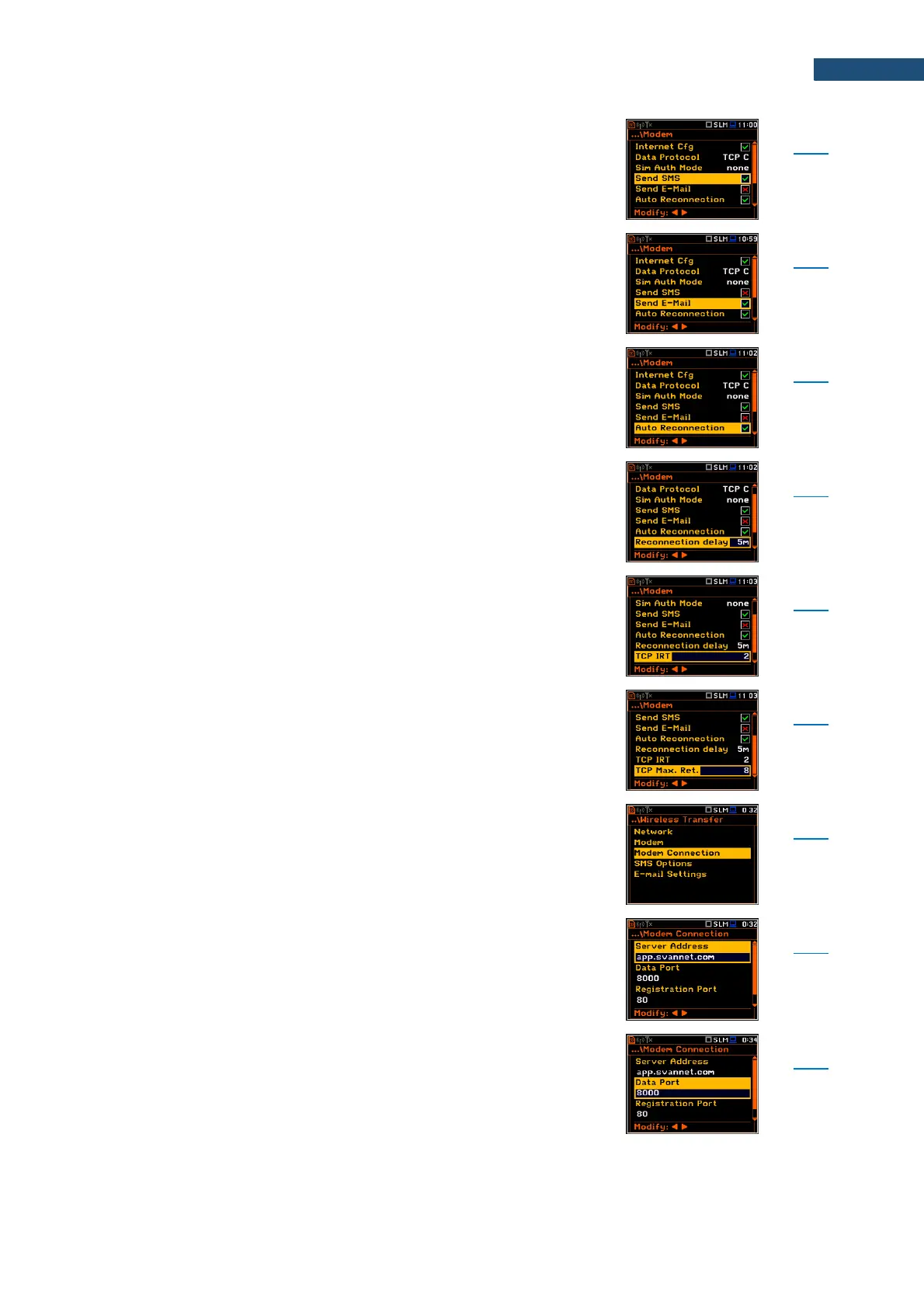
Parameter of the Modem screen switching on the SMS
alarm notification.
Parameter of the Modem screen switching on the e-mail
alarm notification.
Parameter of the Modem screen switching on the device
attempting to reconnect the modem in case of errors or
sudden disconnection.
Parameter of the Modem screen defining period between
each reconnection attempts.
Parameter of the Modem screen defining TCP Initial
Retransmission Timeout.
Parameter of the Modem screen defining maximum
reconnection attempts performed within a simple
connection cycle.
Screen that enables configuring supporting options
required by 3G modem to establish internet connection:
Server Address, Data Port, Registration Port, APN, APN
User, APN Password, DNS Server, DynDns Address,
DynDns Hostname, DynDns Login and
DynDns Password.
Parameter of the Modem Connection screen defining
either IP or domain address, where the registration data
will be sent during registration process (Data Protocol:
TCP S or UDP) or to which the modem will be connected
to (Data Protocol: TCP C). By default, the server address
is app.svannet.com.
Parameter of the Modem Connection screen defining the
port number that denotes a port on which a
communication socket will be configured for data
exchange between the remote host and the station.



 To Next Page