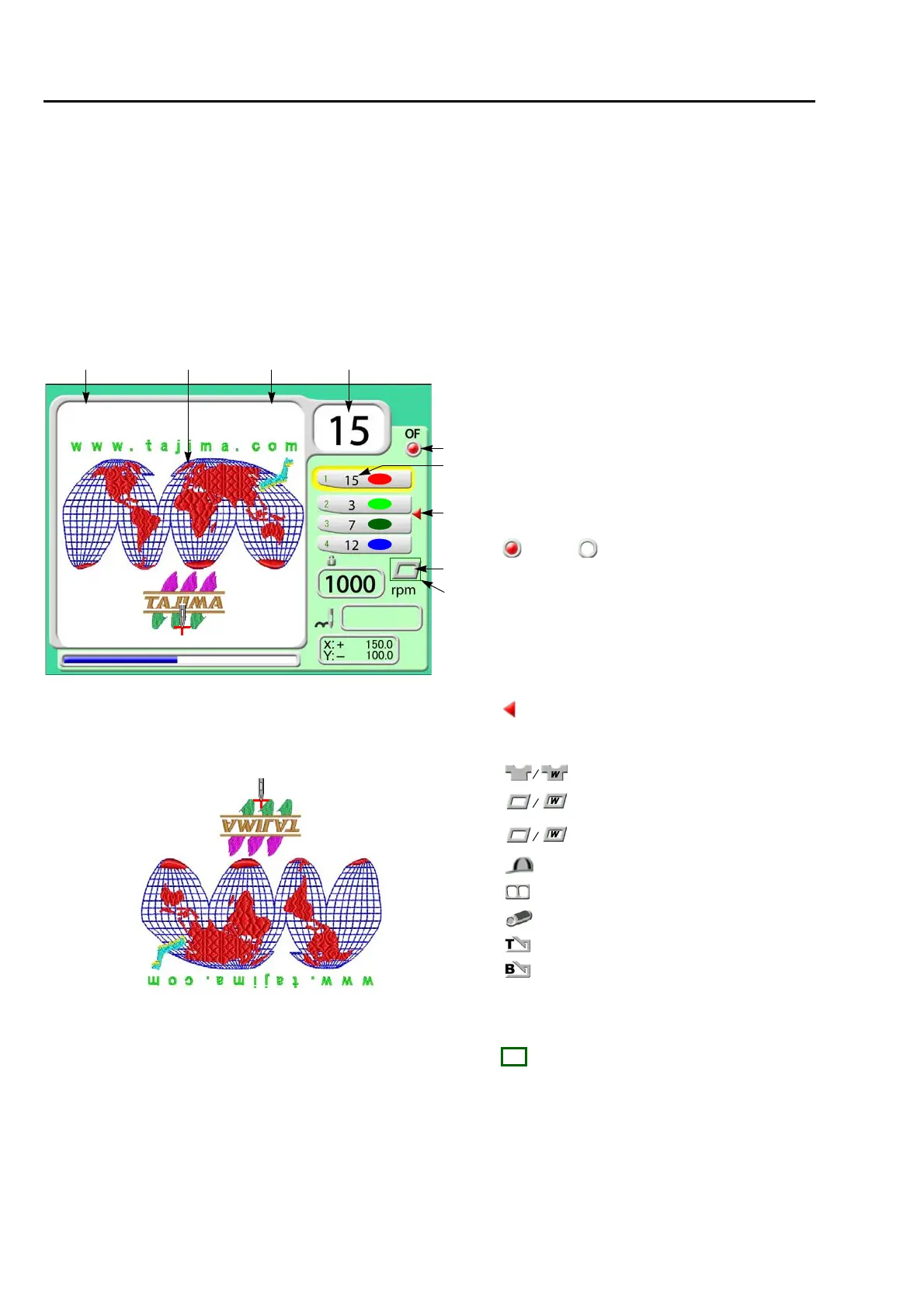
Screen display
26
Chapter 3
1. Screen display
1-1. Main screen
When the power is turned ON, the following screen will appear. From this screen, setting/operation to
embroider will start. To return to the main screen from other screen, press E key until the main screen
appears.
1-1-1. Screen
1 3 4
8
TAJIMA_W 14117
5
6
7
9
0
2
1. Design name
2. Design (data set design) to be embroidered
from now
3. Total stitch number of design
4. Current needle bar No.
5. Setting of Automatic Offset(→p.165)
: With, : Without
6. Needle bar No. selected in each step
(→p.53)
7. Setting to return the frame to the front during
embroidery
(→p.167)
: With setting
8. Current set frame
9. Software Frame Limit(→p.93)
: With setting
Tubular
Cap frame
Border frame
W: TWMX-C
Frame holder
Cylindrical frame
Tubular goods auto clamp frame
Border frame auto clamp frame
XExtension unit
X-EXT
At cap frame spec., setting "Design rotation by 180 degree"
to "YES" will rotate the design by 180 degree.
(→p.155)



 To Next Page