NOTE: In the following steps, "Left" and "Right"
describe machine locations as observed when you
are facing the Xerographic Module at the left side of
the Printer.
7. (Figure 3): Move the bearing out of the
Xerographic Module Frame (Left Side).
Lift the Drum Assembly
and move the bearing to
the right
Drum
Assembly
Carefully lower the
Drum Assembly
1
Disconnect the retaining
clip that holds the bearing
and rotate the clip out of
the way
Figure 3. Moving the Bearing (Left Side)
R3005K
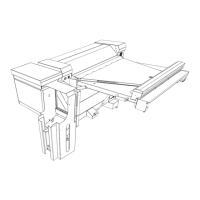
8. (Figure 4); Move the bearing out of the
Xerographic Module Frame (Right Side).
Drum
Assembly
9. (Figure 5): Carefully remove the Drum
Assembly from the Printer and place it, Gear Box
down, in a safe place on the floor.
Holding the gearbox out of the grommet, move the
Drum Assembly to the right while moving the
bearing out of the frame (Without Tag 8)
Loosen the wingnut and rotate
the gearbox to disengage the
bracket from the grommet
Disconnect P/J
2
R3006K
Drum
Assembly
Figure 4. Moving the Bearing (Right Side)
Gear Box
Figure 5. Removing the Drum Assembly
REP 9.2
1/98
4-48
8830


 To Next Page
 Loading...