REP 4.1.15 Power Distribution PWB
Parts List on PL 1.1
Removal
WARNING
High Voltage
Switch off the Scanner and disconnect the Power
Cord.
1. Remove the Left Side Pane! (REP 4.1.1).
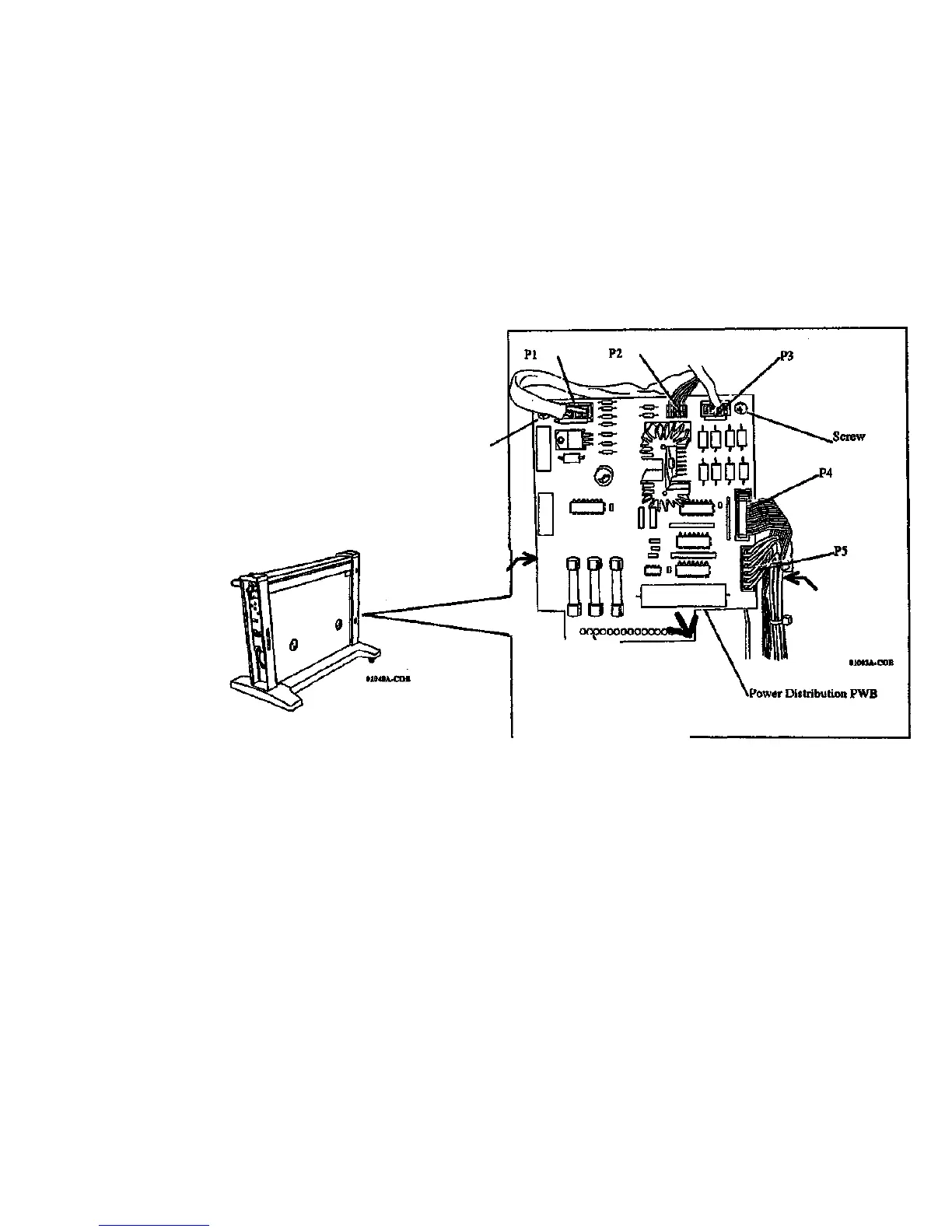
2. (Figure 1): Disconnect P1, P2, P3, P4, and P5...
3. Remove the 2 screws.
4. Remove the Power Distribution PWB:
a. Insert an index finger around the PWB near the bottom.
b. Press down with the two thumbs near the center of the PWB,
while lifting outwards alternately with the index fingers.
Screw
Replacement
Connector P6
Power Supply
CAUTION
Ensure that the pins on J6 are correctly registered with
the connector on the Power Distribution PWB.
1. Press J6 on the Power Supply onto the connector on the the Power
Distribution PWB.
2. (Figure 1): install and tighten the 2 screws.
3. Connect the 5 connectors shown.
Figure 1. Removing the Power Distribution PWB
7356 SCANNER
4/97
4-25
REP 4.1.15


 To Next Page
 Loading...