892 J006 MNAH | PGC5000 G EN 2 | 39
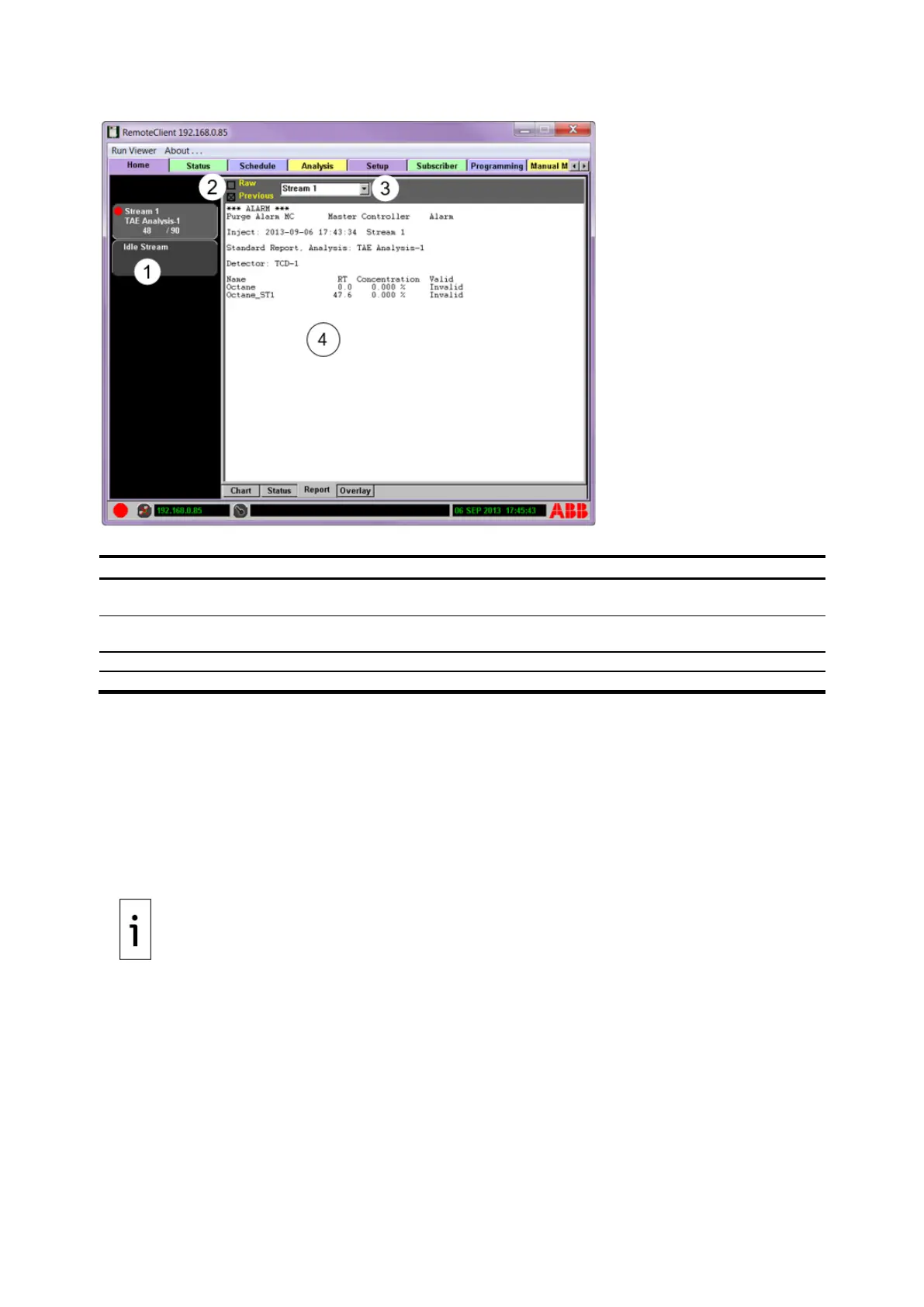
Figure 4-4: Home>Report subtab
Legend: Home>Report subtab
Analysis Buttons – Display the indicator level and analysis progress for all active analyses. The
Idle Stream is included for review of analyses not currently running.
Report Type – Select Raw to display reports in raw data format. Select Previous to display last
saved report for the selected stream.
Report Selection Criteria – Select stream.
Report Area – Report data displayed in the selected format.
The analyzer stores up to a week’s worth of analysis stream data for a standard application. Reports
and Chromatograms for each stream include the last five:
⎯ Calibration stream reports and chromatograms
⎯ Validation stream reports and chromatograms
⎯ Alarm reports and chromatograms for each stream
There is a Locked folder that can contain any number of Saved reports and chromatograms, and there
are Reprocessed and Alarm folders that can contain the last five reports of each.
You can view the previous report for the selected stream or any of the automatically saved reports.
Two report formats are available: Standard and Raw.
IMPORTANT NOTE: The report format selected also selects the type of report that can be sent to
an optional Reporter.
The reports and chromatograms are stored on a removable SD card located on the Single Board
Computer PCB (SBC). This SD card can be removed to transfer data to a PC. A reliable, high grade SD
card is provided with the Master Controller and is available as a spare part. The SD card must be
installed before analyzer startup for the SD card to be utilized, as it will not recognize the device until
the next power cycle during which the SD card is present. To remove the SD card from the SBC, press
the Eject SD card button on the Setup tab screen.
When the SD card is not in the SBC, the reports and chromatograms are stored on the RAM disk,
allowing uninterrupted data collection. When the RAM disk is full, the oldest files are removed to allow
storage of new data, allowing continual data collection. The RAM disk stores several hours of data for
a standard application. When the SD card is returned to the SBC, storage of subsequent data is
directed to the SD card. Data stored on the NAND flash is not transferred to the SD card but can be
downloaded through Ethernet by the user. When the SD card is full, the oldest files are removed to



 To Next Page