76 | PGC5000 GEN 2 | 892 J006 MNAH
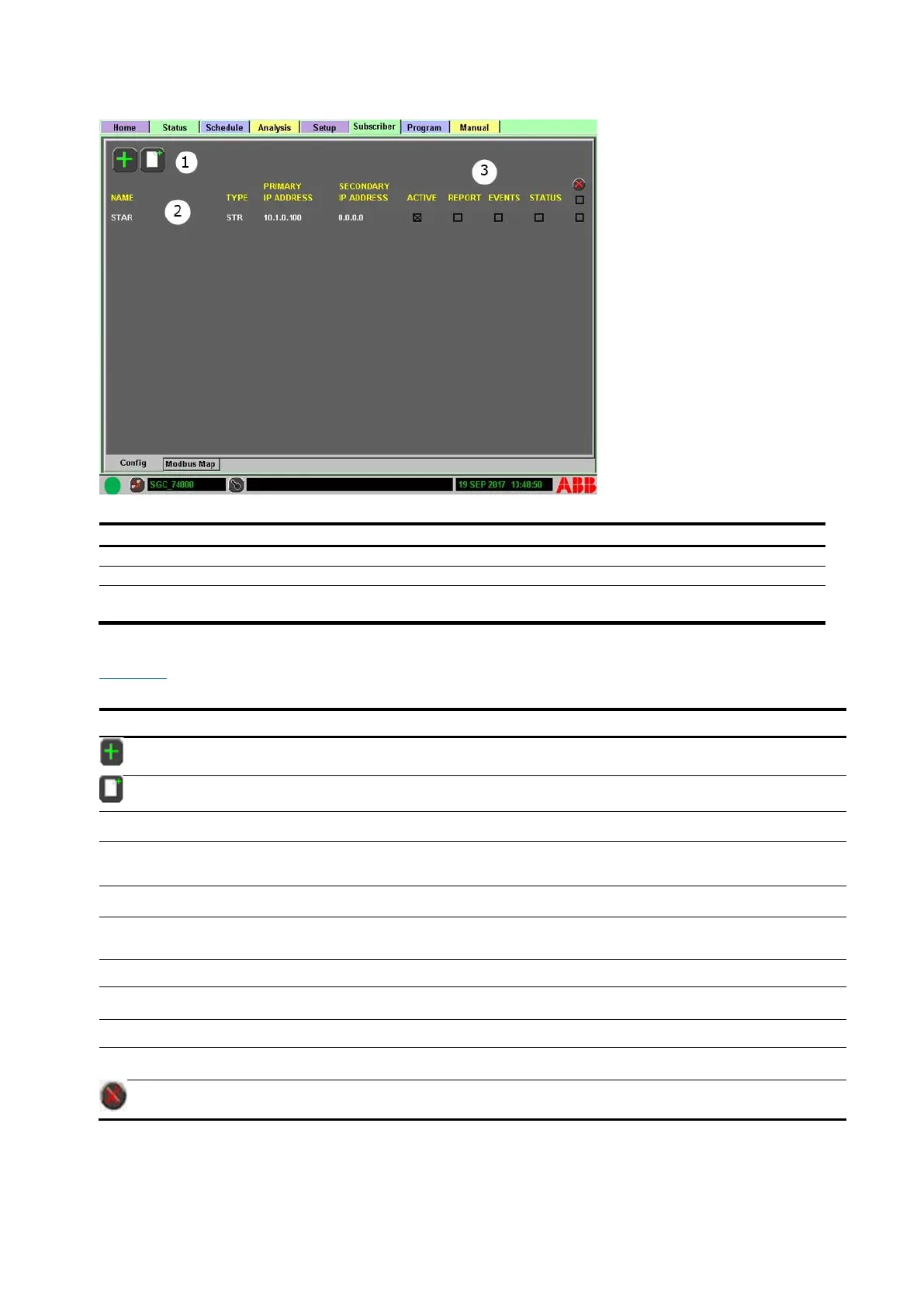
Figure 4-47: Subscriber tab display
Legend: Subscriber tab display
Action Icons: Add existing or new subscriber
Subscriber Information: Displays subscriber name and information
Option Row: Mark the box(s) to activate and select the type of data to report, or delete a
subscriber as needed.
Table 4-5 describes the information provided on the Subscriber tab display.
Table 4-5: Subscriber tab display
Add Device: Provides a list of applications that can be subscribed.
Add New: Adds a new subscriber. Name and IP addresses have to be manually
entered.
Configurable name of the reporting device
The device type of receiver: OPC (ABB’s OPC Server), RD (Report Device) or STR
(STAR Server)
Primary IP network address of the report device
Secondary IP network address of the report device
If the box is marked, defined information is sent to the Subscriber list.
If the box is marked, defined report information is sent.
If the box is marked, event information is sent to the list.
If the box is marked, status change message is sent to that Subscriber.
Delete All/Delete: Choosing the top box will mark all demand configurations for
deletion. Choosing the lower box will mark that configuration for deletion.



 To Next Page