Program steps and cycles | Defining a contour
Blend (Chamfer)
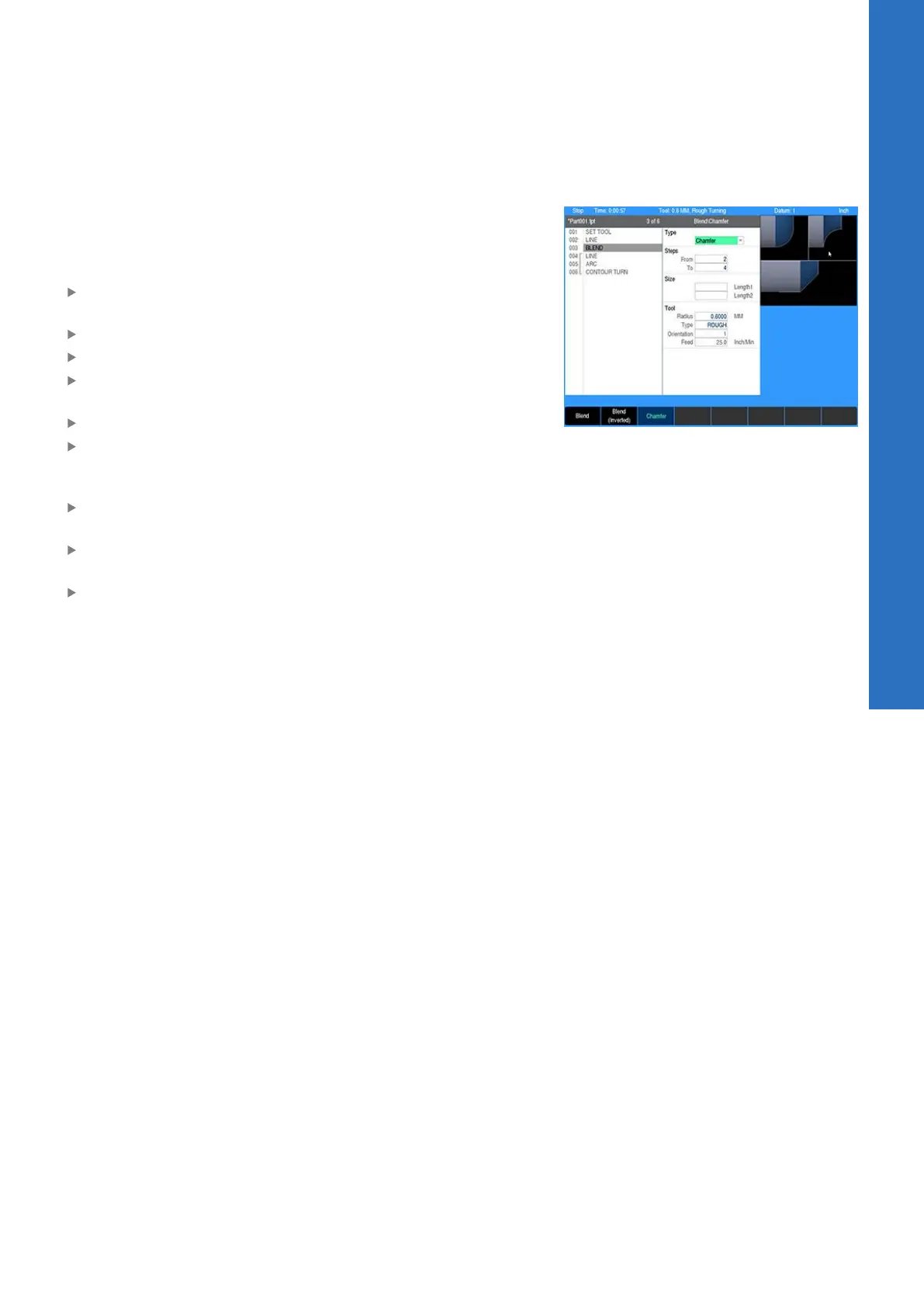
A Chamfer is a bevel or line that is inserted between two lines
to relieve sharp corners on a part. A Chamfer can be inserted
between two intersecting lines whose steps are adjacent in the
program.
From the PGM screen, locate the lines where the Chamfer is to
be inserted between
Highlight the second line
Press the BLEND key
Or press the Program Steps soft key, then press the Contour
soft key, and select Blend (Chamfer) from the popup menu
Press the Chamfer soft key after the dialogue opens
Check that the steps listed in the From and To fields are the
steps to be blended. If they’re incorrect, press the CANCEL key
and highlight the appropriate step.
For Length1, enter the distance from the common point to the
From line
For Length2, enter the distance from the common point to the
To line
Enter the Feed rate
8
ACU-RITE | TURNPWR | User's Manual | 08/2020
121


 To Next Page