Introduction | Console
2
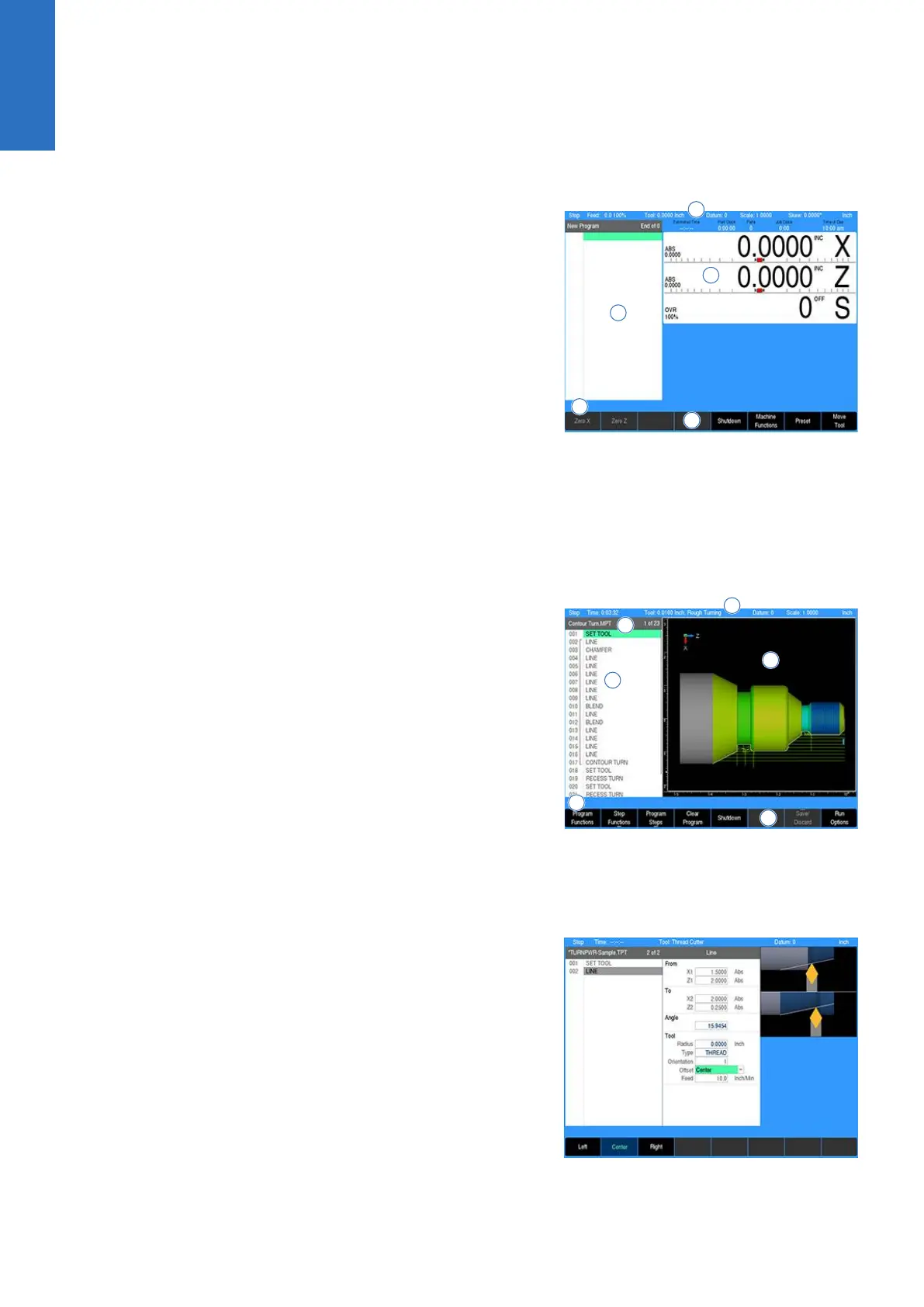
DRO mode display
In general, the display changes as different functions are activated.
Soft keys in the lower display area change per the function
selected. Soft keys perform their associated function by pressing
the key directly below it. Basic procedures and features remain the
same regardless of which mode is selected.
For a complete description of the display areas see "DRO screen",
Page 49.
1 Status Bar display for Servo Motor Status, Feed rate, Tool,
Datum, X-Axis Mode (Diameter/Radius), Units (Inch/MM),
Estimated Time, Part Clock, Parts (run), Job Clock, and Time of
Day.
For additional information, see "Status bar display",
Page 50.
2 Axes Display (current position)
3 Operator Intervention Message line (OIM)
4 Soft keys display area
5 Program steps
PGM mode display
When PGM mode is selected, the display changes from DRO
mode to display program functions and graphics. Soft keys change
to programming functions.
For additional information, see "Status bar display", Page 50.
1 Status Bar display for Servo Motor Status, Estimated Time,
Tool, Datum, X-Axis Mode (Diameter/Radius), Units (Inch/MM).
For additional information, see "Status bar display",
Page 50.
2 Display window of graphical simulation
3 Operator Intervention Message (OIM)
4 Soft keys display area
5 Program name
6 Program steps
Dialogues and drop down menus
This manual provides complete information where specific
examples of actions are being explained.
As a general overview of the dialogues provided by the control,
several fields are likely to be provided for input. To navigate a
dialogue, use the Arrow keys to select the desired field. After
entering the data into a field, press either the ENTER key, or the Up
Arrow or Down Arrow keys to move to the next field. Exiting a field
with one of these key methods will retain the entered data in that
field.
When the required data has been entered, press the USE key to
accept the data entered for use in that specific function.
Most dialogues contain Drop Down menus. Specific machining
operations may require additional information. The choices available
are provided in a drop down menu. In most cases, they are also
provided as soft keys. The choices can be selected from either
location.
26
ACU-RITE | TURNPWR | User's Manual | 08/2020



 To Next Page