Introduction | Console
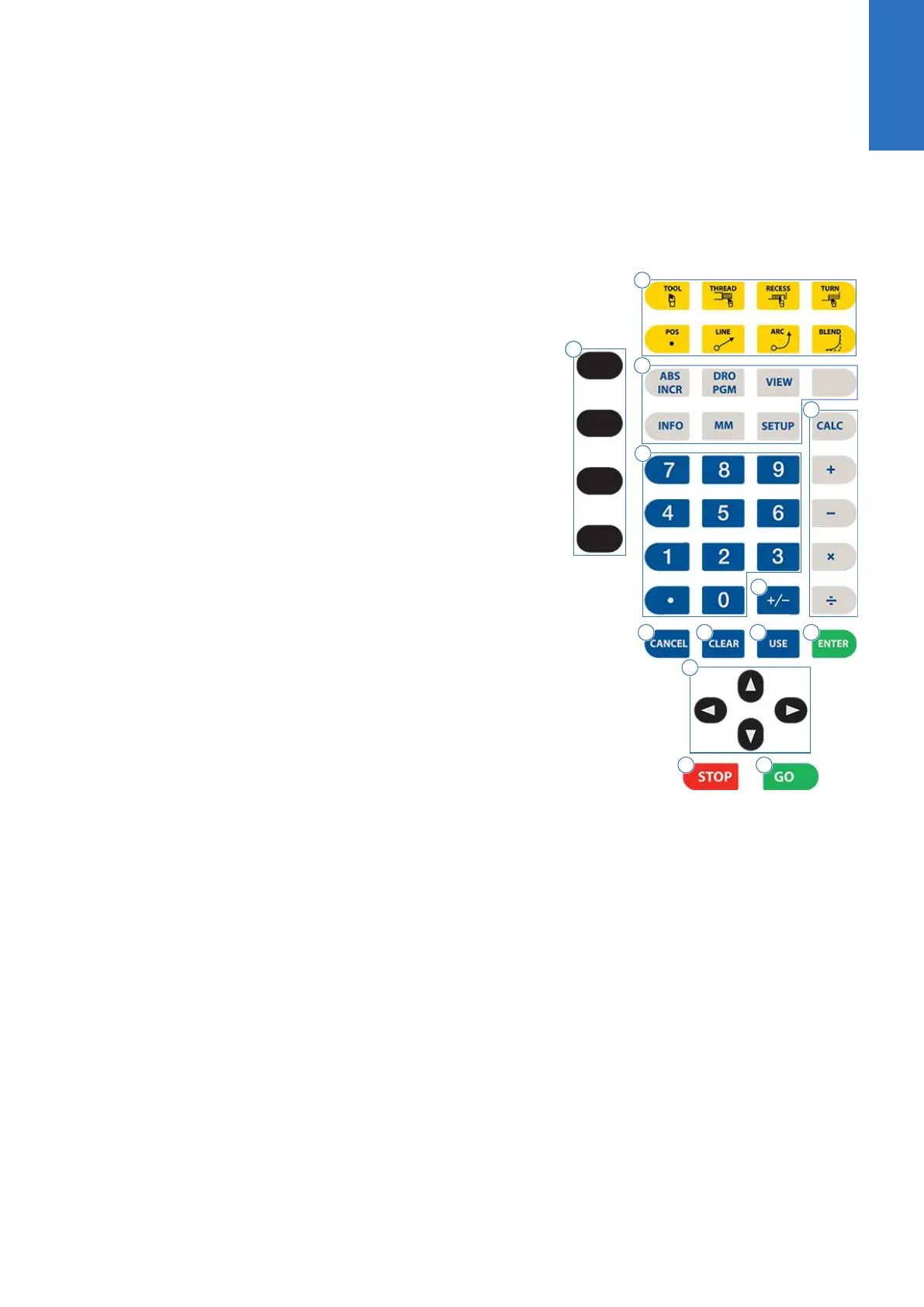
Console keypad
The following keys are located on the console keypad. There is also
a quick reference guide located at the beginning of this manual, see
"Controls", Page 2.
1 Axis keys, use to select the required axis.
2 Turning function keys. Selection of appropriate key provides
direct access to the turning function dialogue.
3 Function keys, select appropriate key for quick access to the
function and data entry.
4
CALC key, opens the fully functional calculator.
5 Numeric keys, use to enter numeric data.
6
+/- key, use to toggle key for “Plus/Minus” data entry.
7
CANCEL key, use to cancel current action.
8
CLEAR key, use to clear selections such as values entered in a
field.
9
USE key, use to complete an operation, i.e. data values
entered in a dialogue.
10
ENTER key, use to activate selections, and entries.
11
Arrow keys, use to navigate around the screen, and highlight
dialogue fields. Also used to move the tool.
12
STOP key, use to pause, or stop a program that is running, or a
machine operation.
13
GO key, use to start, or resume a program.
2
ACU-RITE | TURNPWR | User's Manual | 08/2020
33



 To Next Page