Program edit mode | Programming introduction
5
5.1 Programming introduction
Program display mode
PGM mode cannot be accessed when the Calculator is
active in DRO mode.
If the Calculator is active while in DRO mode, exit the
Calculator by pressing the CALC key, returning the
control to DRO mode.
From DRO mode, press the DRO/PGM key, and
the display changes to PGM mode
If a program is loaded, it will be displayed,
otherwise a blank New Program will be
displayed.
The program display provides soft keys for program selection,
creating, editing, and running functions. The Clear Program
soft key will exit out of a current loaded program. The system
Shutdown soft key is provided on the PGM mode display the same
as it is on the DRO mode display. The Program Functions soft key
provides access to program management features.
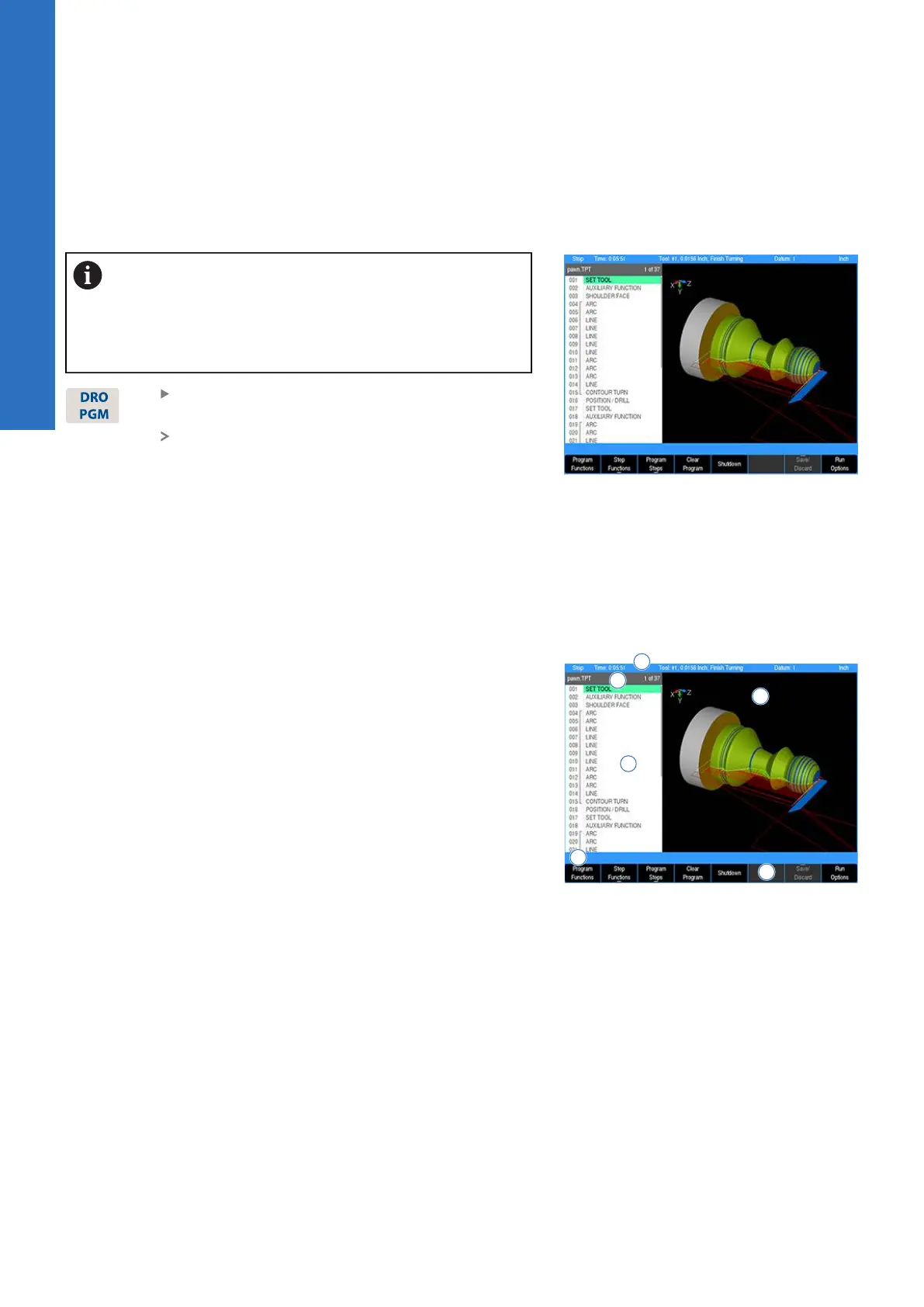
Display area
Programming functions, graphics, and soft keys are provided
in the display area. Each soft key is activated by pressing the
corresponding hard key located directly below it.
1 Status Bar displays the servo motor status Stop/Run/Pause,
Time, loaded Tool (blank if none is selected), Datum, Radius/
Diameter mode, and unit of measure selected (inch/mm).
2 Graphic display window of the current loaded program. If a
program is loaded, a graphical simulation is shown.
3 Operator Intervention Message (OIM) provides prompts, and
messages to the operator.
4 Soft keys display area. The soft keys change per the function
that is selected. They are activated by the associated hard
key that is directly below it. When a soft key appears as being
pressed in, it is activated and its text is yellow. When a soft
key is grayed out, it is not available for the current program
function.
5 The name of the current loaded program is displayed above
the program steps display.
6 The program display window displays the program steps of
the current loaded program.
60
ACU-RITE | TURNPWR | User's Manual | 08/2020



 To Next Page