Program edit mode | Programming introduction
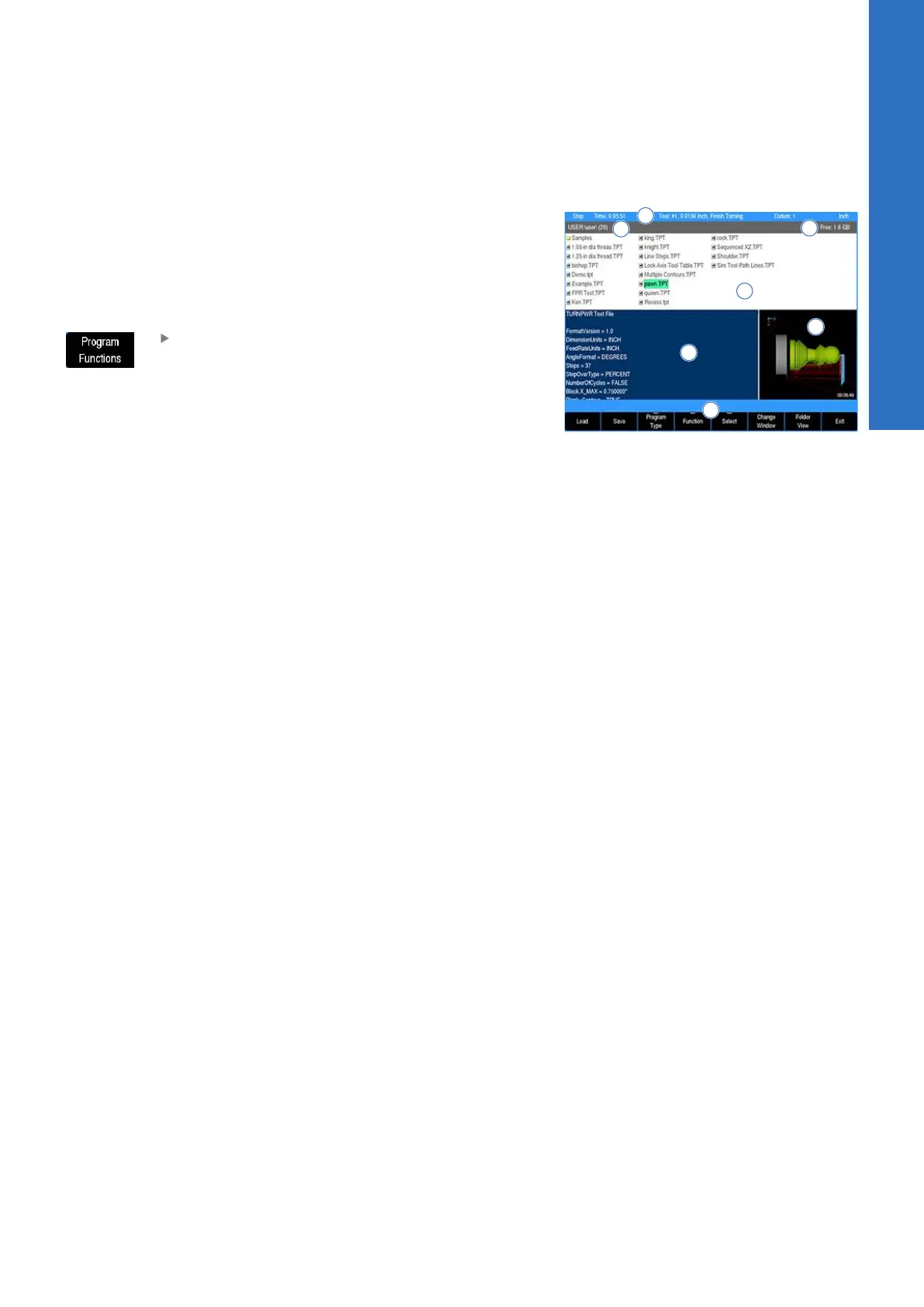
Program function screen
The Program Function screen displays several windows, and
soft keys which are defined in the contents of this chapter. The
display area window is briefly described in the following table.
The Program Functions soft key provides access to Network or
USB memory devices by pressing the Folder View soft key. For
additional information see "Folder view", Page 62.
Press the Program Functions soft key to access
programs stored in the Console, on a Network,
USB memory devices, or to create a new
program
The Program Functions screen displays all programs that are
stored in a selected folder. The default storage folder for the
console is v:\user\. General Information and the programming steps
of the highlighted program are displayed in the lower left window
3, for a quick access review. If a program has ran in its entirety
(without errors), graphic preview 2 is also displayed.
1 Available soft keys
2 Program graphic preview
3 Program steps preview
4 Current folder selected (number of programs within selected
folder of the active program type)
5 Constant status bar
6 List of all the programs stored in the current location (or
folder)
7 Free space available on the current drive
5
ACU-RITE | TURNPWR | User's Manual | 08/2020
61



 To Next Page