Tuning Servo Loops U511 User’s Manual
8-8 Aerotech, Inc. Version 1.1
8.3. The Axis Scope Toolbars
This section discusses the Axis Scope toolbars and the servo gains used to tune the axes.
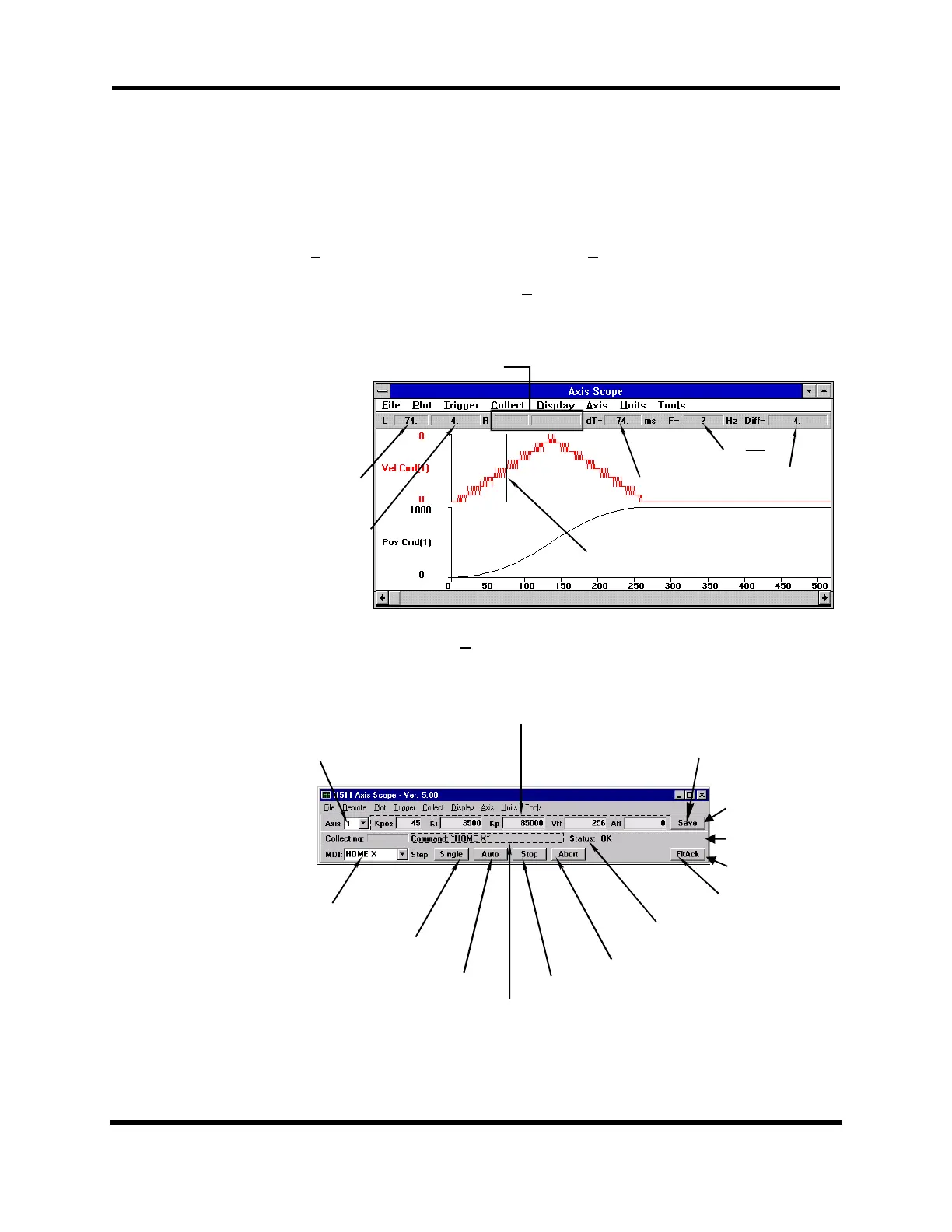
The Cursors option is used to display/hide the C
ursors toolbar. This toolbar contains
features that assist the operator in determining time differences between points on the plot
as well as frequency information. The Cursors toolbar is illustrated in Figure 8-3
Figure 8-3. Cursors Toolbar of the Axis Scope Window
The Gains, Status, and Control toolbars are illustrated in Figure 8-4. These toolbars are
frequently used together in the tuning process.
Figure 8-4. Gains, Status, and Control Toolbars
"Time" + "Plot" values for right mouse button
"Time" value
when left
mouse button
is pushed
"Plot" value
when left
mouse button
is pushed
Time difference
between the two
positions on the
plot.
Difference between
the two points on the
plot.
Move mouse over the position on plot screen.
Click the left or right mouse button and a
vertical line appears marking this position.
F=
1
dT
GAIN Toolbar
CONTROL Toolbar
STATUS Toolbar
Select Which Gains to Adjust
Adjust the
ervo
ains Here
Acknowledge a Fault
Condition
Abort a M
tion
StoptheAutoStep
Auto Step Through Forward
and Reverse Motion
Single Step Through Forward
and Reverse Motion
Motion Command Being Executed
Immediate Mode
Command Box
Save the Servo Gains to
Parameter File
Axis Status. Shows if Axis has a Faul
Condition Such as a Hardware Limit
Artisan Technology Group - Quality Instrumentation ... Guaranteed | (888) 88-SOURCE | www.artisantg.com



 To Next Page