6.3 Tuning fuel 6 TUNING THE MS3PRO
to high rpm, high kPa (i.e. WOT). You can adjust these values using the O
2
sensor, data logs, VE Analyze Live in
TunerStudio, and/or the seat of your pants. Low rpm and low kPa (say less than half of the max rpm and max kPa)
might be able to use stoichiometric or leaner. Richer mixtures would be used at high rpm and high kPa.
However, the low rpm/high kPa and high rpm/low kPa are not seen as often driving your vehicle. Basically, if
the engine never runs in certain parts of the MAP, then the numbers there should not matter. However, since you
may not be able to guess where you will run under every possible set of conditions, you put estimated VE numbers
that make sense into the little used areas.
From this frequently used diagonal strip of the VE table, you will be able to see how much the VE rises from
one rpm bin to the next, and use these differences to estimate the low rpm, very high kPa numbers and the high
rpm, very low kPa numbers. Since you rarely (if ever) run in these parts of the table, the actual numbers will not
make much difference, but they will be there "just in case". You are looking to create a smooth VE map wherever
possible.
It is a good idea to set either the second or third row of kPa bins in the VE Table to the idle MAP value. So,
for example, if you idle at 35 kPa, set the first to say 20 kPa or even a little lower (this can be used for fuel saving
during over run). The second can then either be 35 kPa or a value between 20 and 35, with the next row being
35. The reason is it is always easier to tune idle if the point of idle is on a cross hatch; then there’s only really 2
points that influence it rather than 4. The engine may not always idle at the same MAP value when under load, but
it’s worth trying to set this up for unloaded idle. Most of the time, an engine will idle best if you flatten out the cells
above and below where it idles; it’s rare for an engine to need large changes in VE at idle.
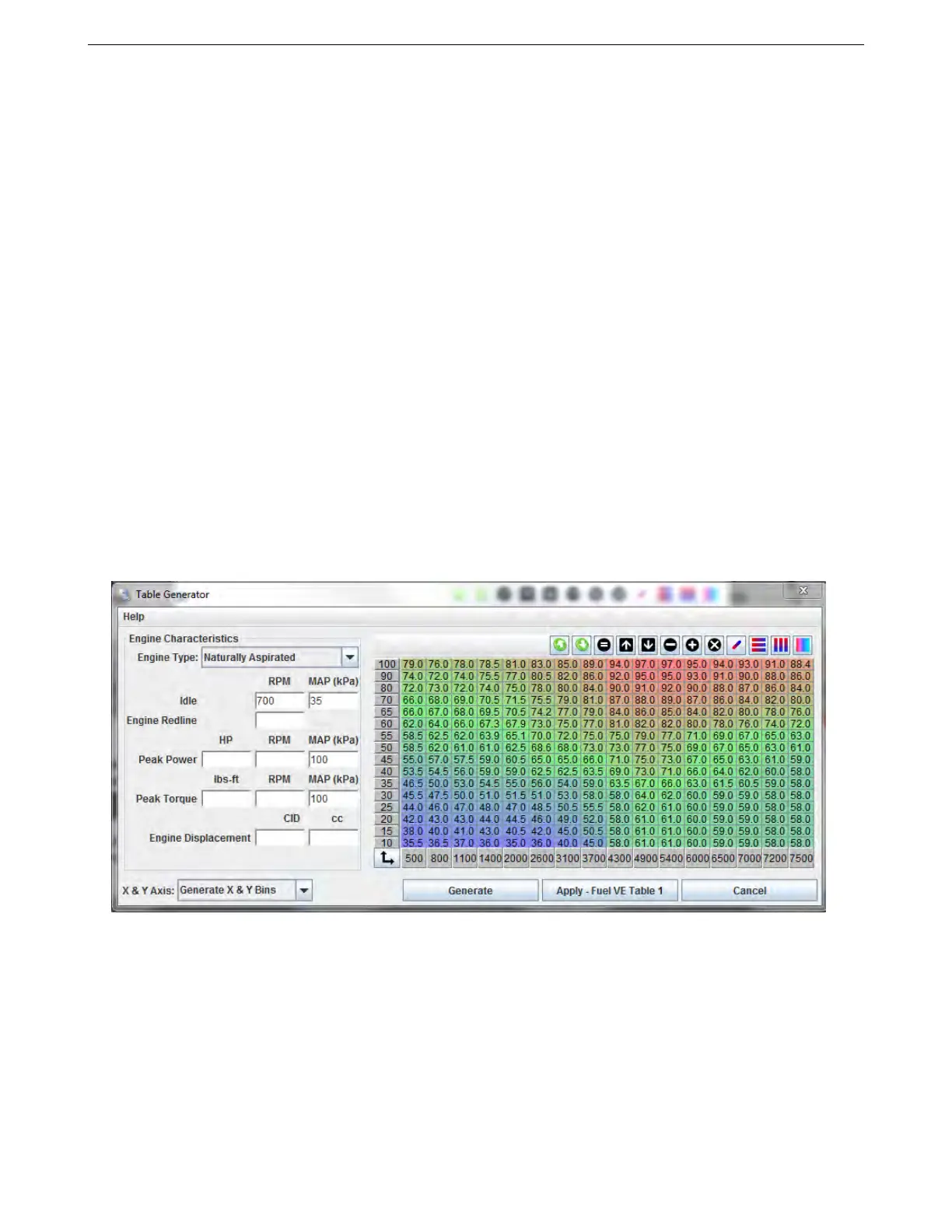
6.3.4.1 VE table generator Clicking on the Tools menu under the VE table will bring up the VE table generator
tool. This can create an approximate starting VE table based on the engine’s size, induction type, and estimated
torque curve. This table can be a good starting point, but will require some fine tuning to dial in. Note that entering
a peak power and a peak torque that are only a few hundred RPM apart can result in a table with almost no useful
data below the peak torque. The VE table generator works for fairly typical engines, but its algorithm does not work
very well for an engine that peaky.
6.3.5 Basic acceleration enrichment (AE) tuning
MS3Pro has two options for basic acceleration enrichment, plus model based acceleration enrichment that we’ll
discuss later. One is the time based accel enrichment setup. The other one behaves similar to an accelerator
pump on a carburetor. We recommend using the accelerator pump style in most cases, but we will cover both
styles if you prefer the “classic” setup.
Both use variables called TPSdot and MAPdot. The “dot” is a calculus notation that indicates rate of change
with respect to time. Don’t worry, you don’t need to know calculus to tune this. The amount is expressed as a
percent of change over time. With TPSdot, it is percent opening versus time; a TPSdot rate of 100 %/sec would be
opening from closed to wide open throttle in one second, or the equivalent speed, such as going from 25% to 75%
AMP EFI MS3Pro manual version 1.202, firmware 1.5.0, 4/21/2017 Page 113



 To Next Page