2 INSTALLING THE SOFTWARE
2 Installing the software
The MS3Pro comes with a software installation USB memory stick that includes the following programs:
• TunerStudio. This is the main program you’ll use to connect to the MS3Pro. It is used to configure the
MS3Pro’s settings, tune the MS3Pro, record data logs on the laptop, and retrieve internal data logs.
• MegaLogViewer. This is an analysis program which can play back data logs and display the data in both line
graph and scatter plot format. It can also modify tune files based on information recorded in data logs.
• Firmware loading utility. This is used to update firmware or for certain diagnostics.
Depending on your computer’s settings, the software may automatically install when you insert the USB stick into
your computer. If it does not, open the USB stick as a drive under My Computer and double click the Setup.exe
file. Follow the installation prompts, and the software should install in just a couple minutes.
The tuning software can run on most versions of Windows, as well as Linux and Mac OS.
2.1 Registering TunerStudio
Both TunerStudio and MegaLogViewer have registered versions. To unlock the registered version, use the serial
number code on your MS3Pro. This appears on a label on the underside of the box as well as on a tag on the back
of the MS3Pro. You will enter the serial number at https://www.efianalytics.com/register/registerCoupon.jsp as a
“Coupon code provided by dealer” to obtain a registration key.
2.2 TunerStudio
2.2.1 Start screen
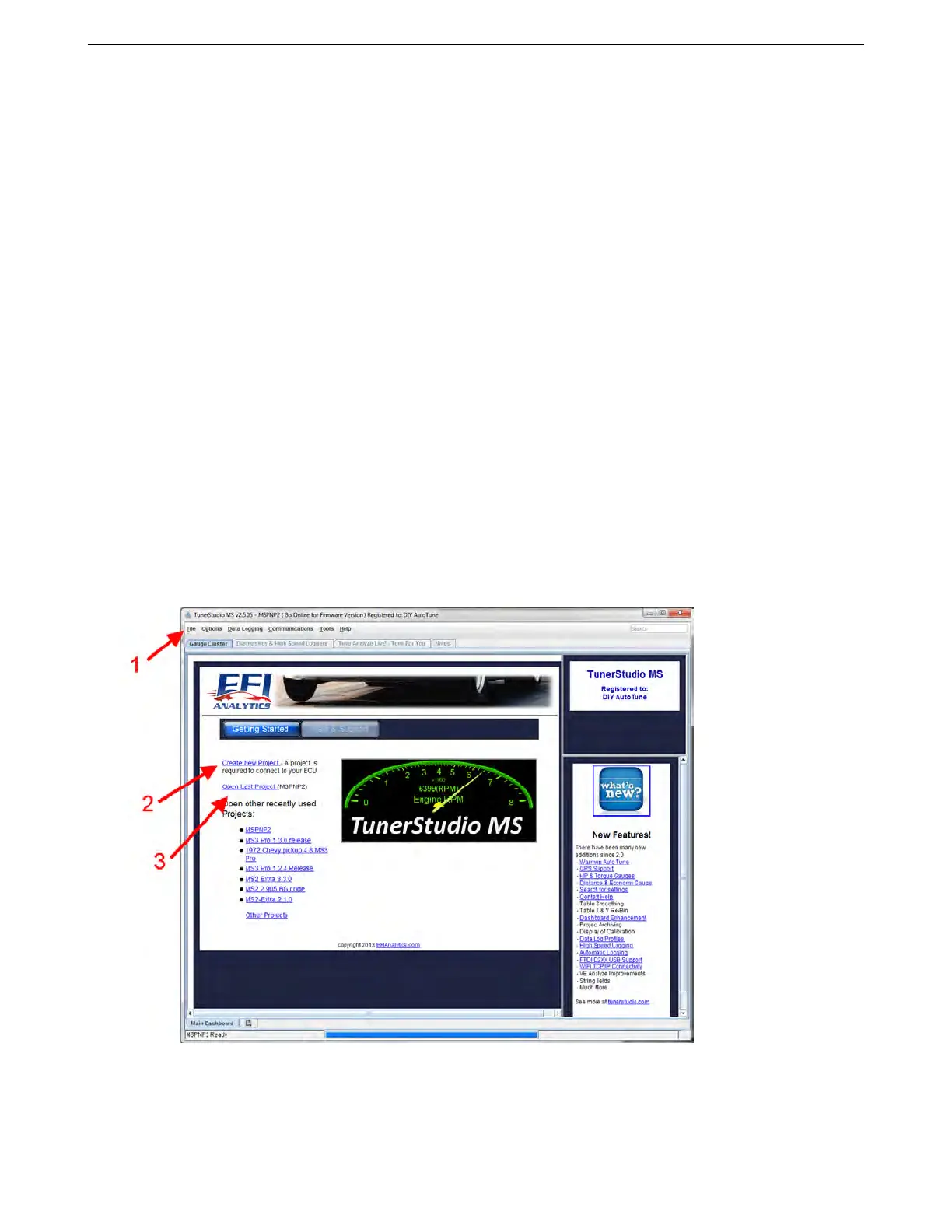
Once TunerStudio opens, you will be presented with the start screen as shown below.
At this point, you’d normally use the screen to create a project or open one; this will set up TunerStudio with
the configuration it needs to communicate with your ECU or allow you to view tune files offline. You can create or
open a new project under the file menu (1), or use this menu to open a new tune for offline viewing. There are
also command links to create a new project (2) or open a recent project (3).
AMP EFI MS3Pro manual version 1.202, firmware 1.5.0, 4/21/2017 Page 16



 To Next Page