2.2 TunerStudio 2 INSTALLING THE SOFTWARE
The Help and Support button brings up links to documentation and support forums for the MS3Pro as well as
other systems in the MegaSquirt line.
Note that if you open a tune file from this screen, it will go into a temporary project and TunerStudio will not
connect to the MS3Pro until you create or open a project for connecting to the MS3Pro.
2.2.2 Creating a project
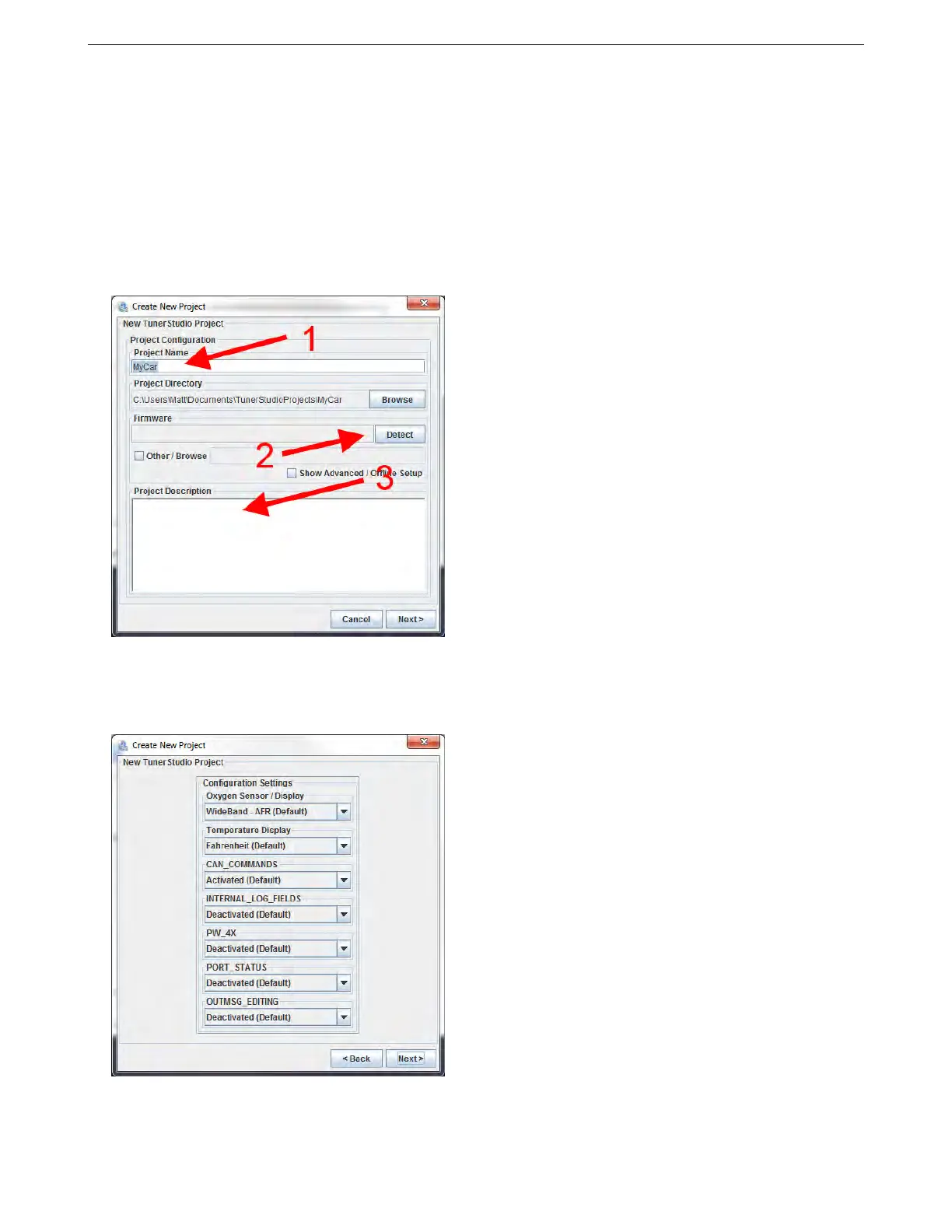
Selecting “New Project” from the File menu opens a wizard to create a new project. It will bring up a screen like
the one below. At this point, you will want to have the MS3Pro powered up (see section 4 for wiring details) and
connected to the laptop with either the USB or RS232 cable. The MS3Pro will need to be powered through the 12
volt supply; it cannot be powered off the laptop.
You can enter a name for the project in (1). Next, click the Detect button (2). TunerStudio will detect what
firmware is on your MS3Pro. If TunerStudio does not have a definition file, it will prompt you to download one from
the Internet, which TunerStudio will handle automatically for any standard release version of the MS3Pro firmware.
You can also enter notes about this project in (3).
Clicking Next will bring up a screen where you can select project specific settings.
The exact settings shown will depend on your firmware. These settings are covered in more detail in section
5.1.
AMP EFI MS3Pro manual version 1.202, firmware 1.5.0, 4/21/2017 Page 17



 To Next Page