7.10 CAN bus / Testmodes 7 ADDITIONAL ITEMS: BEYOND BASIC FUEL AND IGNITION CONTROL
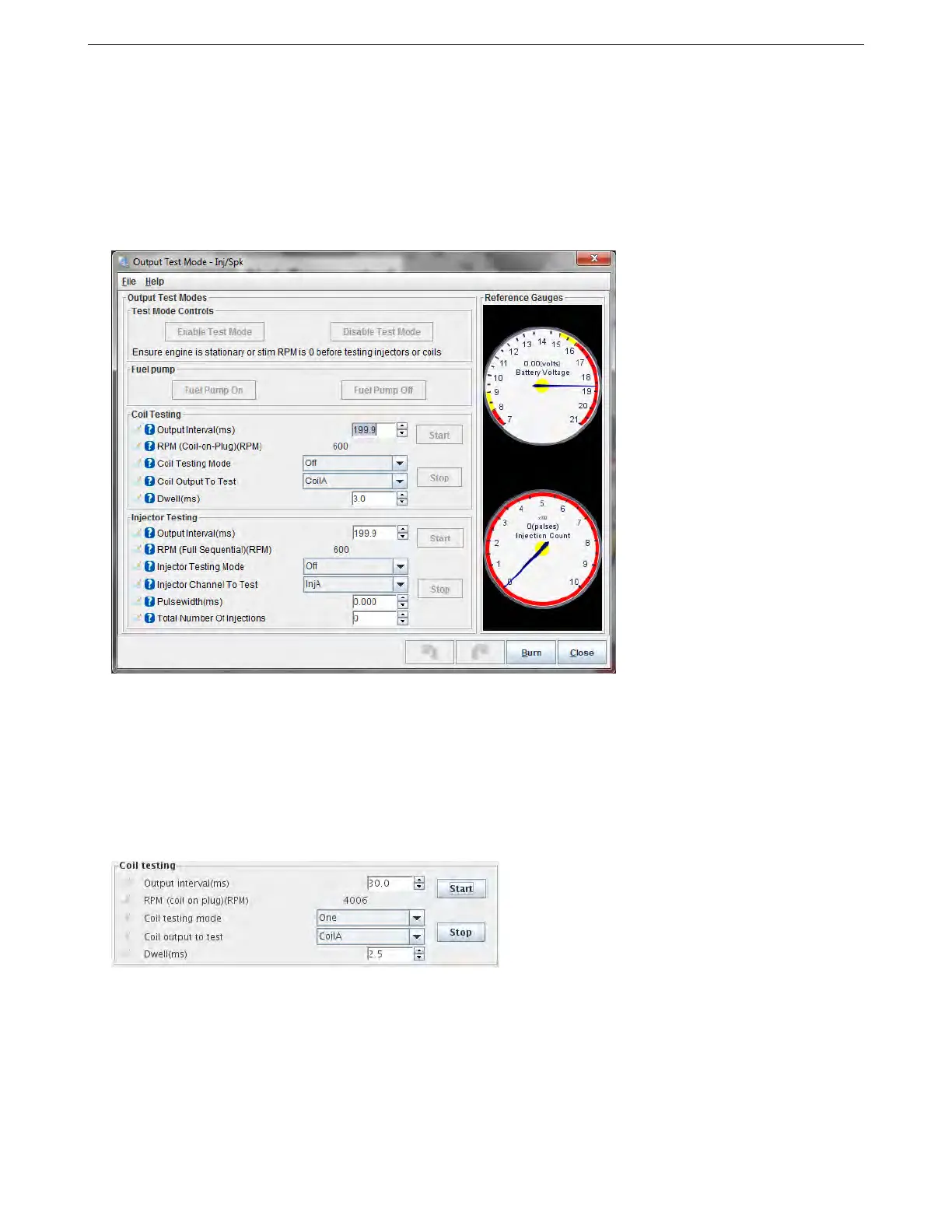
7.10.14 Output test mode - Inj / spark
The test mode allows direct control of the coils and injectors. Used by accident this could cause flooding of the
engine and potential damage. Therefore a special initialization method is required to enable it. Do not attempt to
test injectors or coils on a running engine. Before testing injectors on a engine be sure to depressurize the fuel rail
- this can be achieved by unplugging the fuel pump while the engine is idling. Unless you are flow testing injectors
on a flow-bench, you may well want to remove the fuel pump fuse during all of this testing. Before using the test
mode, ensure that you have already configured the correct number of cylinders and type of injector and spark
output etc. i.e. if you want to test 8 cylinder COP mode, you need to have configured that already.
First ensure that you are key-on, engine-off. (Or that RPM is set to zero on the stim if bench testing.) In this
condition the “Enable Test Mode” button will be available. Click the button to enable the test mode.
7.10.14.1 Fuel Pump Clicking Fuel Pump On will enable the fuel pump output and light the "Ready" indicator
on TunerStudio.
Clicking Fuel Pump Off will disable the fuel pump output and turn off the "Ready" indicator.
7.10.14.2 Coils The coil test mode is useful to confirm you have the coils wired correctly and to check dwell
settings. (Do be careful as ignition coils put out a potential lethal voltage. Typically 30,000V or more.)
To enable coil testing:
1. Choose the desired output interval (the estimated RPM equivalent is shown below.)
2. Set Coil testing mode to One
3. Choose which coil to test e.g. Coil A
4. Choose your dwell time in milliseconds. Start low. e.g. 2.5ms.
5. If your coils are powered via the fuel pump relay as is recommended, set the fuel pump to On.
AMP EFI MS3Pro manual version 1.202, firmware 1.5.0, 4/21/2017 Page 272



 To Next Page