7.4 Startup / Idle 7 ADDITIONAL ITEMS: BEYOND BASIC FUEL AND IGNITION CONTROL
Some final tips:
• Idle Fuel Tuning - Before even attempting to tune Closed-loop Idle speed control, tune the area around idle
so that if RPM goes up or down or load goes up or down, the AFR stays close to the same value. Changing
AFR can affect idle speed, which can then cause the PID code to try to correct, getting into an unrecoverable
oscillation.
• Idle Advance - The idle advance feature can be used to help "catch" the idle in situations where heavy load is
suddenly added while the engine is idling. It is recommended that the advance is increased with increasing
load, and decreased with decreasing load. This way, when the air conditioning or electric fan are turned on,
the sudden increase in load causes a corresponding increase in timing which generates more power. Also,
this feature can be used so that on idle without load, slightly less than what would normally be considered
"optimal" timing can be used. This causes the idle valve to need to open further to keep a particular idle
speed. Then when sudden load is added, the timing increases and the valve position does not have to
change as much to cope with the sudden load increase.
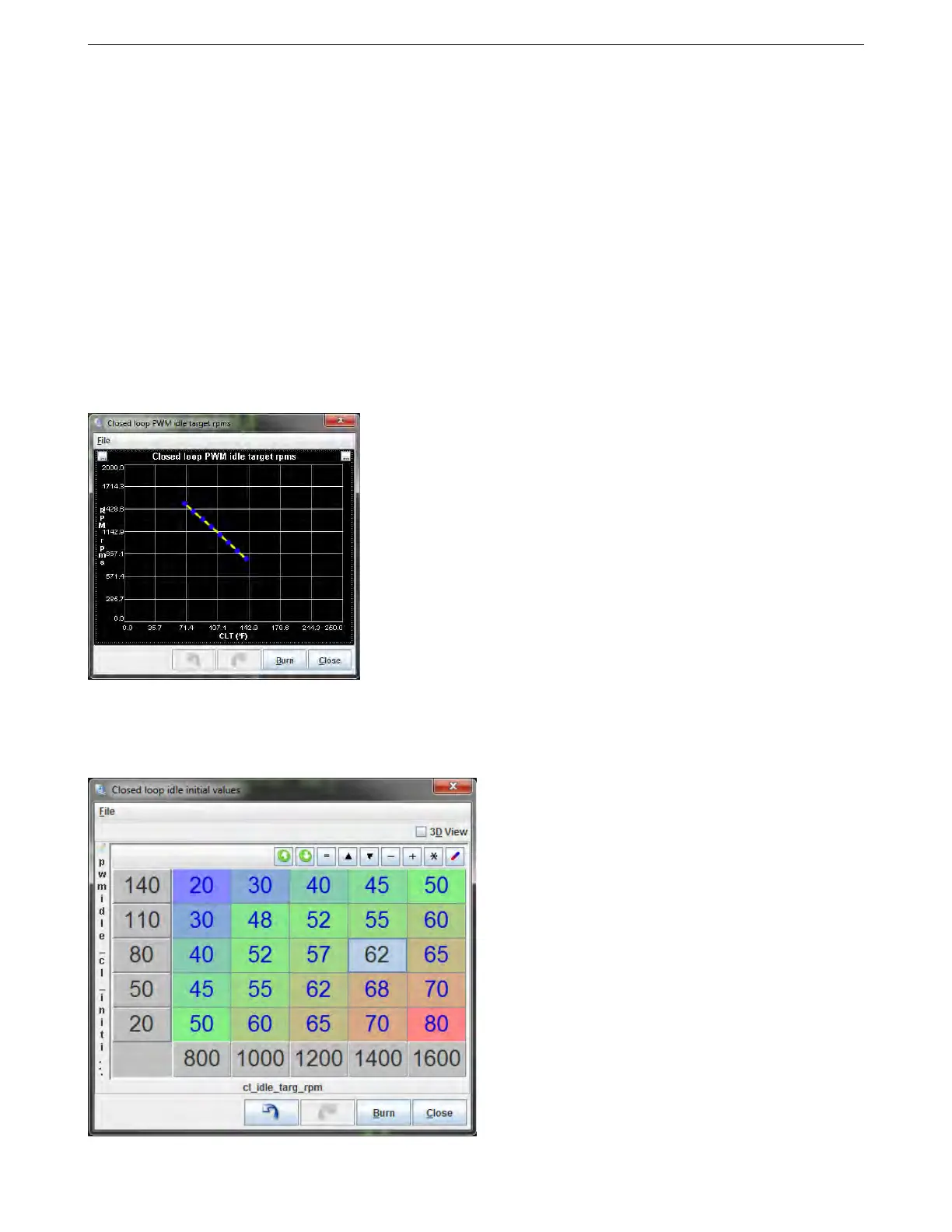
7.4.8 Closed loop idle target curve
This screen is used when running closed loop idle. It lets you specify the target RPM as a function of coolant
temperature.
7.4.9 Closed loop idle initial values
AMP EFI MS3Pro manual version 1.202, firmware 1.5.0, 4/21/2017 Page 188



 To Next Page