5.3 Ignition settings 5 SETTING UP A BASIC CONFIGURATION
CAS connection MS3Pro wire
GND, NE-, or G- CKP- and CMP-
NE CKP+
G1 or G2 CMP+
Other G sensor (not used)
Note that you must connect both the CKP- and CMP- to the ground wire if there is only one ground. The
MS3Pro’s input circuit uses a differential input, and both circuits must be at the same reference volts to use this
mode.
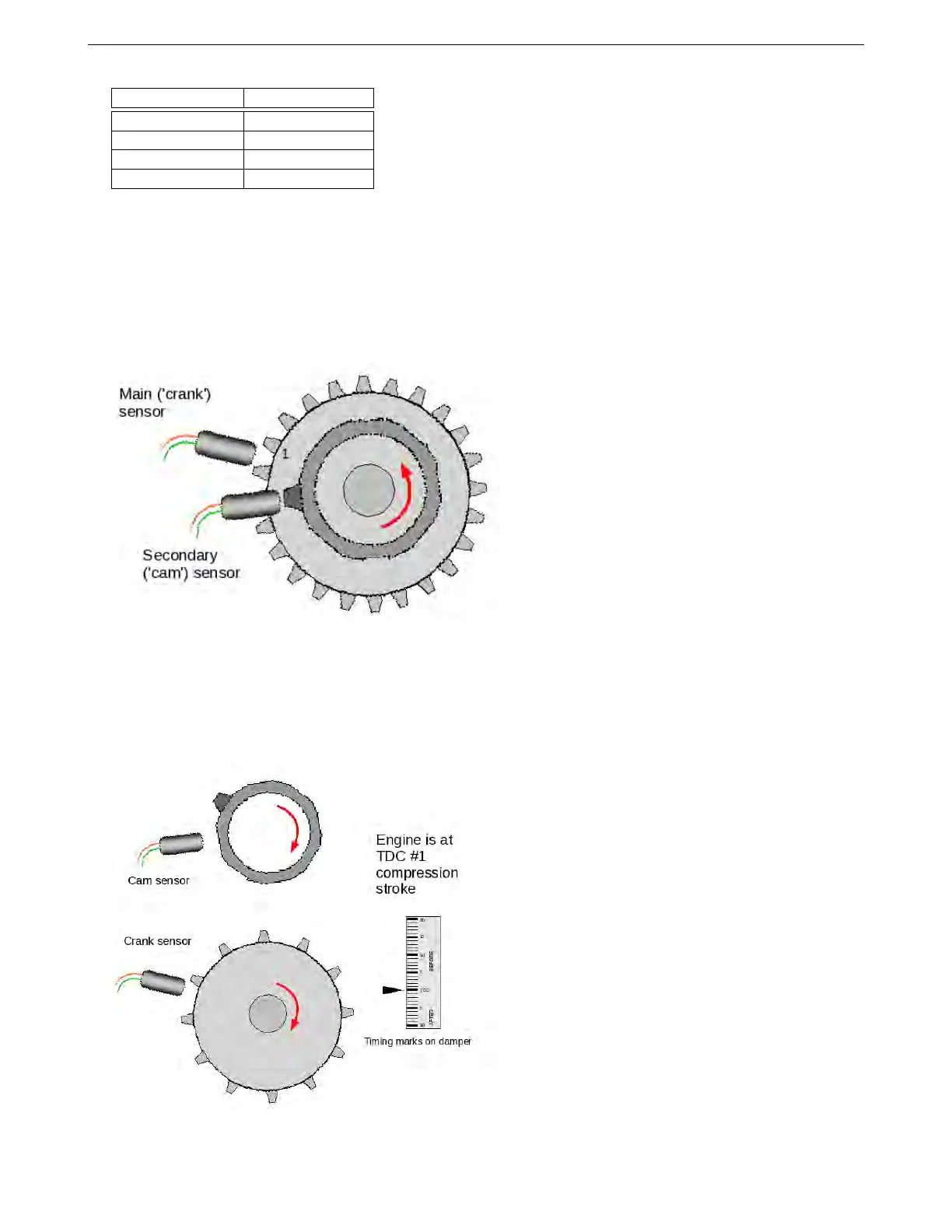
5.3.4.12 Non-missing tooth cam wheel with single-tooth cam This arrangement is one of the variants used
in Nippon Denso CAS. This also covers the common “dual sync” aftermarket distributors, AEM’s Engine Position
Module, and a few other aftermarket distributor or CAS setups.
With the single tooth every 720 degrees this setup gives enough engine information for full sequential fuel and
spark.
Make sure you understand the definition we’re using of tooth #1. With the engine rotating in the normal direction,
tooth #1 is the first tooth to pass the main sensor after the single tooth has passed the second sensor.
Make sure these do not happen at the same time - in the diagram you can see that the main sensor is over a
gap when the secondary sensor is aligned with its tooth. If they do happen at the same time, you can probably
chose the triggering edges so the MS3Pro does not “see” the two edges at the same time. Here is how to set this
one up.
First, set your engine at TDC compression #1.
Now rotate the engine backwards until the "cam" sensor and tooth line up. If you rotated more than one turn,
AMP EFI MS3Pro manual version 1.202, firmware 1.5.0, 4/21/2017 Page 78



 To Next Page