7.2 Fuel Settings 7 ADDITIONAL ITEMS: BEYOND BASIC FUEL AND IGNITION CONTROL
7.2.8 EGO Authority Table
This table allows you to specify the maximum correction that the MS3Pro can apply as a result of O
2
sensor
feedback as a function of RPM and load, in percent. To enable using this table, set “Use Authority Table” in AFR /
EGO Control to On.
7.2.9 EGO delay table
This table specifies how often to update the EGO correction as a function of RPM and load. The numbers in this
table represent milliseconds. To enable using this table, set “Use EGO Delay Table” in AFR / EGO Control to “Use
delay table”.
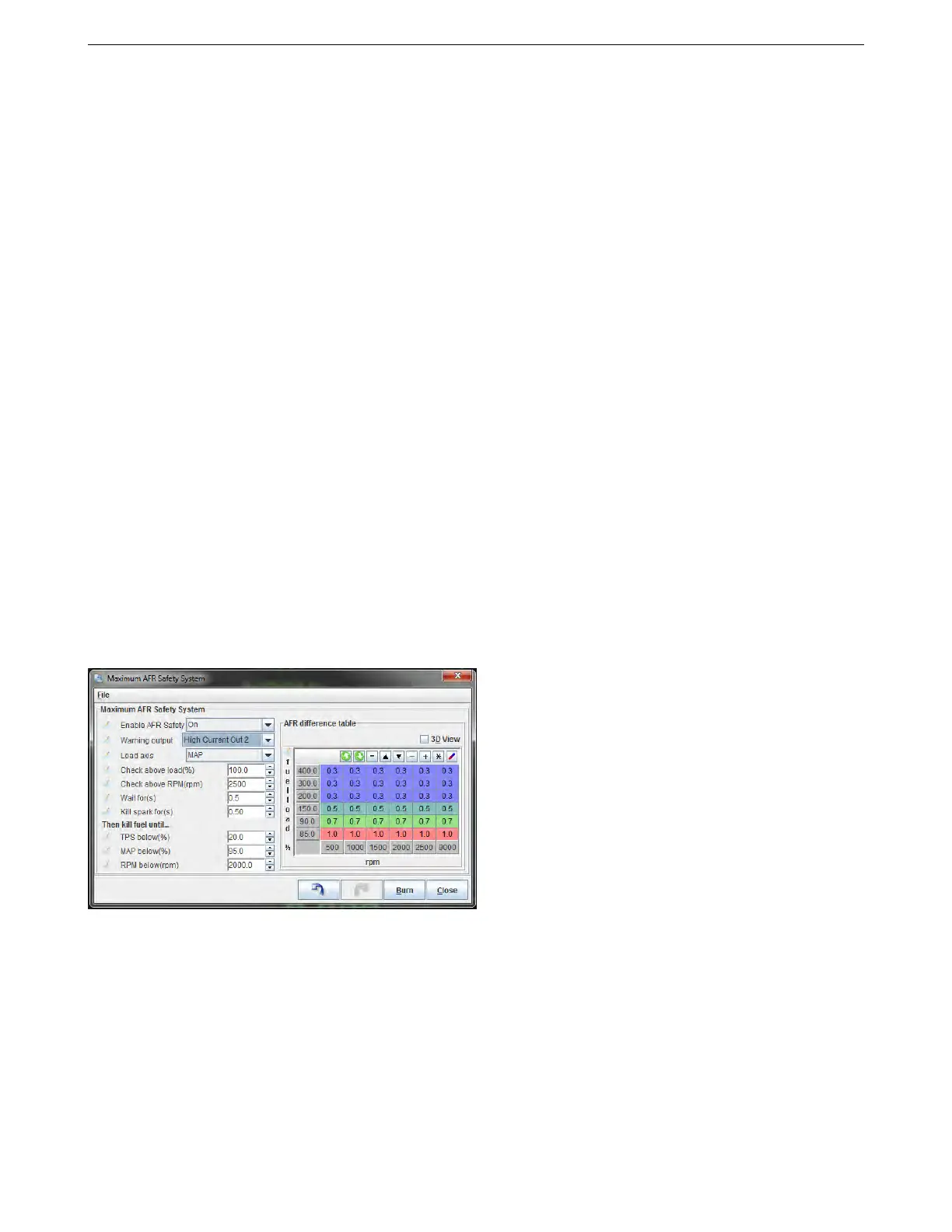
7.2.10 AFR safety system
The "AFR Safety" System is designed to help you protect your engine from unwanted dangerous lean conditions.
Typically this will be used for wide open throttle and/or boosted conditions. It only makes sense to use this feature
with a wideband lambda sensor on an already well tuned engine. The system compares the wideband EGO input
against your existing AFR target table and a safety limit difference table. If this situation persists beyond a time you
specify, the engine will be shutdown as a protective measure until you get out of boost, off the throttle and down in
revs. NOTE This system will only work if configured correctly and will not protect your engine against bad tuning
or knock! However, it is likely it would detect a failing fuel pump or regulator. A single faulty injector could easily go
unnoticed with a single wideband reading the average AFR.
This shutdown settings on this screen will also trigger off of other criteria for shutting down the engine. Other
failsafe settings that can use the shutdown routine are:
• Fuel pressure safety
• EGT safety
• Low water injection fluid
• Oil pressure
Settings:
• Enable AFR Safety - This enables or disables the system
• Warning output - This can be used to turn on an output (such as a warning light or buzzer) as soon as an
over-lean condition is detected.
• Load axis - Typically choose MAP if running speed-density or TPS if running Alpha-N
• Check above load - The system only checks the AFR above this load.
• Check above RPM - The system only checks the AFR above this rpm
• Wait for - This delay allows for a brief lean-spike without tripping the shutdown. Set as low as possible.
AMP EFI MS3Pro manual version 1.202, firmware 1.5.0, 4/21/2017 Page 161



 To Next Page