7.10 CAN bus / Testmodes 7 ADDITIONAL ITEMS: BEYOND BASIC FUEL AND IGNITION CONTROL
7.10.1.1 Base data
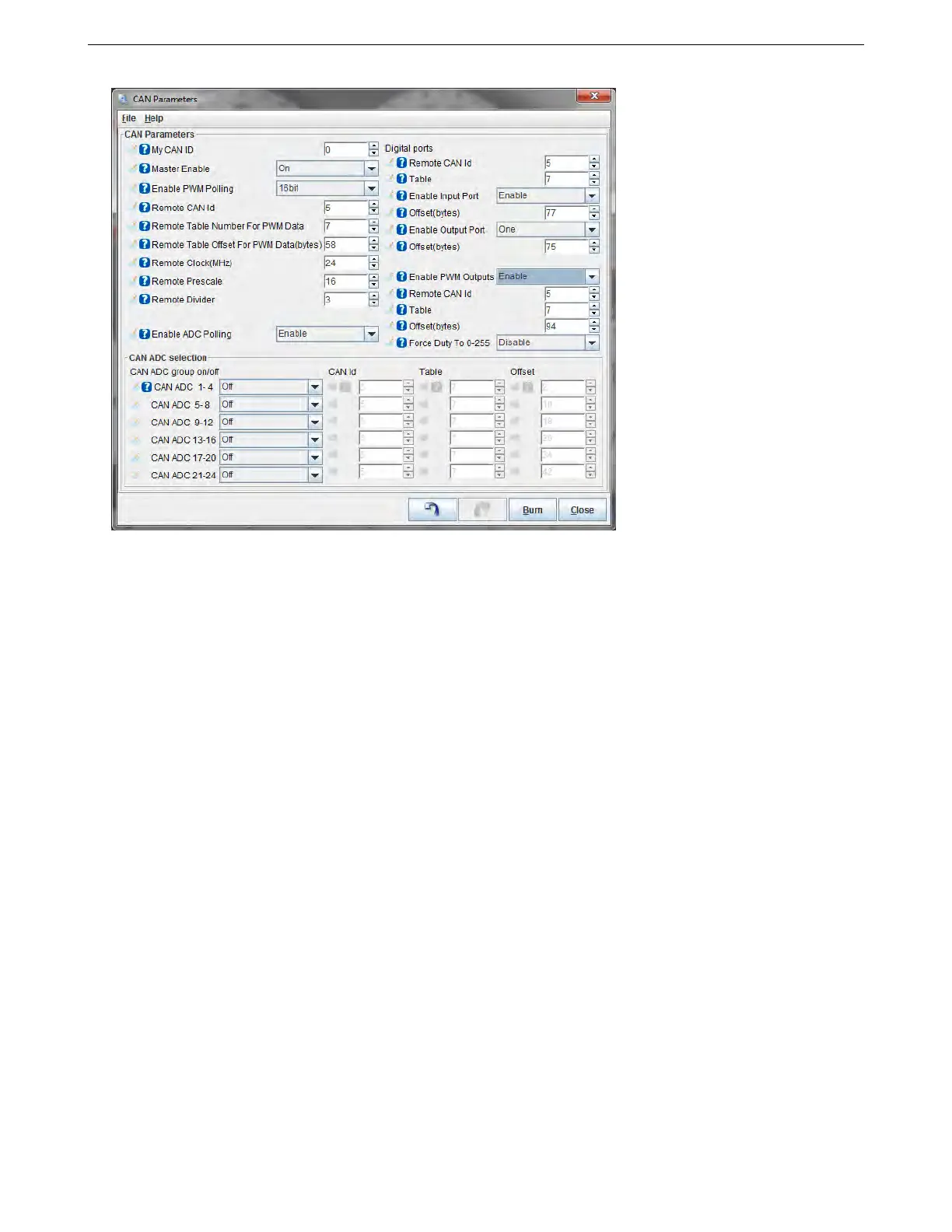
• My CAN ID - the CAN ID of this MS3Pro, normally left at zero.
Each device on the CAN network has its own unique ID, with the number zero reserved for the master device. You
may connect up to 14 extra devices to the MS3Pro, so remote CAN ID numbers can be from 1 to 14.
• Master Enable - Enables fetching data from expansion board via CAN. Setting to "Off" still allows CAN-
passthrough for tuning but turns off all other messages. This can be useful for performing a firmware upgrade
on a remote expansion board.
7.10.1.2 PWM polling The MS3Pro can collect remote PWM or frequency based type input data, from a VSS
for example. Turning “Enable PWM polling” on enables capturing PWM (pulse/frequency) from expansion board
and selects either 16bit or 32bit data. Refer to your expansion board documentation for the appropriate setting.
• Remote CAN ID - the CAN ID of the remote board
• Enable PWM polling - enable or disable this feature
• Remote table number for PWM data - varies by application
• Remote table offset for PWM data - varies by application.
• Remote clock - The clock on the remote device
• Remote prescale - If used a prescale divider
• Remote divider - If used a clock divider
7.10.1.3 Digital I/O This allows the MS3 to use up to eight remote on/off inputs (CANIN1-8) and up to sixteen
remote on/off outputs (CANOUT1-16). CANIN1 is bit 0 from the remote input port and CANIN8 is bit7. CANOUT1
is bit 0 from the first remote output port and CANOUT8 is bit7. CANOUT9 is bit 0 from the second remote output
port and CANIN16 is bit7.
• Remote CAN Id - the remote CANid to fetch from
AMP EFI MS3Pro manual version 1.202, firmware 1.5.0, 4/21/2017 Page 261



 To Next Page