8.5 Communication issues 8 TROUBLESHOOTING AND DATA LOGGING
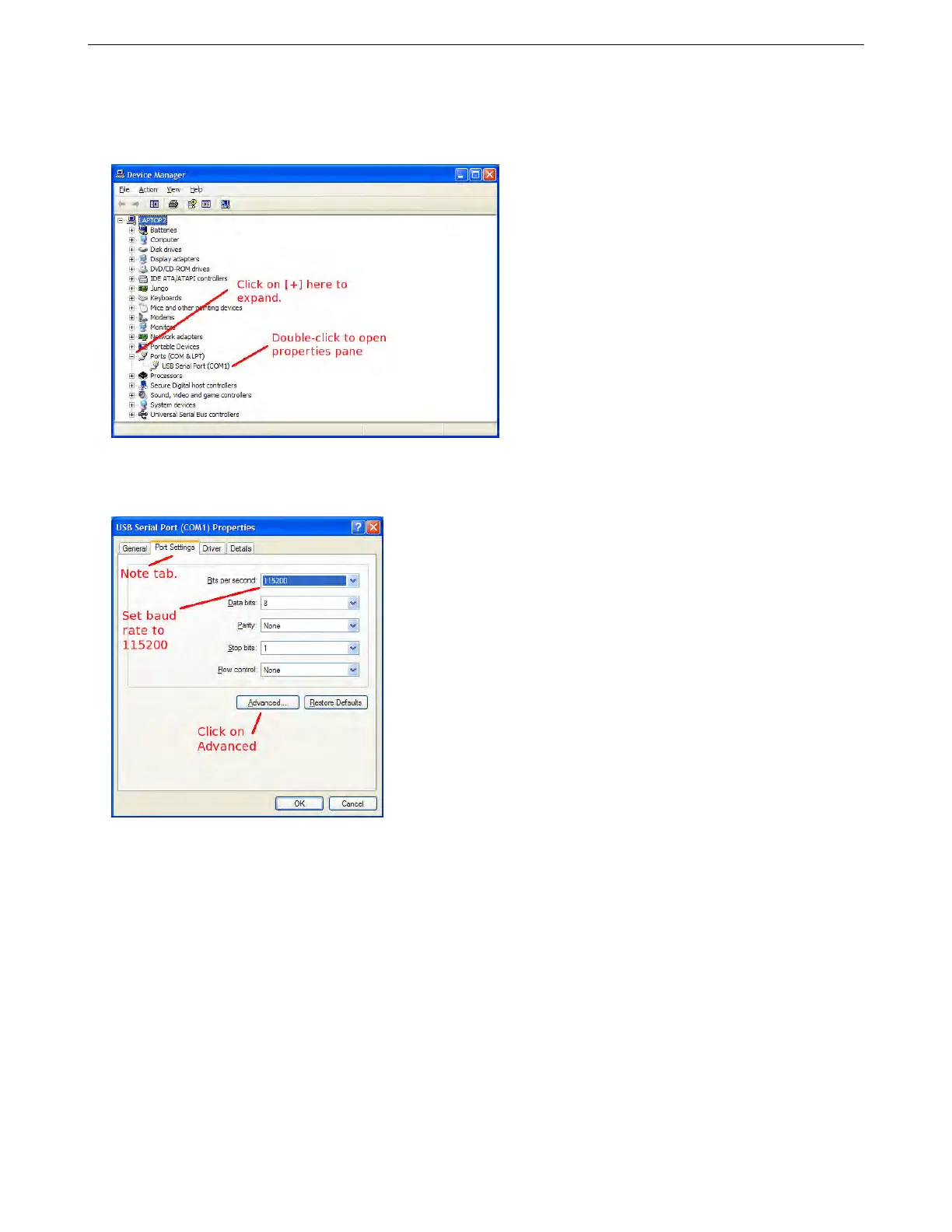
On Windows XP, right-click My Computer and select Manage. This will bring up the Computer Management
screen. Select the Device Manager from the list at the left.
For Vista or Windows 7, click the Start button and go to the Control Panel. From there, click System and
Maintenance, then click on the Device Manager from there. You may need to enter a password.
If you DO NOT see "Ports" listed in the devices, then you do not have any ports setup. This would usually
indicate either your forgot to plug in your USB-serial cable to the MS3Pro, or there is a driver problem. Usually the
best solution to the driver problem is to unplug the cable, uninstall the driver, and then re-install the driver.
Find the Ports section and click the [+] to expand. Then double-click on the port number.
On the Port Settings tab, set the baud rate to 115200, then click on Advanced.
AMP EFI MS3Pro manual version 1.202, firmware 1.5.0, 4/21/2017 Page 299



 To Next Page