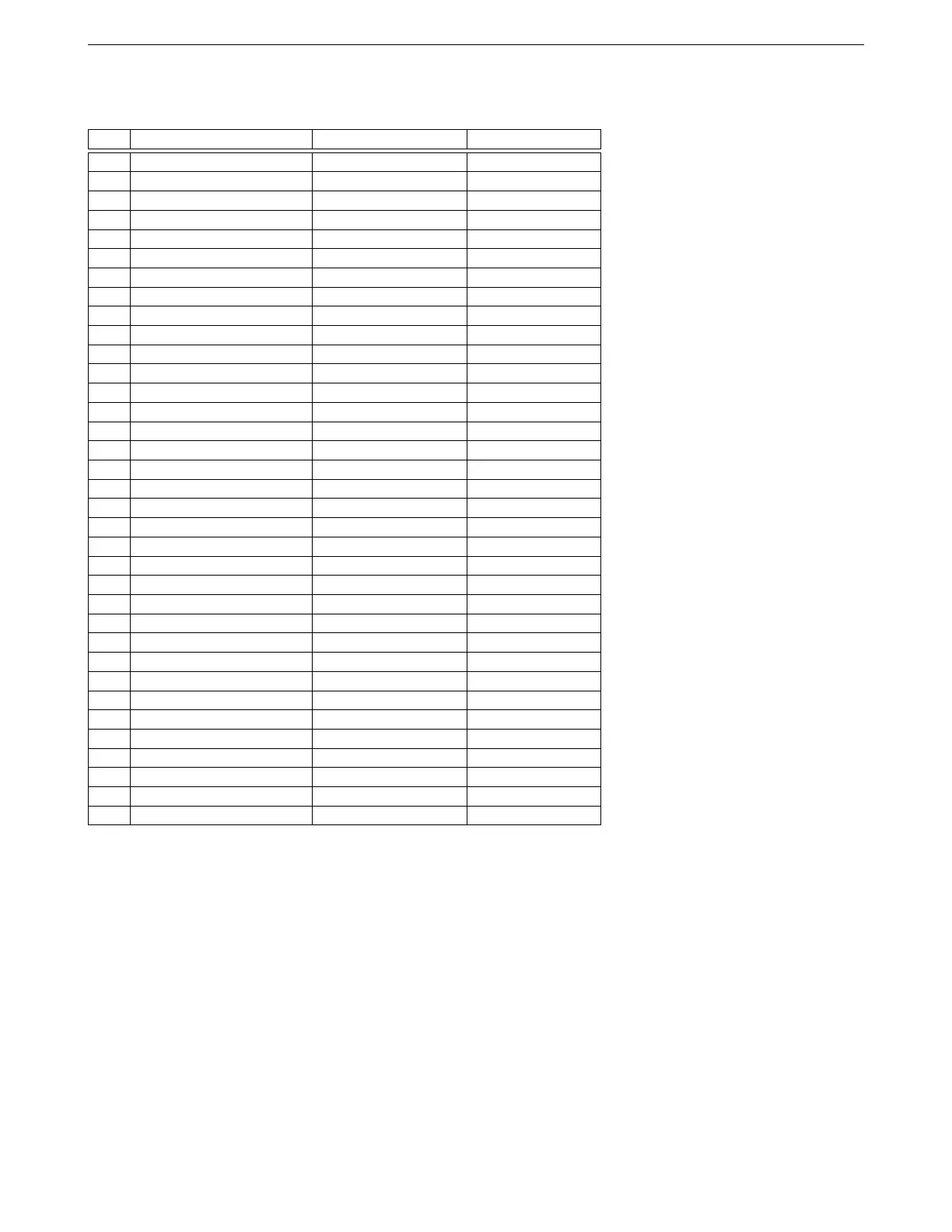
4.1 ECU pinout 4 WIRING
White connector pinout
Pin Function Wire color Stripe / shielding
1 High current out 1 Light green None
2 High current out 2 Light green Dark blue
3 Injector out J White Yellow
4 Injector out I White Gray
5 High current out 3 Light green Red
6 CKP+ White Shielded
7 Knock In 2 Orange Red
8 5V+ VREF out Gray None
9 TPS in Light blue Shielded
10 MAT in Orange None
11 CLT in Yellow None
12 MAP in Light blue Dark green
13 Power ground Connects to shields
14 PWM / Idle Out 1 Light green None
15 CKP- Black Shielded
16 Logic ground * Black None
17 RS232 ground ** Black None
18 Sensor return Black White
19 Analog in 1 Light blue Dark blue
20 Analog in 2 Light blue Red
21 Analog in 3 Light blue Purple
22 RS232 TX ** Black Shielded
23 RS232 RX ** White Shielded
24 Tach out Light green Purple
25 O2 in Pink None
26 CMP+ Yellow Shielded
27 CMP- Red Shielded
28 Fuel pump relay out Purple None
29 PWM out 2 Light green Pink
30 PWM out 3 Light green Dark green
31 Knock in 1 Orange Purple
32 Digital switched in 1 Gray Orange
33 CAN L Tan Red
34 CAN H Tan None
35 12V+ switched power in Red None
* Both logic ground and power grounds must be connected to the negative terminal of the battery. Do not leave
the logic ground disconnected, as this may result in noise issues or improper operation.
** RS232 connections are brought to their own Weather Pack 4 pin connector and do not go into the main
harness.
AMP EFI MS3Pro manual version 1.202, firmware 1.5.0, 4/21/2017 Page 31



 To Next Page