Chapter 12 Searching for and Displaying Images 263
II
Searching by Other Metadata
You can also search for images using the following kinds of metadata:
 Version name
 Aspect ratio
 Filename
 File size
 Master pixel size
 Orientation
 Camera time zone
 Picture time zone
 Stock ID number
To search for images by metadata other than IPTC or EXIF information, you use the
Other Metadata search options.
To search for images by metadata:
1 In the Projects panel, select a project or an album you want to search.
2 Show the Query HUD by doing one of the following:
 Choose Edit > Find (or press Command-F).
 Click the Query HUD button beside the search field in the Browser.
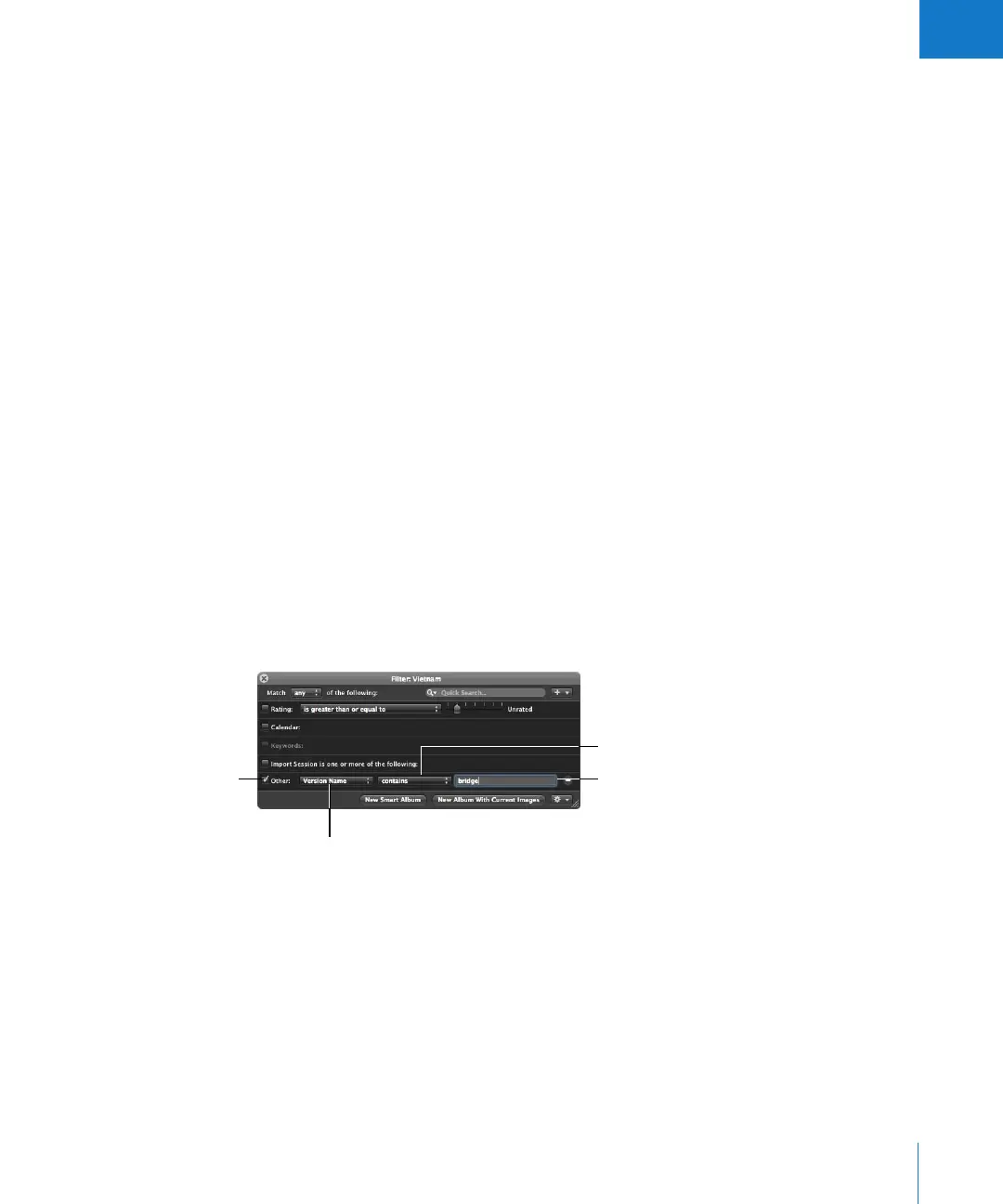
3 In the Query HUD, choose Other Metadata from the Add Filter pop-up menu.
4 Select the Other checkbox and specify the search criteria.
5 Choose “any” from the Match pop-up menu, if it’s not already chosen.
The images that match the search criteria are displayed in the Browser. To save your
search results, see “Saving Your Search Results” on page 265.
Select the Other
checkbox.
Choose the type of metadata
you want to search for.
Choose how you want to
qualify your search from
this pop-up menu.
Enter a metadata
value here.





 To Next Page