Chapter 2 The Aperture Interface 63
I
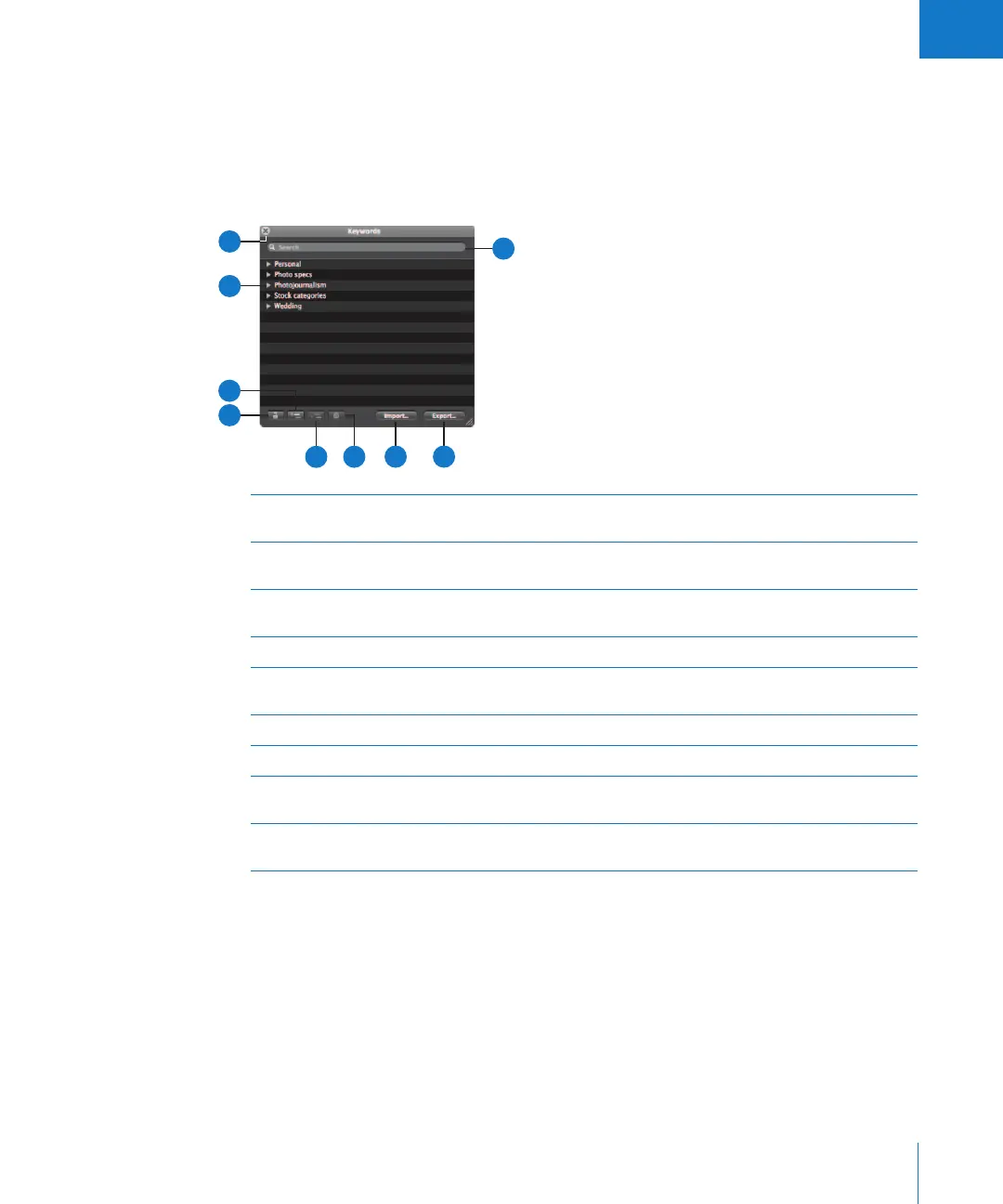
Keywords HUD
The Keywords HUD contains a library of keywords, allowing you to efficiently organize
and apply keywords to your images.
To show the Keywords HUD:
m Choose Window > Show Keywords HUD (or press Shift-H).
A
Lock button Click this button to lock the Keywords HUD and prevent changes.
Click it again to unlock the HUD.
B
Add Keyword button Click this button to add a keyword to the keyword library of the
Keywords HUD.
C
Disclosure triangle Click the disclosure triangle for a keyword group to view all
keywords in the group.
D
Close button Click this button to close the Keywords HUD.
E
Search field Enter text to search for keywords that match the text. Click the
Reset button (with an X) to clear the field.
F
Export button Click this button to export your Aperture keyword list.
G
Import button Click this button to import keywords into the Keywords HUD.
H
Remove Keyword
button
Click this button to remove one or more selected keywords.
I
Add Subordinate
Keyword button
Click this button to add a subordinate keyword, such as a keyword
within a keyword group.
C
D
B
A
E
G F
H
I





 To Next Page