System allows fewer login attempts than specified in the switch configuration
Your TACACS+ server application may be configured to allow fewer login attempts than you have configured in
the switch with the aaa authentication num-attempts command.
TimeP, SNTP, or Gateway problems
The switch cannot find the time server or the configured gateway
TimeP, SNTP, and Gateway access are through the primary VLAN, which in the default configuration is the
DEFAULT_VLAN. If the primary VLAN has been moved to another VLAN, it may be disabled or does not have
ports assigned to it.
VLAN-related problems
Monitor port
When using the monitor port in a multiple-VLAN environment, the switch handles broadcast, multicast, and
unicast traffic output from the monitor port as follows:
• If the monitor port is configured for tagged VLAN operation on the same VLAN as the traffic from monitored
ports, the traffic output from the monitor port carries the same VLAN tag.
• If the monitor port is configured for untagged VLAN operation on the same VLAN as the traffic from the
monitored ports, the traffic output from the monitor port is untagged.
• If the monitor port is not a member of the same VLAN as the traffic from the monitored ports, traffic from the
monitored ports does not go out the monitor port.
None of the devices assigned to one or more VLANs on an 802.1Q-compliant switch are
being recognized
If multiple VLANs are being used on ports connecting 802.1Q-compliant devices, inconsistent VLAN IDs may
have been assigned to one or more VLANs. For a given VLAN, the same VLAN ID must be used on all connected
802.1Q-compliant devices.
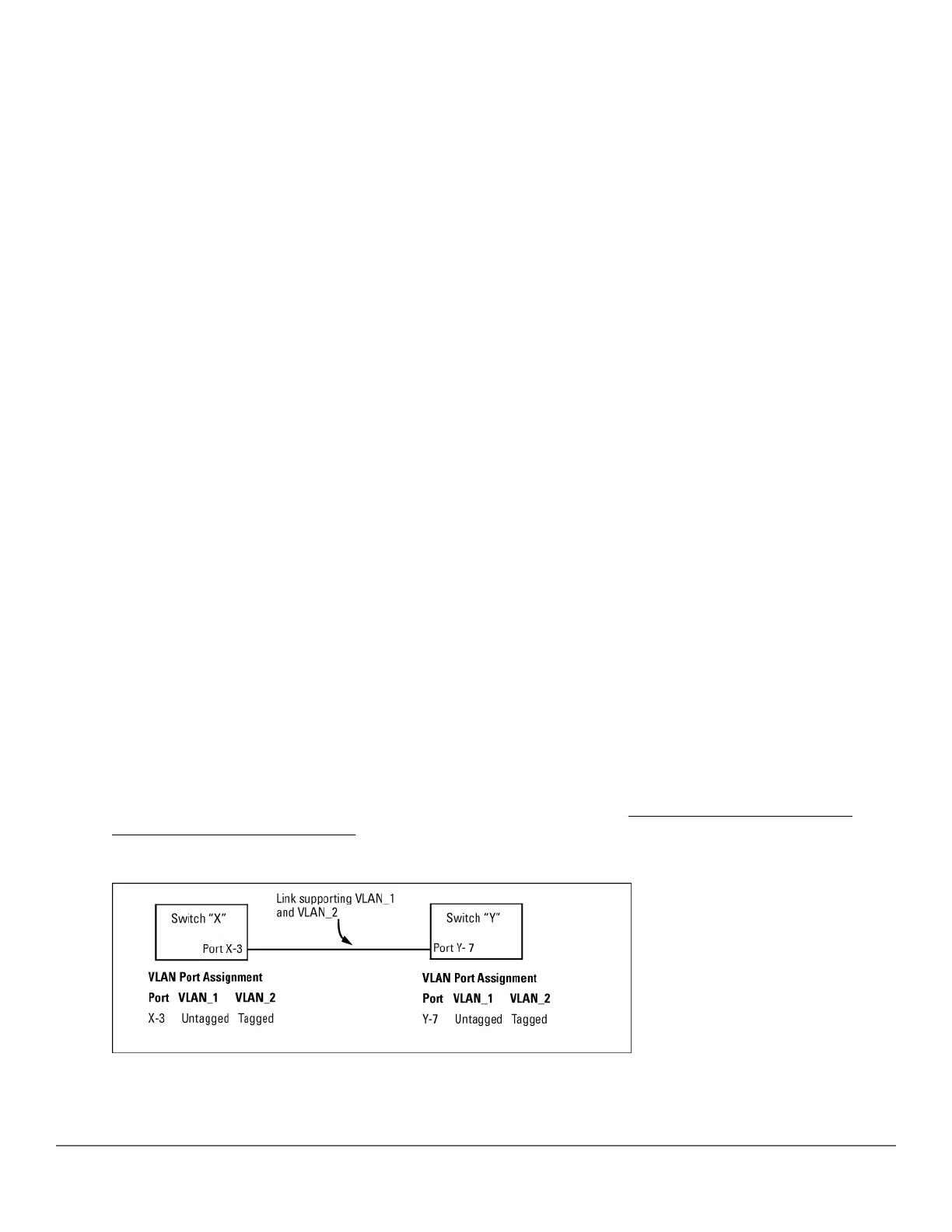
Link configured for multiple VLANs does not support traffic for one or more VLANs
One or more VLANs may not be properly configured as "Tagged" or "Untagged." A VLAN assigned to a port
connecting two 802.1Q-compliant devices must be configured the same on both ports. For example, VLAN_1 and
VLAN_2 use the same link between switch "X" and switch "Y," as shown in Figure 58: Example: of correct
VLAN port assignments on a link on page 320.
Figure 58: Example: of correct VLAN port assignments on a link
320 Aruba 2530 Management and Configuration Guide for
ArubaOS-Switch 16.05














 To Next Page