D-1
Quick Reference Guide for Model C1M
This guide offers a summary of key operations, parameter flowcharts, and settings, for convenient reference at the
operation site This guide is made for repeated use. Dirt wipes off easily and even notes written with an oil-based felt-tip
pen can be removed with an eraser.
If more detailed information on model C1M is needed, refer to the user's manual for installation and configuration (CP-SP-1448E).
The most convenient way to configure the C1M is with the Smart Loader Package (model No. SLP-C1FJA_). Please
contact the azbil Group or a distributor for more information.
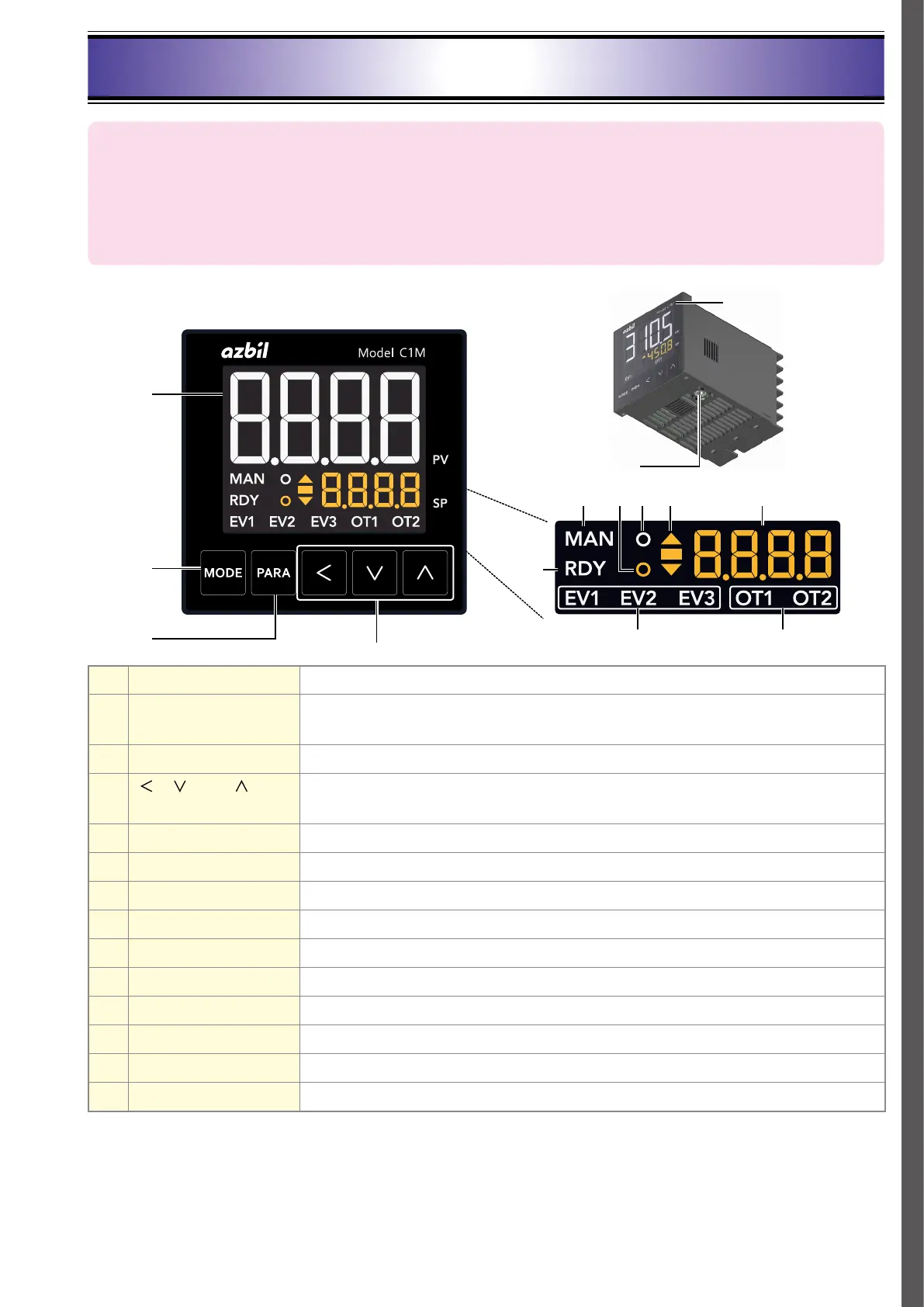
(4)
(12)(11)(5) (10)(9)
(13)
(14)
(1)
(2)
(3)
(6)
(8)(7)
(1) Upper display Shows PV (present temperature, etc.) or items that can be set.
(2) [MODE] key Pressing this button shows the operation display. If it is held down for 1 second or longer,
the preset operation (initial setting: AUTO/MANUAL selection) can be executed.
(3) [PARA] key Switches the display.
(4) [
], [ ], and [ ] keys Used for incrementing/decrementing numeric values and performing arithmetic shift
operations.
(5) MAN mode indicator Lights up in MANUAL mode.
(6) RDY mode indicator Lights up in READY (control stop) mode.
(7) Event indicator Lights up when the corresponding event output is ON.
(8) Control output indicator Lights up when the corresponding control output is ON.
(9) Status indicator Lights up according to the setting of the status indicator. (Default: Not used)
(10) AT indicator Flashes during AT execution.
(11) Slope display unit Shows the operation status during a step operation.
(12) Lower display Shows SP (set temperature, etc.) and other settings.
(13) Loader connector Connected to the PC using the USB loader cable included with the Smart Loader Package.
(14) Protective film Protects the surface. Please remove the protective film before use.



 To Next Page