5-46
Chapter 5. Functions
Internal contacts: operation type
Among the internal contact operation types, the following are related to step
operation.
Note
•
5 - 7 Digital Input (DI) / Internal Contacts (p.5-47) (for functions of
internal contacts)
Item (bank) Display Description Initial value User level
Internal contact 1 operation
type
(DI assignment bank)
DI1.1
0 to 20
0: No function
7: RUN/READY
19: Advance
20: SP step hold
(1–6 and 8–18 are not directly related to
step operation.)
0 Simple,
standard,
advanced
Internal contact 2 operation
type
(DI assignment bank)
DI2.1
0
Internal contact 3 operation
type
(DI assignment bank)
DI3.1
0
Internal contact 4 operation
type
(DI assignment bank)
DI4.1
0
Internal contact 5 operation
type
(DI assignment bank)
DI5.1
0
• 7: The operation mode changes to READY when the internal contact turns ON.
The mode changes to RUN when the internal contact turns OFF.
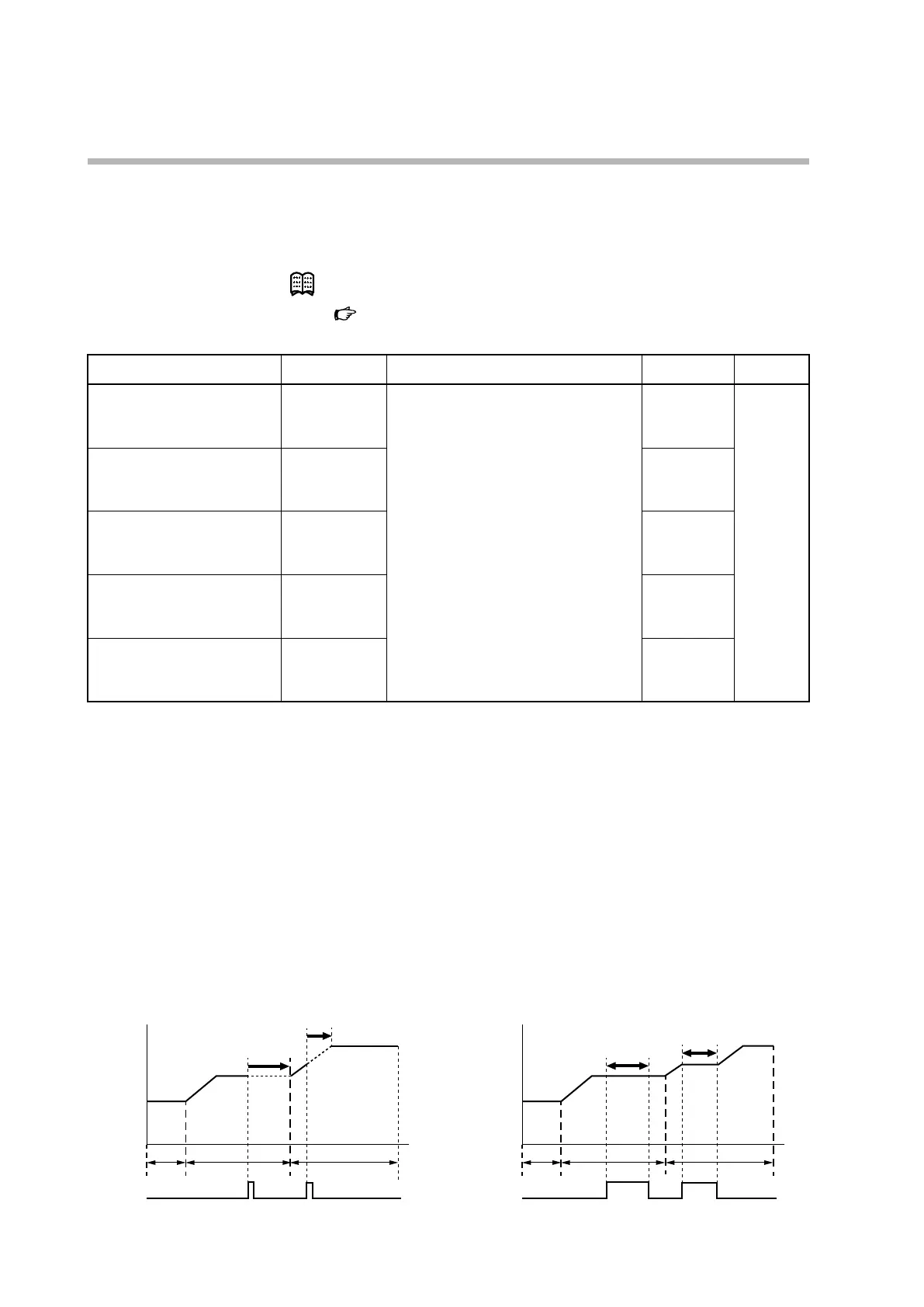
• 19: If the internal contact turns ON in RUN mode during the SOAK, the next
RAMP starts from the beginning. If it turns ON during the RAMP, the next
SOAK starts from the beginning. This is called advance operation.
If an advance operation is executed during the SOAK of the last step, the
operation specified by
C35,
(STEP loop) applies: switching to READY mode,
looping back to the beginning of the RAMP in step 1, or continuing to SOAK.
• 20: If the internal contact turns ON in RUN mode, the progress of the step stops
(the SP of the step is held steady). If an advance operation is executed in this state,
the process will jump to the beginning of the next RAMP or SOAK and its SP is
also held.
Step 1
Step 2 Step 3
Time
SP
Advance
during SOAK
during RAMP
Step 1
Step 2 Step 3
SP
DI:
SOAK extension
by holding the SP
RAMP extension
by holding the SP



 To Next Page