3-4
Chapter 3. Installation
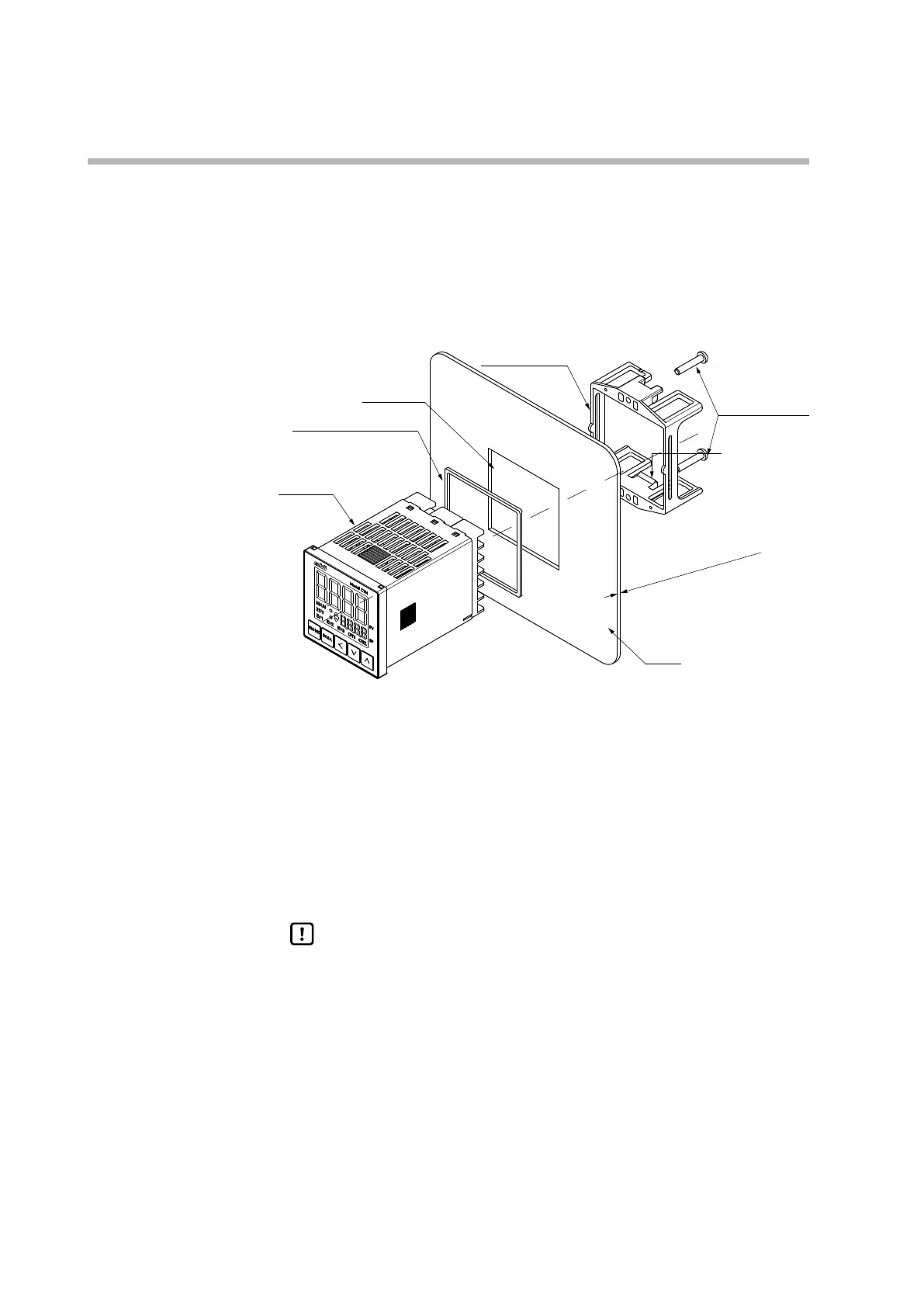
Mounting method
• Mount this device horizontally with the back not raised or lowered more than 10°.
• Use a rigid panel whose thickness is no more than 8 mm.
z
Waterproof mounting
Tools: Phillips-head screwdriver
Panel cutout
Gasket (included)*
* Used only for waterproof
mounting
Screws for
mounting bracket
Catch
Plate thickness: 8 mm max.
Panel
(1) Place the gasket on the terminal side of this device and slide it to the back of
the console.
(2) Insert this device from the front of the panel.
(3) Attach the mounting bracket from behind the panel.
(4) Push the mounting bracket onto the panel until the catches of the bracket are
fully engaged with the grooves in this device.
(5) Tighten the screws at the top and bottom of the bracket.
Handling Precautions
• To secure the bracket to the panel, tighten the screws of the supplied
mounting bracket until the bracket can no longer move, and then further
tighten each screw by only half a turn. Excessive tightening of the screws
may deform the case.
• If units are gang mounted, waterproofing and dust proofing performance
cannot be maintained.



 To Next Page