2-7
Chapter 2. Outline of Functions
Handling Precautions
• If a value does not flash after [<], [∨], or [∧] is pressed, the value cannot be
changed.
For example, if the RUN/READY selection is set in the DI assignment bank,
the device keys cannot be used to switch between RUN and READY.
• If pressing [∨] does not change the flashing value, press [∧], and vice versa.
• If [PARA] is pressed while the display is flashing, this device shows the
next item without making any changes. If [MODE] is pressed while the
display is flashing, this device shows the operation display without
making any changes.
• The manipulated value (MV) displayed in MANUAL mode continues
flashing even if you release the key. In this case, the flashing value is
being output as the MV.
Using the [MODE] key
When the operation display is shown, press [MODE] for 1 second or longer to
execute the switch that is set by C72 ( [MODE] key function) in the setup bank.
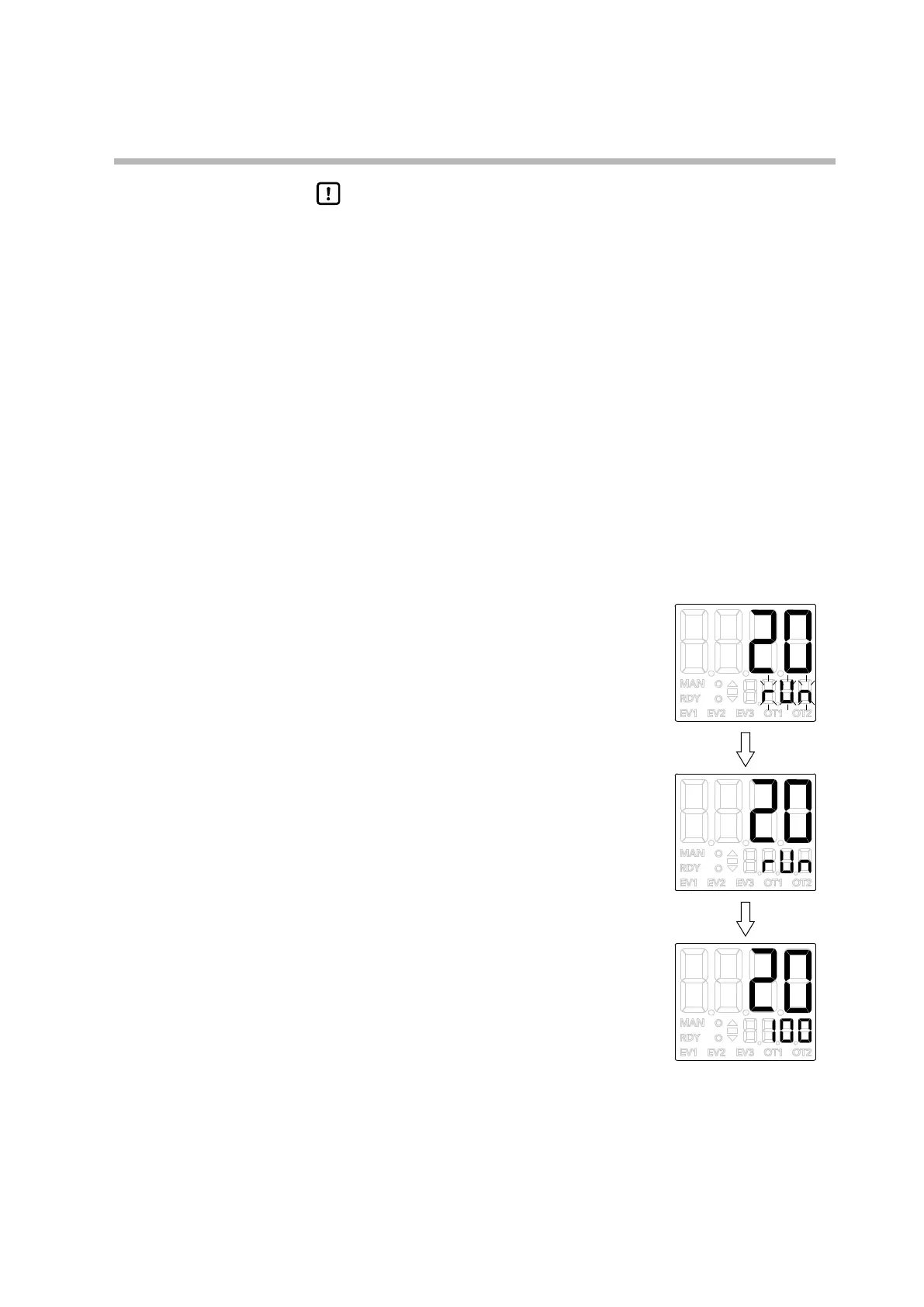
The figures on the right show an example of
pressing [MODE] when C72 is set to 2 (RUN/
READY selection).
(1) If [MODE] is pressed when the PV and SP are
displayed in READY mode, the lower display
shows rUn flashing.
(2) If [MODE] is held down for 1 second or longer,
the mode will switch from READY to RUN,
and rUn stops flashing.
(3) When you release [MODE], the operation display
is shown again.



 To Next Page