5-75
Chapter 5. Functions
• To release the latches, do any of the following operations: turn the power off and
then back on, set “release all DO latches” (do.Lt) to Lt.OF (latch release) using the
keys or communication, or change the above latch setting in the DO assignment
bank to 0 (do not latch).
DO assignment by Smart Loader Package model SLP-C1F
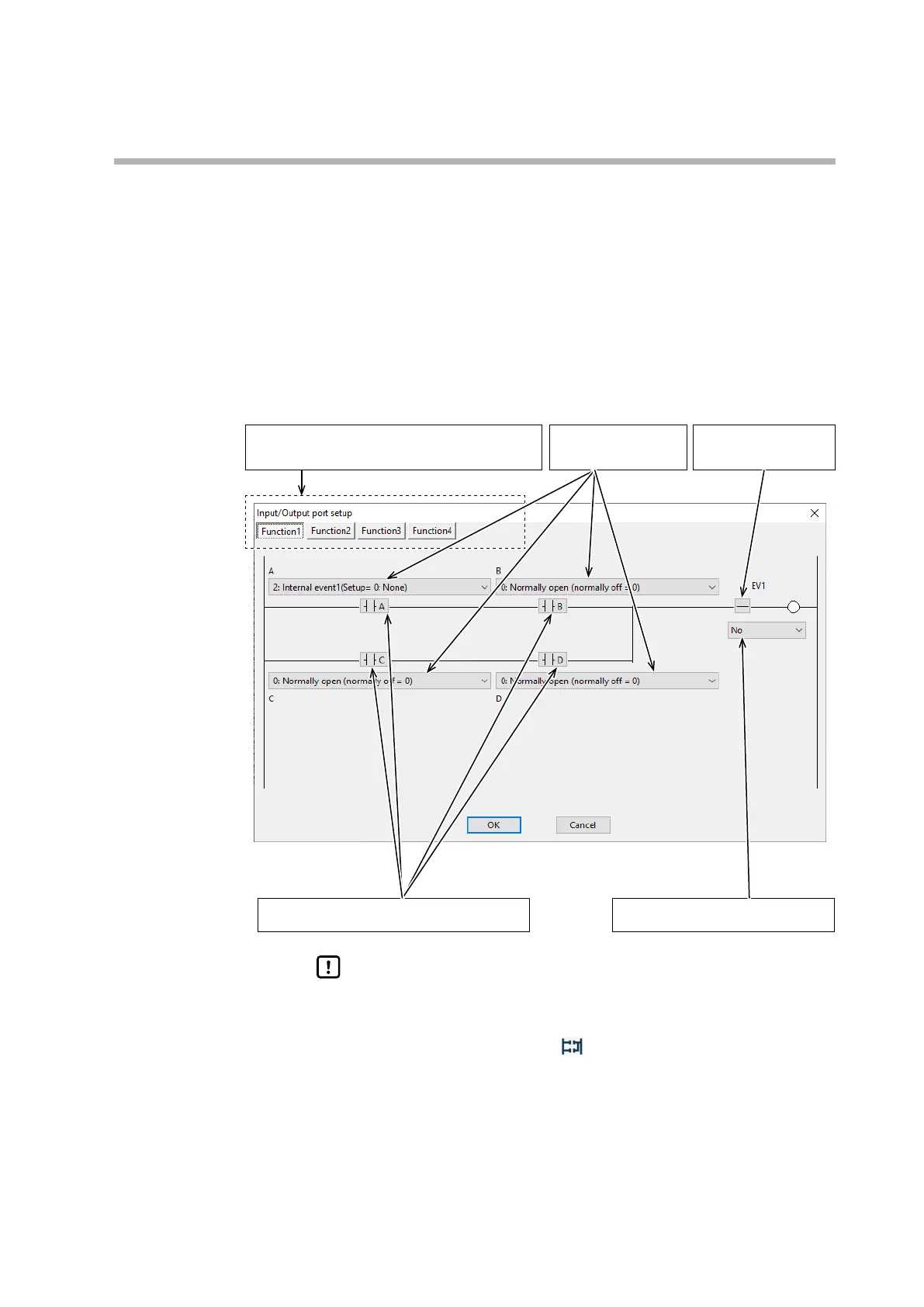
When specifying the settings in the DO assignment bank using Smart Loader
Package model SLP-C1F, select [Edit] → [Input/Output port setup] from the
input menu. This will display a screen for easy setup of the output bit function
type, output assignment, output assignment polarity, function result polarity, and
whether to latch the output.
Select an output bit function.
The ladder changes depending on the selected function.
Select the setting for the
four outputs A to D.
Select whether to reverse
the bit function result.
Select whether to reverse assignments A to D. Select whether to latch the output state.
Handling Precautions
• In addition to selecting from the menu, you can also open the [Input/
Output port setup] screen by the following operations.
•
Click the I/O port setting icon
•
Right-click an output bit function setting
•
Press Ctrl + P



 To Next Page