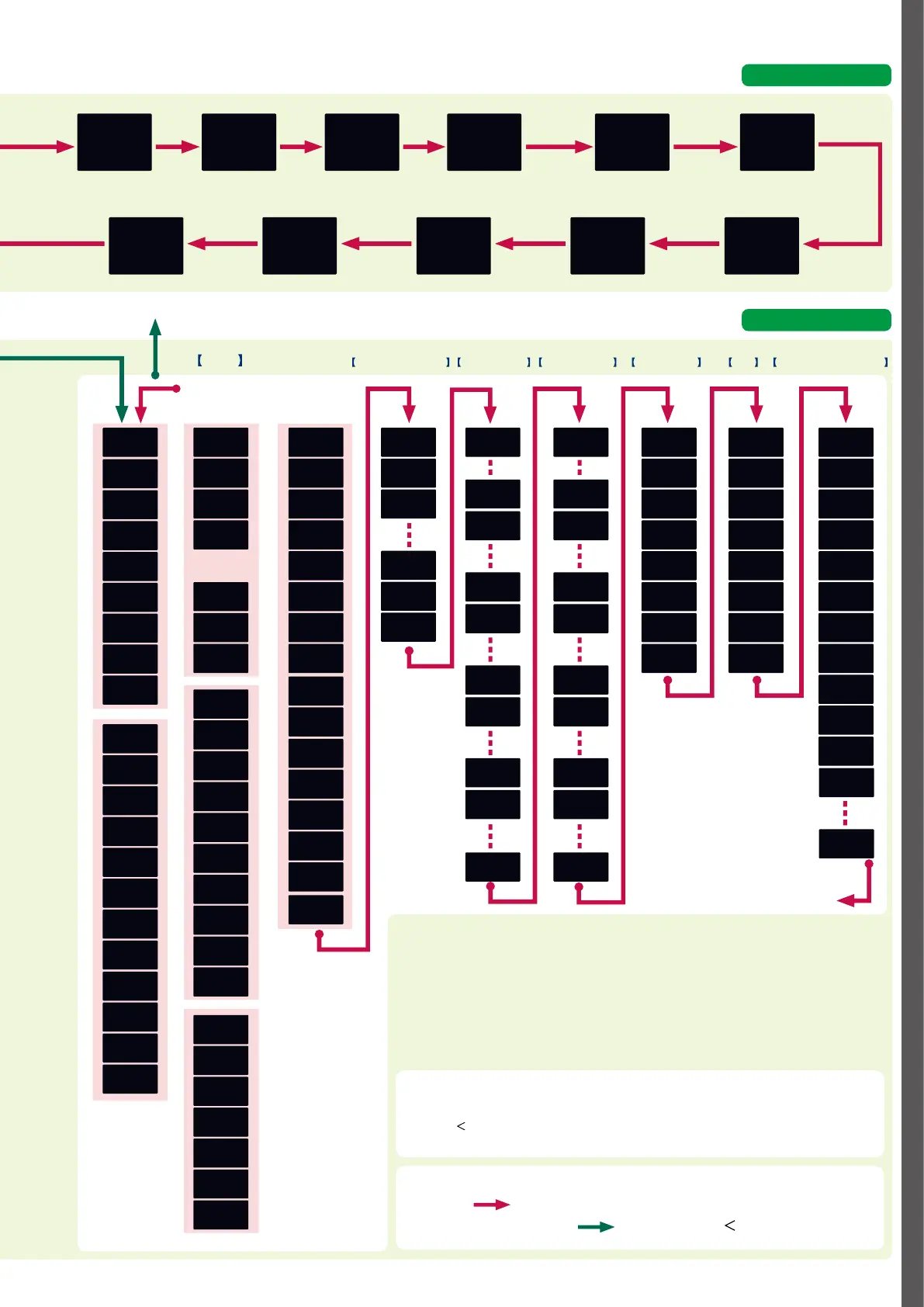
D-3
LSP1
200
ST.0
0.00
OUT
65.3
HEAT
65.3
COOL
65.3
400
AT 0
CT1
30.0
CT2
30.0
E1
300
E1.sb
0
T1.--
0.0
E2
0
E2.sb
0
T2.--
0.0
E3
0
E3.sb
0
T3.--
0.0
UF-1
8
.
8
.
8
.
8
UF-2
8
.
8
.
8
.
8
UF-7
8
.
8
.
8
.
8
UF-8
8
.
8
.
8
.
8
400
200
A--M
AUTO
r--r
AT
AT.ER
dolt
UDB.1
SP-1
PID.1
RMP.1
TIM.1
E1
E1.sb
E1.HY
E1.On
E1.Of
P-1
I-1
D-1
RE-1
OL-1
OH-1
P-1C
I-1C
D-1C
OL.1C
OH.1C
P-8
I-8
D-8
RE-8
OL-8
OH-8
P-8C
I-8C
D-8C
OL.8C
OH.8C
CTRL
AT.OL
AT.OH
DIFF
OFFs
FL
AT.TY
SP.LG
AT-P
AT-i
AT-d
At.Pt
At.Pv
CTR.A
CLg
RA
BI
CYU
CY
tPO
CYU2
CY2
tPo2
TP.TY
SPU
SPD
E5
E5.sb
E5.HY
E5.On
E5.Of
SP-8
PID.8
RMP.8
TIM.8
C 30
C 31
C 32
C 33
C 39
C 40
C 41
C 71
C 72
C 73
E1.C1 DI1.1
DI1.9
DI2.1
DI2.9
DI3.1
DI3.9
DI4.1
DI4.9
DI5.1
DI5.9
Ot1.1
Ot1.8
Ot2.1
Ot2.8
FP01
FP16.8
Ev1.1
Ev1.8
Ev2.1
Ev2.8
Ev3.1
Ev3.8
E1.C2
E1.C3
E5.C1
E5.C2
E5.C3
C 74
C 75
C 76
C 77
C 78
UF-1
UF-2
UF-3
UF-4
UF-5
UF-6
UF-7
UF-8
LOC
C.LOc
L.LOc
PASS
PS1A
PS2A
PS1B
PS2B
id01
id02
id03
id04
id05
id06
id07
id08
id09
id10
id11
C 79
C 80
C 90
C 91
C 92
C 93
C 97
C 98
C 42
C 43
C 44
C 45
C 46
C 47
C 48
C 49
C 50
C 51
C 64
C 65
C 66
C 67
C 68
C 69
C 70
C 01
C 03
C 04
C 05
C 06
C 07
C 08
C 09
C 14
C 15
C 16
C 17
C 18
C 19
C 20
C 21
C 22
C 23
C 26
C 28
C 02
C 03
*3
2-second press of [PARA] key
When the power
is turned ON
LSP
group
No.
SP
MVStep
No.
Step
remaining
time
MV
MV for
heating
MV
MV for
cooling
MV
PV
[PARA] key
SP
Display of settings
Operation display
Internal event 3
sub-setting
Setting
Internal event 3
main setting
Setting
Internal event 2
sub-setting
Setting
Internal event 2
main setting
Setting
PV
AT
progress
Internal
event 1
main setting
Setting
CT1
Current
CT2
Current
Internal
event 1
sub-setting
Setting
Timer
remaining
time 1
Internal
event 1
delay time
To (2)
2-second press of [PARA] key
Power-on all on
all o sequential on
and o operation
display (sequence
takes about 9 s)
Key operation & display
(If AUTO)
When
changed from
MANUAL to AUTO
(2)
(If MANUAL)
When
changed from
AUTO to MANUAL
(1)
[PARA] key
To (A)
2-second
press of
[PARA]
key
[PARA] key
[PARA] key
To (B)
(B)
*2
Timer
remaining
time 3
Internal
event 3
delay time
*1
*3
Timer
remaining time 2
Internal event 2
delay time
Instrument informationLockUser functionDO assignmentDI assignmentEvent conguration
Setup
Control actionAnalog input
*1 The parameters and numerical values registered as user functions
UF
are displayed.
*2 If no key is pressed for 3 minutes, the display automatically returns to (2), the PV display.
*3 If the [
] key is pressed while holding down the [PARA] key, various displays/settings
can be navigated in reverse order.
Explanation of arrows
[PARA] key:
2-second press of [PARA] key:
Item selection in setup menus
[PARA] key (move to next item)
[PARA] + [
] (to previous item)
Some items are not displayed depending on the availability of optional functions, model number, display setup (
C73
to
C78
) and user level (
C79
).
Pressing the [PARA] key while changing the setting of an item will cancel the change, and the next item will be displayed.



 To Next Page