5-38
Chapter 5. Functions
5 - 6 Step operation
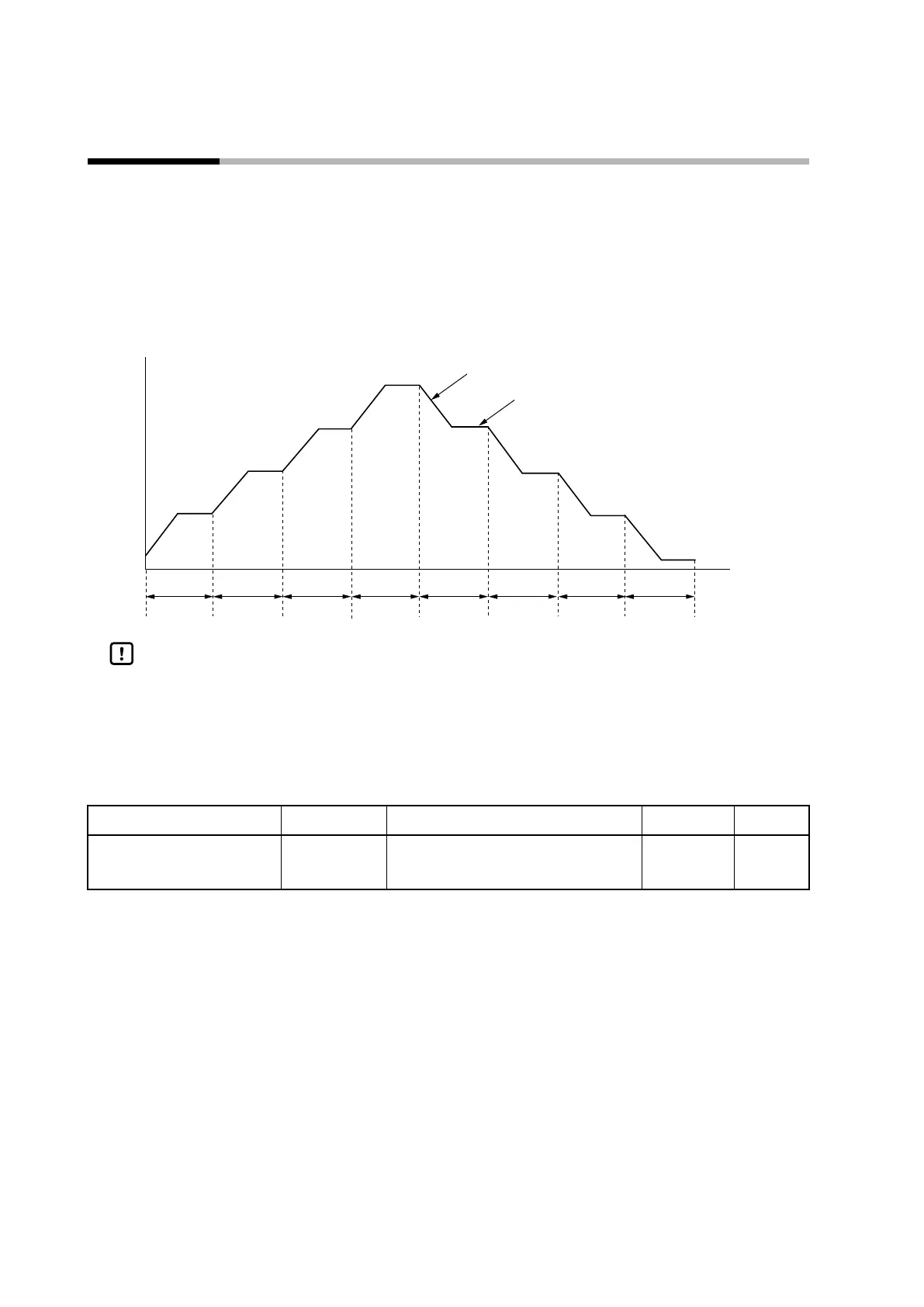
Using up to eight SP groups, a step operation where the SP changes as shown in the figure below can be executed.
Configure a step operation by specifying the LSP, ramp, and time of each step. The PID group No. to use in each step
can also be set.
In each step, the segment where the SP is changing is called the RAMP, and the segment where the SP does not
change is the SOAK.
The RAMP and SOAK segments in step 5 are indicated in the figure below.
Step 1 Step 2 Step 3 Step 4 Step 5 Step 6 Step 7 Step 8
Step 5 RAMP segment
Step 5 SOAK segment
Handling Precautions
• A step operation can run in RUN mode. If the mode is changed to READY, step
operation stops at the beginning of step 1.
Number of LSP groups
The number of steps in one step operation can be specified by this setting.
Item (bank) Display Description Initial value User level
LSP system group
(setup bank)
C 30
1 to 8 1 Simple,
standard,
advanced



 To Next Page