Chapter 5: Routine Operational Procedures
5/29
Operators & Maintenance Manual GENIUS Compact Version UK 0.1 © BESTnv
BESTnv Industrial Research BV, Marinus van Meelweg 20, 5657 EN, EINDHOVEN, THE NETHERLANDS
General tel. +31 (40) 292 2622 - Service tel. +31 (40) 292 2620 - Fax. +31 (40) 292 2633 - Email: service.BESTnv@bestnv.com
- 3. Setting the actual Threshold fi lters.
- 1D (mono) threshold
Just increase or decrease the threshold value: fi rst dial on the left, next to the fi lter image.
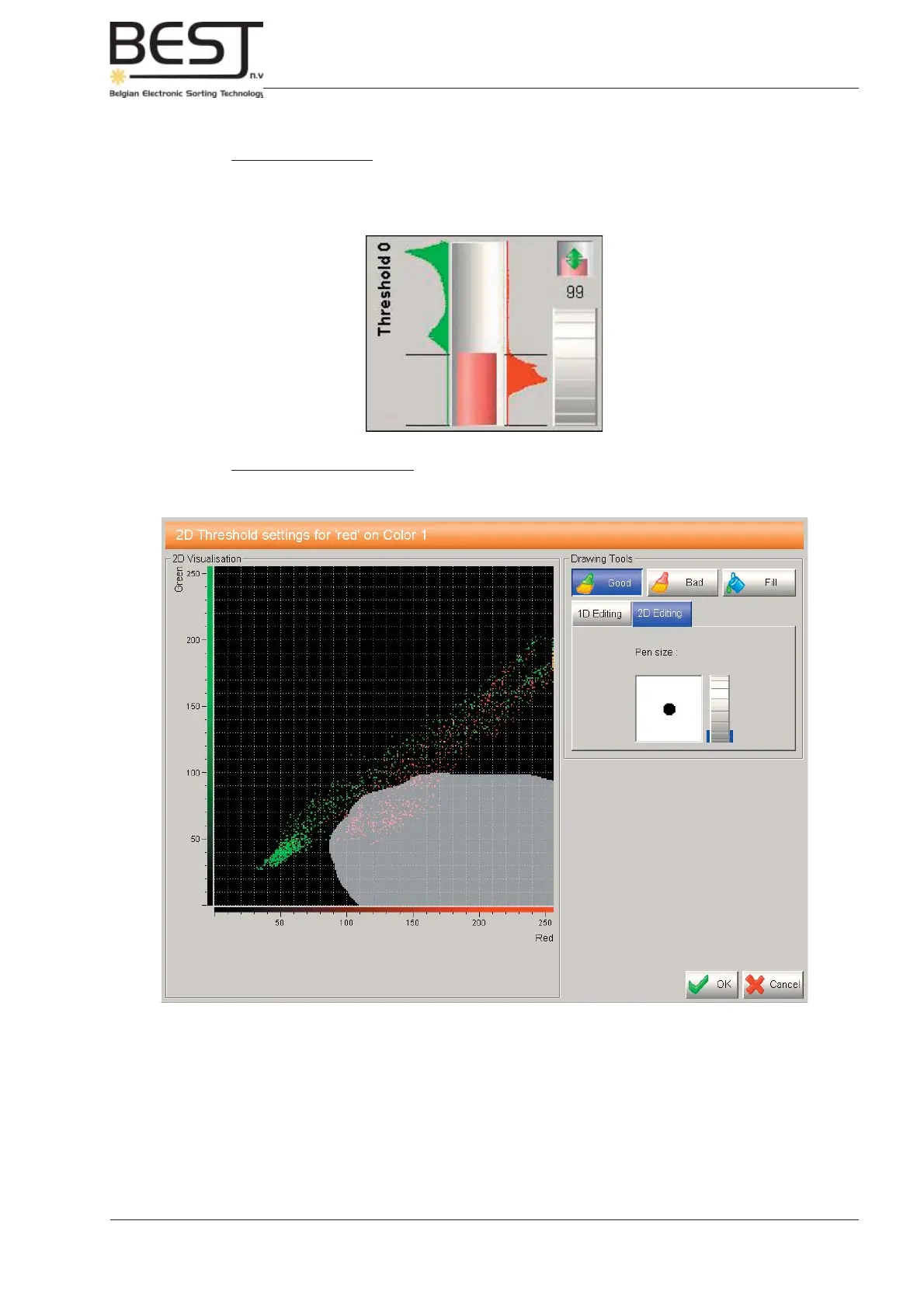
Ideally the fi lter should be set in such a way that no good product (green on graph) is detected,
but most (preferably all) of the defects (red on graph) are detected (e.g. see picture below).
- 2D (combined) Thresholds
To change this fi lter, one should press the image of the 2D threshold fi lter. A 2D (combined)
Filter Menu will appear (see picture below).
Use the “Good”, “Bad” and “Fill” buttons, with 1D or 2D editing to draw a Good product zone (black)
around the green pixels representing the good product, or draw a Bad product zone (colour of threshold)
around the red pixels representing the defects (see picture).



 To Next Page