3/13
Chapter 3: Theory
Operators & Maintenance Manual GENIUS Compact Version UK 0.1 © BESTnv
BESTnv Industrial Research BV, Marinus van Meelweg 20, 5657 EN, EINDHOVEN, THE NETHERLANDS
General tel. +31 (40) 292 2622 - Service tel. +31 (40) 292 2620 - Fax. +31 (40) 292 2633 - Email: service.BESTnv@bestnv.com
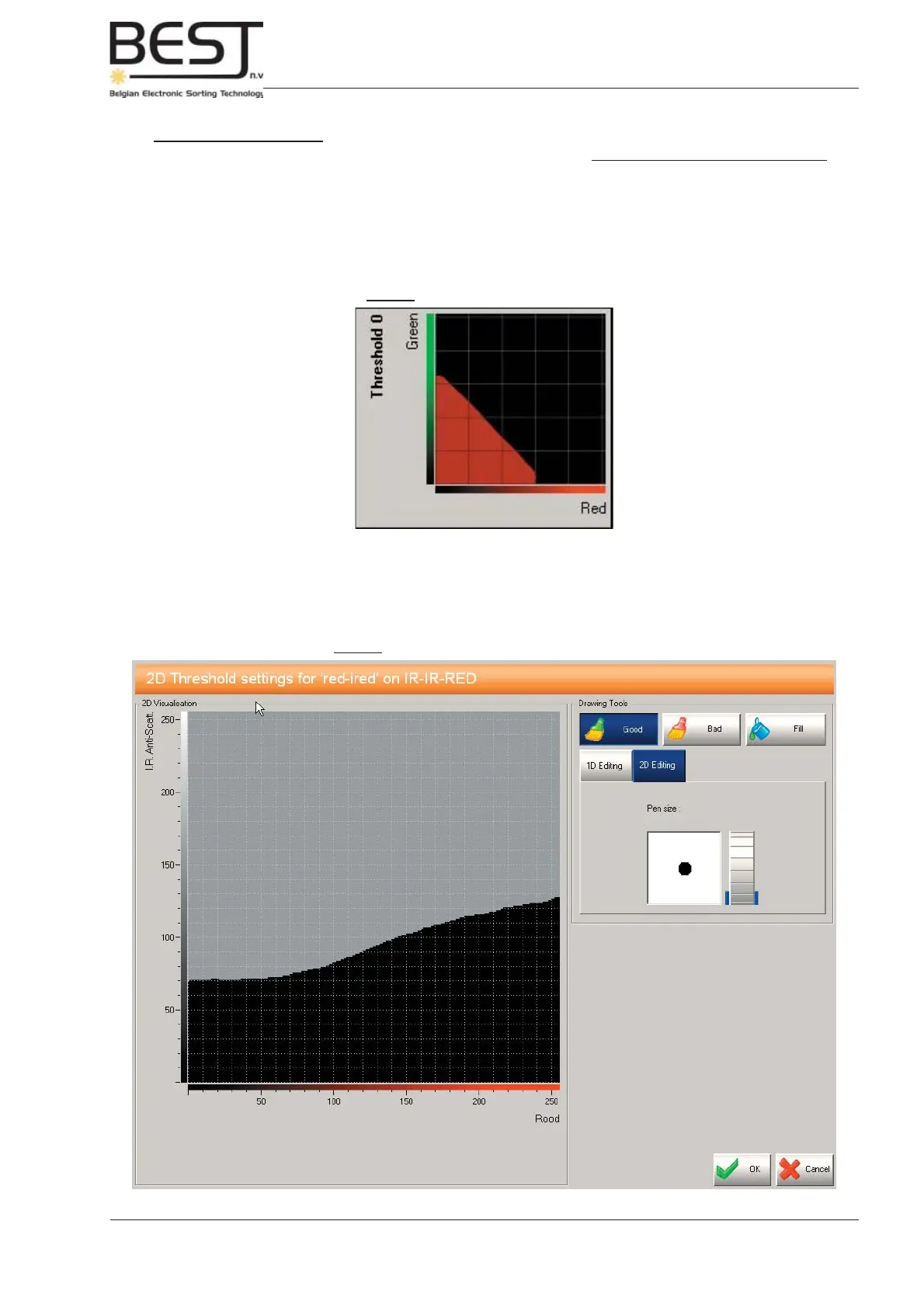
Picture: Combined (2D) Threshold
Picture: Setting a Combined (2D) Threshold
Combined Thresholds:
Combined thresholds are formed by combining two signals of a colour camera or two laser signals.
Combined sensitivities are used to detect defects that cannot be detected by ordinary sensitivities without
causing a big rise in the percentage of good product in the reject. Combined sensitivities enable us to
defi ne the borders of the good product zone much narrower, which makes it possible to reach diffi cult
areas and detect a number of extra, diffi cult, defects, without causing an undue rise in the percentage
of good product in the reject.
To set the combined threshold, just press the graphic (see above) on the touchscreen, and use the tools
in the settings menu to draw and/or fi ne-tune the good product and defect zones. For more info, see
chapter 5: operational procedures.



 To Next Page