Chapter 3: Theory
3/14
Operators & Maintenance Manual GENIUS Compact Version UK 0.1 © BESTnv
BESTnv Industrial Research BV, Marinus van Meelweg 20, 5657 EN, EINDHOVEN, THE NETHERLANDS
General tel. +31 (40) 292 2622 - Service tel. +31 (40) 292 2620 - Fax. +31 (40) 292 2633 - Email: service.BESTnv@bestnv.com
2D Defect Size
The 2D Defect Size consists of 2 simple thresholds:
- the Defect Width: the minimum number of pixels in a row in one scan line a defect must have to be
detected. (Max. 256)
- the Defect Length the minimum number of pixels in a row in successive scan lines a defect must have
to be detected. (Max. 8)
In other words: the higher the 2D Defect Size parameters, the bigger the defect must be before it is
detected. The exact length and width of a pixel depend on the Width of the belt and the Belt Speed. The
belt width will be set by the installation engineer and stays fi xed, but the belt speed can be changed
according to the customers wishes, and so the length of the pixels will change accordingly. The exact
result of your settings, with respect to the set max. width and length of the defect will be calculated
automatically (length only when belt is running) and shown graphically and with the values in mm next
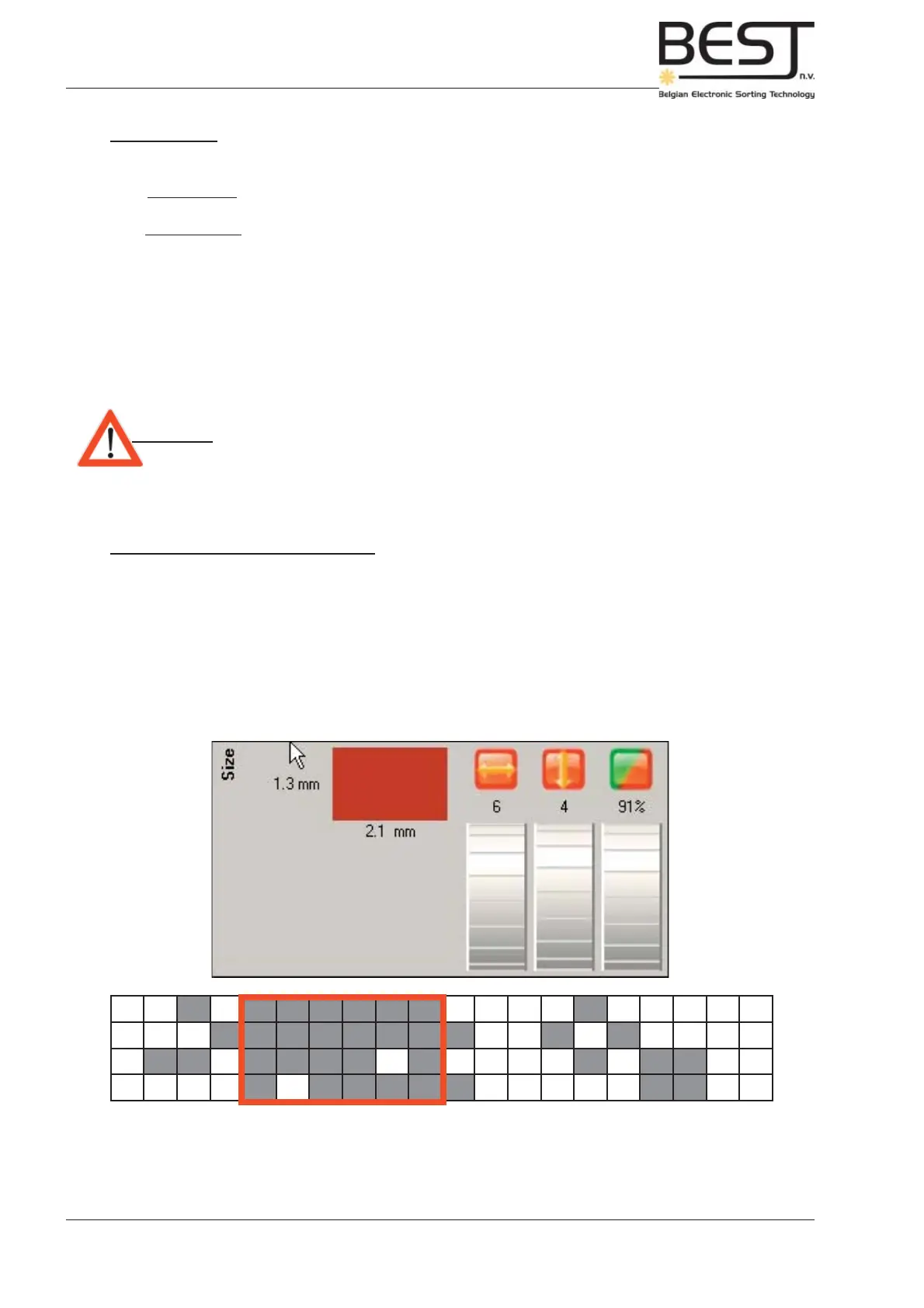
to the dials on the screen (see picture).
Attention: -2D Defect Size settings must be set with a running Belt!
In general it is advisable to set these parameters in such a way that they roughly form a square.
Defect Density (Fill rate) percentage
With this setting one can determine the percentage of defect pixels an object must have before it is actually
seen as defect and ejected. This value can be set from 0% to 100%. With 100% only objects that are
completely composed of defect pixels will be ejected, with 0% everything will be ejected.
In the example underneath the Defect Width is set to 6 and the Defect Length to 4, which means all
products or defects that count six defect pixels or more in one row on the line scan will be detected,
everything smaller (A, C & D) will be ignored automatically. With a Defect Density set to 91%, only those
areas of 6 by 4 pixels with 91% or more defect pixels will be ejected, all others are ignored.
This parameter is often used to ignore small fl uctuations in colour, such as lighter spots on good product.
It can also be used to improve detection of certain diffi cult defects: two thresholds are set, one with a
very low defect size fi lter that detects all defect sizes, but cannot go too sensitive, and one with a higher
defect size fi lter, but a more sensitive threshold, enabling the user to set the sorter more sensitive to
certain bigger defects.



 To Next Page