3
Setting Specifications That Are Common to Each Function (Common Settings)
3-14
Selecting and Storing Settings to Suit your Needs
3
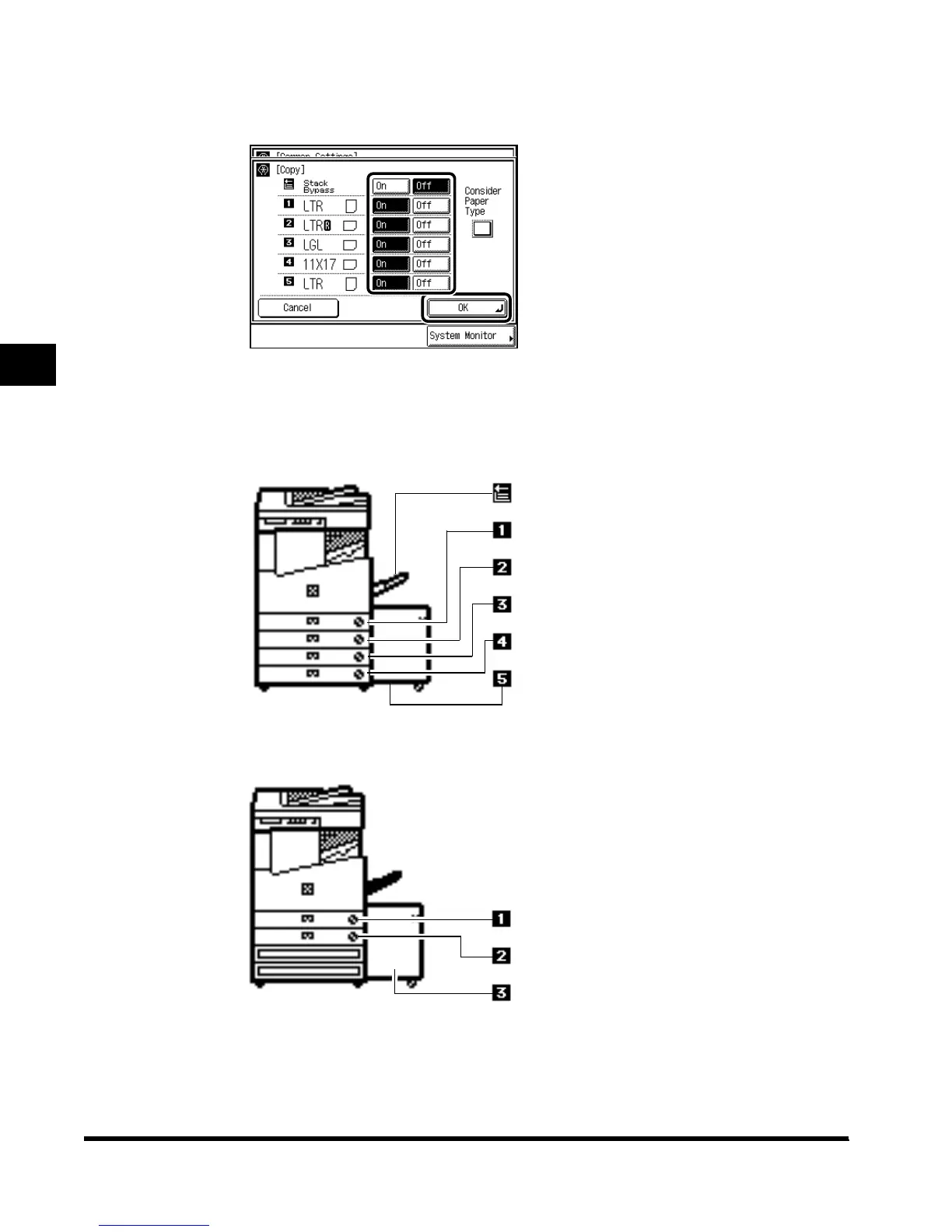
Select “On” or “Off” for the stack bypass and each paper drawer,
and press “OK.”
To make the paper drawer eligible for APS/ADS, press “On.”
To make the paper drawer ineligible for APS/ADS, press “Off.”
The number of each paper drawer indicates the following locations:
Stack bypass
Paper drawer 1
Paper drawer 2
Paper drawer 3 (option)
Paper drawer 4 (option)
Paper Deck (option)
When the Cassette Feeding Unit-W1 and the Paper Deck-L1 are attached
The Pedestal and the Paper Deck-L1 are attached
Paper drawer 1
Paper drawer 2
Paper Deck (option)
E1L_US_U_.book-INDEX Page 14 Wednesday, May 23, 2001 11:40 PM












 To Next Page